 In one of the ongoing Skype public chats today, Julian Bond clued the rest of us into a post he had found “How to Twitter from Skype“. This actually takes you out to the “Twitter 4 Skype” site in Japan that is essentially running a Skype “bot” that acts as a gateway between Skype and Twitter. You add the “twitter4skype” user to your Skype contact list, and then you can send/receive messages to Twitter. Since I have been trying with very limited success to use the existing IM service to post to Twitter via Jabber, I thought I’d try this service out as well. My immediate issue, though, was this:
You have to give this “twitter4skype” service your Twitter password!
Naturally… how else is it going to connect to Twitter and post as you? But that’s the issue… who is behind this service? It’s some site in Japan? Do I trust them with my login credentials? Who are they?
This would be a great place for something like OpenID where I could give them my account name, but not have to provide my password… but for that to work, of course, Twitter would need to support OpenID as well.
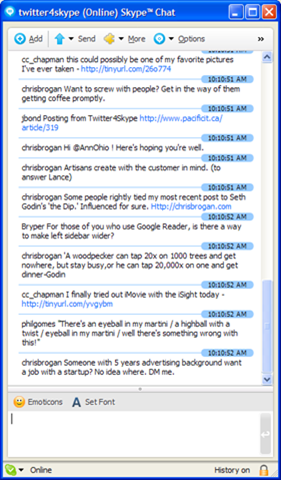 Given my interest in experimentation, I did, of course, suck it up and provide my credentials. The result was the chat window you can see on the right. Now, what Julian Bond pointed out to me – and that I admit is very cool – is that you now have a list of your Twitter messages in a Skype persistent chat window…. where you wind up with a history that is very easily searchable! Rather cool!
Sending a twitter update (aka “tweet”) is as simply as typing it into the Skype chat window. Of course, you don’t get the bit of Javascript that tells you how close to the 140 character limit you are. I also don’t know yet about automatic tinyurl wrapping… but it seems like it is going into Twitter’s web interface, so one would imagine that this works. (I’ll know in a moment.) (Update – yes, it does the automagic tinyurl wrapping.)
All in all an interesting service. If you are interested (and willing to give your Twitter password to an unknown service out there), you can follow the instructions on the website.
P.S. Do note that to make it work, you send in a message like:
/account
danyork
password
When I first tried it, I followed the instructions too literally and did “twitter danyork” and “twitter password” (which, of course, is not my password!).