Category Archives: Blogging

Technorati rolls out new widgets for blog authority, tag clouds, top searches…

UPDATE: See my follow-up post about how the “Technorati Authority Widget” does not work like I thought it would. 


I enjoy the fact that the folks at Technorati continue to roll out new tools of interest to bloggers.  This month brought new sidebar widgets for tag clouds, the top technorati tags and also for blog authority.  While I haven’t yet decided whether I do want to add them to my sidebar, they are interesting to consider.  I’m going to try posting the “blog authority” widget here in an entry, primarily because Technorati’s tools page says that it may take a bit to generate the widget:

View blog authority

I will be honest, though, and wonder how many people will actually use it outside of the truly “top-ranked” bloggers. I mean, currently this blog is ranked around 42,000, which, out of 71 million blogs, is admittedly quite good.  But is it good enough that I really want to clutter up my sidebar with something like that? (As well as adding yet one more thing to delay the loading of my page?)  I don’t know…  I’d need to think about that a bit.

I also don’t know about adding the tag cloud… but I’m thinking about the top tags, if for no other reason than the fact that it’s interesting to see one way to view “the pulse” of what people are talking about.  (And I see my own blogs whenever I post, which means that I would see the list of top tags, which might then make me curious about what people are writing about.)

P.S. And yes, regarind the “authority widget”, I fully realize that Technorati rankings are a very imperfect way of understanding how “important” a blog may or may not be… but until someone else comes along with something better, it’s one of the few tools we have in our arsenal, IMHO.

Giving Twitter its due… (addition to blog navbars)

If you notice the horizontal menu bar going across the top of this site or on Disruptive Telephony (sorry, RSS readers, you’ll need to actually visit the site to see this), you’ll notice a new addition to the list of the various blogs at which I write (you may have to refresh/reload your browser) … yes, indeed, I figured it was probably time for me to add my Twitter page up there.

I’ve been experimenting with Twitter since the beginning of the year (courtesy of a tip from Chris Brogan) and as Jeff Pulver’s “twitter is…” posting this morning shows, the definition of what Twitter is really useful for keeps evolving. 

For me, I’ve found it a great way to keep up with what some friends are doing… kind of like a RSS reader showing snippets from their blogs… but with occasional personal content.  It’s also been a great source of links to things that are happening “now”. Items that are “breaking news” within the circle of people that I find interesting… along with quirky offbeat things that people throw in as well.  I’ve posted some questions and received some great answers.  I’m not one of the “Twitter addicts” who seem to live on it… but I do check it a couple of times a day (more than I honestly check my RSS reader).  I have noticed in my own workflow that Twitter has replaced the “travel blogging” I used to post to my personal blog when I was on a trip. The ability to easily SMS from a phone helps with that.  I’ve also found it definitely driving traffic to my sites when I’ve posted a link there.  All in all I’ve found it quite useful.

Useful, enough, anyway, that I figured I ought to add it to my blog navigation bars… it is now one of the places I “blog”.

Technorati tags: ,

Sun Microsystems advertising their CEO’s weblog through Feedburner’s Ad Network?? Huh?

 Because I am fascinated by this grand experiment called “social media”, I like to play with various aspects just to see what might happen.  So for the last couple of months, I’ve been experimenting with ads in a couple of my RSS feeds through the Feedburner Ad Network.  I definitely do not expect to make any money off of it… for me it’s more an experiment to see if anyone actually clicks through on ads in RSS feeds!

Due to the higher number of subscribers, most placements have been targeted toward my Blue Box podcast, and it’s been both interesting and entertaining to see what ad campaigns are requested.  Because I feel a certain level of responsibility and respect for Blue Box listeners/subscribers, I’m very picky about what I let run.  There have been a few that were appropriate… and a few that weren’t.

The newest campaign I was asked to approve, though, gave my head a bit of a spin. As you can see in the image to the right (click for a larger view), it’s a campaign by Sun Microsystems to promote CEO Jonathan Schwartz’s weblog!  As you’ll note, I approved it since I figured it might actually be something of interest to our listeners (and you can see my nice spray paint job in Windows Paint to obscure the campaign details :-).  But think about this for a minute…  here is a very large company spending some of its advertising dollars to promote a weblog through ads in various RSS feeds!

Pretty interesting space we’re in, eh?

The evolving conversation about blogging behavior, civility and Kathy Sierra’s situation

As I mentioned previously, the blogosphere is all abuzz about Kathy Sierra’s situation.  Out of all the buzz, here are some posts I found among the more interesting or insightful:

Somewhere in all of that was also this Washington Post article:

which, while not talking about this specific case, was a good commentary on the amount of venom appearing in blog posts and comments.

All in all an interesting day in the blogosphere….

Future Now: What makes you comment? (on a blog)

Fascinating post over on the grokdotcom blog: What Makes You Comment? The comments, naturally, are the fascinating part.  Quite interesting to see the varied reaction from folks there.

As I said in my own comment there, I generally do leave comments on a blog when I find an article interesting, provided that:

  • I have the time to write a comment
  • I have something to say beyond simply “Great article”
  • I can just easily post the comment without any kind of complex registration process

Do you leave comments on blogs?  Why or why not?  The Future Now folks would like your opinions…   (of course, they are required in a comment, so if you are someone who just doesn’t leave comments, well… 🙂

Technorati tags: ,

"On the Internet, nobody knows you’re a ____" – spewing threats while hiding behind the mask of anonymity

There are no real words to say in response to the horrible saga confronting Kathy Sierra.  In the 20+ years that I have been using the Internet I’ve certainly been subjected to abuse in various forms and in various forums (USENET, anyone?), but I have to say that even the worst flame war I was involved with never quite reached the level of personal attacks that she has suffered.  I do wish her all the best in coping with the situation.

Obviously her view is just one side of the story and Chris Locke has written a response to the allegations against him which takes a different view. To his credit, he was one of the people who did identify themselves in their postings.  He speaks of the YOYOW ethos – “You Own Your Own Words” (from the Well days) – and says that he stands by his words… and while I may disagree with parts of his views, I do respect that he at least identifies himself as the author.

It’s pretty obvious, though, that there were others who attacked Kathy Sierra from behind the mask of anonymity.  As the old 1993 New Yorker cartoon said “On the Internet, nobody knows you’re a dog.” (click the image for a larger view)  Anonymity is a double-edged sword.  It allows people who might not say things (out of fear of reprisal, for instance) to relay their information.  It allows people to be someone that they would like to be.  But it also allows the idiots to spout off and say their horrid things.  In this case, some people seem to have definitely gone too far.

Anonymity makes it easy… you can say whatever hurtful things you want and, at least in theory, no one can trace them back to you.  (And there are technologies out there that help with that.)  Anonymity frees people from the responsiblity and accountability that comes with that YOYOW concept.  They can be whomever they wish to be at that time – and if that means they want to be a mean or rude person, they can do so.  I am sure there has been a time or two when I thought about seeking refuge behind an anonymous comment to speak my true mind… but that I can recall I never did.  While I was never part of the Well, the YOYOW ethos is certainly part of my way, along with a companion mantra:

Never post or send anything online you would not want to appear on the front page of the New York Times.

I try to live by that every day.  I try my absolute best never to put in email… or in any blog posting… or any web forum posting… or even in IM conversations… anything that I wouldn’t want to appear on a newspaper/website front page or on something like CNN. Odds are that it will never be an issue, but just in case….  In my opinion, you’re crazy if you don’t live by that.  Google (and friends) sees all — and caches all.  Anything committed online has the potential to live on forever in the digital archives, to be found wherever it is… and to haunt you forever. I think it’s a better policy just to make sure you don’t write or say anything that you might regret later. 

It does seem, though, that in this case a number of folks (the prominent ones Sierra mentions) may have wound up in that situation.  Caught up in some (warped?) view of “fun”, they wrote some things on a couple of web sites that seem now rather hurtful and mean-spirited.  No, they probably didn’t mean many of them… or in fact any of them… it was “all just in fun”…  but it would appear that they didn’t think through the consequences of their actions – and the hurt that they could cause.  It’s easy enough to do… caught up in the moment… but it’s a strong reminder that words can hurt.

I hope for Kathy Sierra’s case that the police can soon get to the bottom of whomever was issuing the death threats and that she can soon resume her normal life activities.

I would also like to hope that the massive blog pile-on currently going on (of which this post is admittedly a part) maybe, just maybe, might make people think a tiny bit more before they hit “Publish” or “Send”.   Just because you can write things that are extremely negative or hurtful doesn’t mean you should.  Write it if you need to… but then step away from the computer… go for a walk… have a drink… and then come back and look at it again.  Would you want to be on the receiving end of that blog post, comment or email?  Would you find it funny?  or hurtful?  If you wouldn’t like to be the recipient, can you please hit delete now?

Will this episode remind us all that a bit of civility goes a long way?  And that we need more of it?   I’d like to hope so… but I guess I’m also jaded enough to question whether it really will…

Is OpenID really secure? Can you trust it? A Security Round Table podcast explores the issue… and provides a ton of links

What is OpenID? What are the security issues around it? Should you trust using it? What do you have to be worried about? What are the main security threats to it?

While I’ve mentioned here why bloggers should care about OpenID (and written more about it over on DisruptiveTelephony), I really wanted to understand more about the security issues around OpenID, so I got together with two other members of the Security Round Table, Michael Santarcangelo and Martin McKeay, to explore the issues around OpenID and security to a far greater degree.

We have shared the resulting conversation as a SRT podcast, and have also published as the show notes the large body of links that we accumulated during our preparation for the show.  I’d encourage you to check out the SRT site purely for the links alone, as I think we pulled together one of the more comprehensive lists of links I’ve seen related to OpenID.

In the end, the three of us came aware quite impressed with the possibilities of OpenID with regard to the specific piece of the identity puzzle that it is aiming to solve.  We hope this podcast helps people understand both the potential benefits as well as a few potential challenges with regard to security and OpenID.  Comments and feedback are very definitely welcome.

Technorati tags: , , , ,

Watermarking your images… using Windows Live Writer??? Huh?

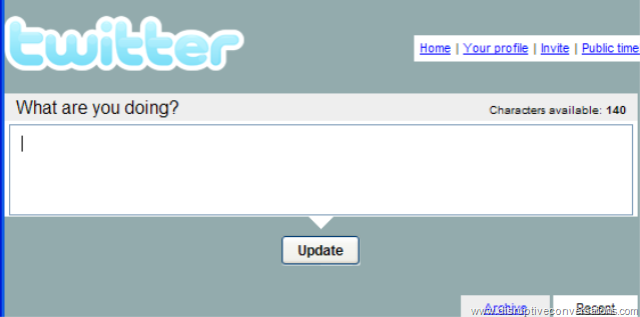
Over at Saunderslog, I have been curious about how Alec Saunders was getting a watermark of his URL across the bottom of his blog images, as shown on the right in the quick screenshot I took of the twitter window. I thought he might be using some new feature in Flickr or in some other editing program. In any event, it turns out to be a feature of Microsoft’s Windows Live Writer beta which he is using.  The funny thing is that I’m using WLW as well, but had not yet discovered this interesting little feature. (Nor is it clearly mentioned on the WLW information page.)


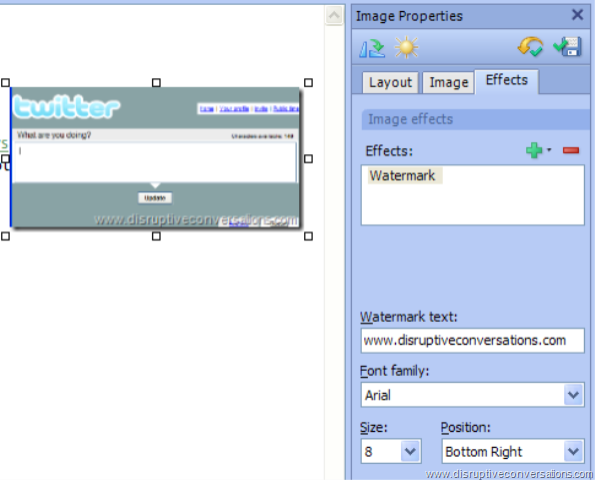
Using this watermarking capability is remarkably simple. First you insert your image into WLW, which might just be a simple "Paste" from another program.  As shown in the screenshot on the left, when you click on the image to select it, you get a sidebar for the "Image Properties".  I use the first and second tabs all the time, but had never played with the third "Effects" tab.

Ta da… click on the green "+" sign to get a drop-down menu, choose "Overlays" and then "Watermark".  Enter the URL and change the font and sizing and you’re done!

What’s nice is that WLW is changing the image itself versus using CSS or something like that… which is what I would want it to do, so it’s great to see. 

Since I was exploring this third tab, I also now noticed that under the "+" sign there is a "Transformations" menu with a number of image effects, such as "Black&White", "Sepia", "Sharpen", "Blur", etc.  Now I typically do such manipulation in some other program (like Google’s Picasa), but it’s nice to know these are here if I just want a quick change to an image.

So thanks, Alec, for pointing me to something I already had and just hadn’t fully explored.

As to Windows Live Writer, what I don’t get is why the WLW blog hasn’t been updated since November.  Has Microsoft stopped development on it? Or paused their work?   There does seem to be activity in their forum… it’s just curious that there have been no blog posts in, now, almost four months.  Puzzling…

Design Requirements for a Corporate "Blog Portal", v1.0 – what else do you think should be there?

I was recently asked by an open source developer working on some blog portal software what attributes I thought a corporate "blog portal" should have.  Thinking about what I’ve seen at http://blogs.cisco.com/home and http://blogs.sun.com/ (two that I like) as well as some other work I’ve been doing, I came up with this list.

What do you think of this list?  Do you have other ideas?  Things that need to be added?  (Or deleted?)  Comments are welcome.


DESIGN REQUIREMENTS FOR A CORPORATE BLOG PORTAL, version 1.0

The following is a list of requirements for a "blog portal" for a company or organization.  This could be for either an internal or external (i.e. public) blog portal.

1. LIST OF AVAILABLE WEBLOGS – Ideally if you went to the blog portal you would first see a web page that listed all the various weblogs that are hosted on the website, complete with brief descriptions.

2. AGGREGATION OF BLOG ENTRIES ON A MAIN PAGE – There would also ideally be a listing of "recent entries" across all blogs. This would allow someone unfamiliar with different blogs to simply look there and see what people are writing about. (This could be done with tools that aggregate RSS feeds and display an HTML’ized version of the resulting mashup feed.) 

3. RSS FEED FOR ALL BLOGS – It would be great if the portal provided an RSS feed for this aggregation of blog entries. Think of it as the "everything" feed. There might not be many folks who would want this "entire" feed (outside of true company junkies, analysts, and competitive intelligence staff at competitors) 

4. SUPPORT FOR USERS AUTHORING IN MULTIPLE BLOGS – Ideally a user should be able to login to the blogging platform and then contribute to whichever blogs they have been granted access. I don’t want to have to login separately for each of them – and from the admin side, it would be nice if there was an interface that made it easy for the admin to set permissions across blogs. (Step 1 could be requiring the admin to config ACLs on each blog, but ideally a Step 2 would centralize that into an interface that shows who can write where, etc.) 

5. SEARCH ACROSS ALL BLOGS – On that same "main page" that lists all blogs on the platform, there should also be a Search box that allows you to search across all blogs for any entries in any weblogs that have the search words/phrase. Another search box (or the ability to use the same one with an option) for "tags" or "categories" would be a bonus. 

6. PRIVACY/PASSWORDS – However, there should also probably be the ability for a weblog author to "opt out" of the cross-blog search and appearance on the main page. Similarly, I could see the use in the ability to restrict access to *viewing* the weblog (and/or subscribing to its feed) to specific users. There could be a blog with content that is ideally only for executives, for instance. To me this is a lower priority because I think the greater value is in sharing information widely… private information can still be kept in email or on a specific hard drive. Still, I could see it being a request at some point. 

7. STATISTICS – Everyone loves stats and at some point champions of a blogging project will be asked how it is going. Anything that can give overall stats, typical web stats like number of page views, etc., but also more blogging-specific things like total number of posts, average number of posts per day/week/month, total number of comments, average number of comments per day/week/month, avg number of comments per post, subscribers to RSS feed (which I grant is tough to discern), number of posts in last day/week/month, etc.. If the portal was for external blogs, you could get fancier and give stats on number of trackbacks, external links, etc. Overall summary stats would be great, but also stats for individual blogs. Ideally even a page that compared all hosted blogs in those stats. This would enable the champions of the blogging program to see which blogs might be doing exceptionally well, which might be struggling and indeed which have stopped – without having to visit all the individual blogs. Bonus if the software generates nice pretty charts that can be used as eye candy in powerpoint presentations.

8. DESIGN INTEGRATION WITH MAIN WEBSITE – It probably doesn’t need to be said, but a company is going to want to integrate this with the rest of their corporate website, so there needs to be the ability for the web design to be modified, customized, etc. to seamlessly fit in with the rest of the enterprise web site. So full ability to modify CSS, change headers, footers, graphics, etc., etc.


 

New hack to TypePad – putting a graphic on right side of the heading banner…

Extremely astute observers of this blog – who happen to be visiting the web page versus reading it via RSS – will notice that the banner at the top of the page changed a wee bit over the weekend.  Over at the right side there are now two “conversation balloons” a la comic strips.  (Refresh your browser if you don’t see them.)  This was part of the vision of my original “blog split-up” back in January.  Each of the blogs (well, currently only this one and Disruptive Telephony, but I’ve probably got another in the queue) has a unique color for the banner but I also wanted a unique graphic. 

However – and this was a key point – I wanted the blog width to be “fluid” and the text to expand to the size of the browser window.  This naturally ruled out any fixed-size banner images and I knew that I was going to have to use CSS or something like that.  The answer appeared the other week when I noticed what a web designer was doing to change the format of an internal blog we are developing.  The code was really exceedingly trivial:

<div style="float:right;"><img src="imagename" align=left alt="somealttext"></div>

Now I also added a “margin-top:2px;” into the style attribute to move the image down a little bit, and you could also turn the image into a link if you wanted to. 

So now the trick is simply to put this into the right place in your TypePad templates.  As I mentioned previously, I used a “menu bar hack” from TypePadHacks.org to get the menu bar you see across the top of the page.  Because of that, I’m already deep inside TypePad’s “Advanced Templates” and already have a customized “banner-header” template.  I just inserted this one line (filled in with names, of course) into that template, republished the site and… ta da… I’ve got a graphic on the right side of my banner.  Well, I also had to create the image as a transparent GIF, but that’s a minor detail.  You’ll see I also have this over on Disruptive Telephony, although I’m probably going to change the image because I’m not sure that the white phone as I have it there is overly compelling or useful.  Need something a bit larger and more interesting… although I’m not sure exactly what.  For the record, I found that the images that worked best were about 50 pixels high.  (Larger images forced the banner to be thicker, and that’s not what I want.)

At some point when I have the time, I’ll write it up for John Unger’s TypePadHacks website.  I’d like to write up a bit more info about how to get the “banner-header” template if you don’t already have it.  Anyway, if you play with it, have fun…

Technorati tags: , , , ,