Category Archives: Blogging

Owning the #1 Technorati search result through using the new WTF feature!

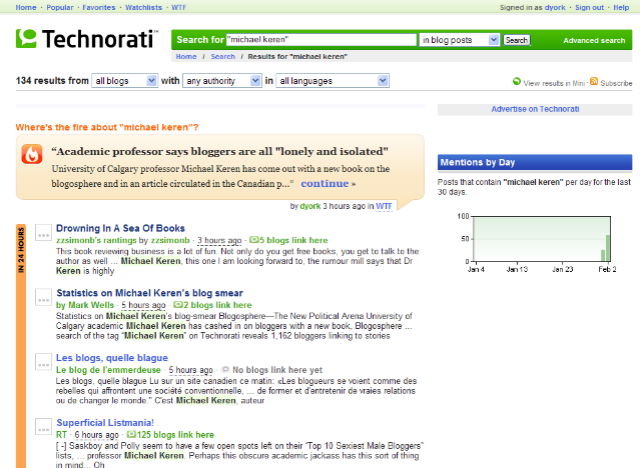
How would you like your text and a link to your blog(s) to show up at the very top of a Technorati search as the #1 result? As shown in the picture to the right, I just did that.  If you do a Technorati search on “Michael Keren”, with or without quotes around his name, you wind up with a screen like the one I’ve shown, and right up on top is a peach-ish/tan-ish box with a flame next to it that has a headline, some text and a link to my Technorati profile.  I just put that up there a few minutes ago.

It turns out that two days ago, Technorati released a new feature called “WTF”, which they are defining as the more “work-safe” acronym of “Where’s The Fire?” [1]  Essentially, you can create a “blurb” explaining why there’s a “fire” around a certain search term and post it. Other Technorati users can then vote on the blurb and the blurb with the most votes is the one that lands on top of the list.  As explained on Technorati:

Ever wonder why something is sooooo popular? Why are the hot topics hot? WTFs explain the buzz around people, things, and events. Who writes these WTFs? You do! Anyone can write one on any topic, and everyone can vote for the best explanations. The ones with the most votes rise up and the dreck sinks. Let millions of other people benefit from your genius… no blog required!

Dave Sifry writes more about the new feature and says this:

Here at Technorati HQ, we know that we’re taking a pretty risky step – we’re putting our highest-value real estate – the topmost search result – in the hands of our community. This is a big social experiment to see if people will work together to help create something great and useful, and will use the voting system to push up the best explanations to the top.

Indeed they are taking a risk… and the experimentation is great to see.  Now let’s see how successful it is.  I can see the power of it… but I can also see the abuse.  Since anyone who is a Technorati user can create WTF blurbs for any search, there is nothing to prevent people from leaving blurbs that are quite negative.  For instance, in light of today’s economic news, I could (but won’t) go leave a blurb on the Exxon Mobil search that says:

Exxon Mobil is a sleazy oil company that announced a quarterly profit of $39.5 billion which works out to a *profit* of $4.5 million dollars *per hour*, while the US Senate is debating whether the minimum wage should be bumped up to $7/hour.

Uh, oh… sounds like yet one more thing that PR and marketing folks need to pay attention to!  I’m guessing the PR folks could put a counter-definition up there as a WTF blurb, but then you’ve got to get the most votes to wind up on the top!  (And in today’s climate, gee, which one is going to get more votes?)   Of course, you could do it for individuals as well.  For instance, because Mitch is just way too easy to pick on, I could (but won’t) add to the “mitch joel” Technorati search:

Bald black-wearing blogger from “beautiful Montreal” with tons of groupies who raves about Second Life and pronounces “image” a funny way.

I don’t know what happens if Mitch then posts a WTF blurb of his own and both have no votes.  Does the latest blurb win?

So the question is – will bloggers in search of links go through and populate Technorati with WTF blurbs that might get people to view their Technorati profile and then their blog?  Will we see “fights” to determine whose blurb gets on top?  How long will it be until unethical people start WTF-spamming to drive links to their profile and blogs?

Interestingly, there doesn’t seem to yet be an overly easy way to monitor if there is a “WTF” blurb written for your company… obviously you can look at the page for your search.  If there is already at least 1 blurb, you can monitor the URL “www.technorati.com/wtf/<name>”, as in  http://www.technorati.com/wtf/michael-keren, but it’s not clear to me that there is yet an automated way to do this (like an RSS feed).

 It will be fascinating to see how people use – and abuse – this system.  So the question, if you are a Technorati user, have you written a WTF blurb for the searches that relate to you?  Will you do so?  Or will you let others…   (and no, Mitch, I won’t be submitting that one for you!)

[1] Non-English readers may not realize that “WTF” is also translated in at least American slang as “What The F___?” with the commonly used profanity that sounds a lot like “duck” (as Dan continues to try to keep his blog work-safe).

Using FeedBurner Networks to build "The One Feed To Rule Them All"…. all Dan York… all the time… :-

If you have multiple blogs, how do you easily create a single RSS feed that aggregates all of your blogs?  I have faced this issue directly with my migration from a single weblog into a network of blogs.  Some of my readers may, for whatever reason, still want to read all my writing (and to my amazement something like 15 people have subscribed to this feed I’m talking about below).

As I first wrote about over on my personal blog, there is a way now to do this. By using FeedBurner’s relatively new “Networks” feature (FAQ here), I have now created the “Dan York – All Feeds” network. There is now a webpage with recent posts and links to the blogs and then an aggregated RSS feed that combines posts in all blogs.

Now, if you look at FeedBurner’s list of Networks, you’ll see a wide range of uses.  Dave Jones put together one that may be of interest to readers (if you are not already aware) called the Public Relations feed.  It provides a nice list of PR-related feeds and, like mine above, gives you a webpage with sample posts and an aggregated feed.  Each blog included can use a “badge” to promote their inclusion in the network.  For instance, you can look at Dave Jones’ blog to see the PR network badge in the top of his right sidebar.  Note that you can click a link to advertise in the network or you can explore network members.

Which gets to the larger point –  FeedBurner is really targeting its “Networks” as a way to enable advertisers to advertise across a series of feeds, i.e. a bunch of feed publishers can band together and then, if they want, get advertising that goes across all their feeds.  Presumably they will have far greater numbers together and thus be able to attract bigger advertisers.

So obviously by building my own private network, I’m twisting the intent a bit.  And the advertisting focus did impact my efforts a bit because in order to create a FeedBurner Network, you have to have a blog that is a member of the FeedBurner Ad Network (FAN).  With a FAN-activated feed, you can then create a Network.  NOTE: None of the other feeds HAVE to be FAN members, but at least one must.  Once you have created a Network, you can invite other people to add feeds via email, or you can add one of your other FAN-activated feeds.

Given this, my steps to create the network were basically:

1. Login to FeedBurner, go to “My Networks” and click “Create a network”
2. Choose one of my FAN-activated feeds to “anchor” the network.
3. Fill out the form and, under “Privacy”, switch it from the default of “Public” to “Private”.
4. Submit the form and proceed to the page to invite members.
5. Add any of your other FAN-activated feeds to the network using the easy form.
6. Send yourself an email invitation for each of the other feeds to invite them in.
7. For each invitation, accept it on behalf of each different feed.
8. Sit back and enjoy your aggregated feed and site.

Now, if you think about step #6 for a moment… I have 8 feeds I wanted to aggregate, yet only 3 of those are FAN members.  So, yes, indeed, I sent 5 separate invites to my own inbox. I then clicked the link in each separate email and entered FeedBurner to accept membership in my new network for each of the different feeds.  In the end, I did wind up with my “one giant Dan York feed”, but the separate email invites was a bit tedious.

Of course, I do understand perhaps why FeedBurner doesn’t make this overly easy for non-FAN feeds.  FeedBurner is a business and they are experimenting with the whole FAN idea and the concept of getting advertisers to insert ads in feeds.  So it’s in their interest to encourage feeds to be in the FAN so that they have more feeds for advertisers to join into.  So it makes sense in that way.  It may also very well be that the folks at FeedBurner didn’t really think people would do what I did here. 

In any event, I thought I’d post this for those of you who: a) use FeedBurner; and b) have multiple blogs/podcasts/feeds/etc.

Let me know what you think… and if for some reason you really want to see all my writing across all my blogs, the feed is now there (well, actually, that’s the web page… the feed is down in the lower right marked “Network Feed“).

Technorati tags: , , , ,

Joining the "2000 Bloggers" project…

 Given that it seemed an interesting (and one-time) experiment, I left a comment on Tino Buntic’s 2000 Bloggers project page and now have been added to the giant page of photos of the 2000 bloggers (WARNING: The page is (Duh!) graphic heavy!)  Rather than leave the URL for my personal blog, I left the URL for this new blog, partly as an experiment in site traffic.  Being so new, I can get a better view of site-driven traffic… we’ll see.  I don’t really know how many visitors would actually come over here as a result of my picture (the same standard one I use on this blog).  Now, if my picture had been a bit different or strange or weird, perhaps… Anyway, it’s just another part of the ongoing experiment in all these media.

BTW, he says he has not yet his 2000 bloggers, so if you are interested in being included, head on over to his page and leave a comment.  (You just need to have a photo on your blog and have been blogging for a bit.)

Meanwhile, do check out the pictures and see how many people you know… 🙂  It’s also just quite fun to see the wide range of faces and photos.

What happens to your blog(s) when you die?

When you die, what happens to your blog(s)?  What happens to all that writing?  Think about how things have changed… traditional “writers” have always left behind their writings.  On paper, in journals/diaries, in printed books and magazines.  Perhaps out in public view or perhaps in the “box up in the attic”.  However they are stored, the writings survive the death of the writer and then are seen some day by family or perhaps by researchers.  Indeed, historians relish finding old caches of (snail-mail) letters, diaries, unfinished books or poems. Famous (or wealthy) people have bequeathed their “papers” to a library, often at the university they attended.  Families pass down the “family bible” through generations. It’s all part and parcel of how we have accounted for – and preserved – our history as a culture.   Often the historians prize most the “everyday” writings… the letters… the postcards… the brief notes… as they offer a glimpse into a distant era.

Fast forward to today… while we still generate printed books by the millions and while people still do write in paper diaries/journals/etc., so much of our writing has moved online.  Yet let’s think about what happens when you die:

  1. Sooner or later, the registration for your domain(s) will expire and people won’t be able to find your material at the regular URL.
  2. Likewise, sooner or later your subscription at your hosting provider expires. (whether that is a true hosting provider where you are running your own software or a hosted blogging provider like TypePad)
  3. Because of #2, your files are eventually purged from the hosting provider.
  4. Your writing disappears… except, perhaps, to maybe live on in the Way Back Machine if your site was included in one of its snapshots.

Now, #1 and #2 might be delayed a bit if you set your subscriptions/registrations to “auto-renew”.  They would keep auto-renewing at least until the credit card they have listed expired. (Which, one might think, might be relatively soon if your bank cancels it.) Perhaps you could tie it to a bank account that might live longer… but the point is that sooner or later it runs out.

What about the “free” blogging sites like Blogger, LiveJournal, WordPress.com, etc?  Good question.  Blogs that are created there do seem to stay around for a very long time after they’ve been updated.  But still, you’d have to think that after some (potentially lengthy) period of inactivity, eventually the system admins are going to archive off inactive accounts.  Odds are that some historian 20 years from now won’t see your pages on LiveJournal (if, indeed, LiveJournal is even still around in its current form).

So what does happen?  Do your entries… just… stop?  Does someone else go in and put in a final entry? (as was done for Dave Ross in “Oh Crap. I have Cancer.“)  Who has your username(s) and password(s) to be able to go and do this?  Does someone else pay for your domain name?  Or print it all out?  Do you have instructions for someone?  (Is this a new area to be added to wills?)

Or do you even care?  Are your online writings not worth saving?  Do you want them all to die out with you?

(I got on this train of thought because of recent conversations on FIR and in other places about “what happens to your corporate blog when you leave the company?”  Should it stay up?  Or should it be removed? (as email addresses would be removed for employees who left the company) It just occurred to me that the argument begged the follow-on question raised here.)

Michael Seaton on plagarism and blogs (a.k.a. why do people feel it’s okay to steal content?)

If you have not read Michael Seaton’s post “Plagarism hits The Client Side a.k.a. Scott gets caught“, I’d recommend it as a warning for the kind of thing that can happen to any of us.  In it, Michael details the fact that another blogger out there took one of Michael’s posts, made a few minor changes to it and then posted it as the blogger’s own post without any kind of attribution.  Michael noted another post that was a plagarized version of a TechCrunch post, and as you’ll see in the comments, I found that one of the blogger’s other posts was also a duplicate – this time of a post from another blog back in June 2006. 

I didn’t note it on my comment in Michael’s blog, but in the post I found to be a duplicate, the blogger had been rather dumb in that the image (of DropSend usage) that he pulls in is actually pulled from the blog where he copied the text!  I mean, if you are going to steal someone’s content, you might want to put the images up on your server so that it can’t be tracked back to the source!

But seriously, it’s a shame to see this kind of thing.  As noted by Michael, the blogger in question seems to be a senior marketing person at a well known company in Washington, DC.  And here he is posting other people’s content as his own.  Michael has asked for an explanation, but so far there has been no word publicly from the blogger.  (Although I’ll note his blog hasn’t been updated since January 18th, which I think was when Bryper commented on his re-post of Michael’s text and that post suddenly came down.)

Time was that unethical people could do this type of thing… “can I copy your essay?”  But in the age of Google, Technorati and friends, you will eventually be found out.  You may have a good run… maybe even a long run… but eventually you will be discovered.  And guess what, courtesy of both Google’s caches and sites like the WayBackMachine, your content lives forever. So even if you take down the posts, they are still out.  (And of course, people like me can help in that, as I just used “wget” to grab a copy of the blogger’s website.)

There’s a very simple solution of, course, which can be summarized in this:

Write your own <insert-favorite-expletive> content!

Need we say more?

TypePad Hacks gives me "Applied Hacking Award" for blog redesign…

Last week, John Unger over at TypePadHacks.org dropped me a note to let me know that I was given an “AHA” award for my blog redesign.  It actually mentions “Disruptive Telephony“, but I’ll note the award here since this blog shares the same design and I write about blogging here.  He notes my use of the three-column hack and also the menu bar hack.  I do definitely appreciate the notice and feedback, so thanks, John, but I’ll really say thanks back to John and all the other members of the TypePad Hacks community who have put together the various “hacks”.  The site does make it very easy for someone to learn how to tweak their blog in different ways.  I’ve learned a good bit from the site and have more ideas for things I’ll do to these blogs once I can find some more of that mythical thing called free time…

P.S. Also check out the “landing page” of the other award winner, David Alexander. It’s nicely done and something I’ve been thinking about doing with another page (Hint… you’ll notice that I’m missing an “About” link here.  Stay tuned…)

Will blog comment spam and trackback spam kill the global conversation?

Thanks to spammers, there are definitely some days that I do wonder whether I have the stamina to continue to engage in the “conversation” that is so much a part of social media.  Take today… I get the standard email that someone has submitted a comment to the “Voice of VOIPSA” weblog and I need to moderate it.  So I go and find that just in the last day there are 10 comments awaiting moderation… one of which is real and the other 9 are comment spam.  And not just quick spam but rather these big giant link dumps that I have to scroll down through, hoping that I don’t miss a “real” comment in all scrolling through the crap.  VoV is a WordPress blog, so I do the quick “Mark all as spam” and then find the 1 that isn’t and mark it for approval. 

Now note that this is with the wonderful Akismet Spam protection module installed! In fact, Akismet helpfully tells me that there are 3,108 spam comments that it has caught since I hit “Delete all” just a couple of weeks ago.  It tells me that 18,311 spam comments have been caught since we installed Akismet on the VoV blog sometime back in the fall.

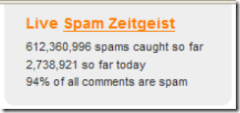
 A quick trip to Akismet’s home page will show you this nice graphic to the right, along with a page with more stats.  Now, of course, they are a vendor of blog comment/trackback spam prevention software, so naturally it is in their interest to show a high number of spam comments. (Just as it is in the interest of anti-virus vendors to talk about how many viruses are out there in the wild.)    But whether or not their stats are indeed accurate and 94% of all comments are spam, I think we can all agree that it’s a problem.  As I wrote earlier, fellow VoIP blogger Alec Saunders wrote back in December about how spammers were outgunning him 275-to-1.   Shel Holtz writes of having to deal with 100+ trackback spam messages each day.  Any search of Technorati or Google for “trackback spam” will show you the many pages and articles that are talking about the issue.  Even black hats are talking about the issue.

And the level of spam is definitely changing the openness and speed of the conversation.  As I noted, Voice of VOIPSA is using both Akismet and moderation.  On TypePad, I’ve implemented CAPTCHAs to reduce automated blog comment spam, and it’s seemed to work okay, although occasionally one gets through.  I’ve also moderated trackbacks… which is fine, but does obviously introduce latency in the conversation and requires more work for me.   Shel Holtz can’t moderate trackbacks on his platform, so he’s turned them off completely:  “Farewell, trackbacks; screw you, spammers“.  He’s not alone as I know of others doing the same. I’ve seen some bloggers turn off comments completely. 

I don’t blame them.  Who has the time to deal with sorting through all the junk?  And if you don’t moderate or somehow deal with the issue, who wants their blog to turn into a pure spam site?  And each time someone turns off trackbacks or comments, the global “conversation” of which we are all a part dies a little bit more.  Even turning on moderation huts the conversation… others don’t see comments quickly and can’t reply to those comments – and it’s more work for the blog author. I submitted a comment to a blog last week and because it said comments were moderated, I knew I wouldn’t see my comment right away, but when it never appeared I contacted the author and found out the comment never showed up in his moderation queue!  It was a software error, apparently, but I had no way to check.  Now, almost a week later, is my comment even still relevant?  Do I really have the time to go post it again?

What’s the solution?  It’s not entirely clear to me.  Part of the solution is obviously back-end tools like Akismet and the other similar services.  Part of it may be the CAPTCHA tools that we use (although that’s really a bit of an arms race against spammers developing tools to overcome the CAPTCHAs… such tools are out there with varying levels of effectiveness).  Part of it may be identity assertion – things like TypeKey or OpenID (although note that there is nothing preventing spammers from creating OpenIDs).  Part of it may involve a retreat into gated “communities”, i.e. you have to register and be approved by the blog author before commenting (some sites do this now) or be added to the authors known and trusted “friends” list.  I could, if I chose, do this on my LiveJournal blog right now and restrict comments to only my LiveJournal “friends”.

But each one of those solutions throw up barriers and potentially diminish the openness of the conversation.  What about the comments from random readers that sometimes can lead you to other very interesting topics?  (Or might simply make your day in their praise?)  If everyone must be registered or moderated, how “real-time” can the conversation be? (unless it is within the walls of trusted users?)

Will spam kill the “conversation” of social media just as that medium emerges so strongly?  Or will we find the ways or create the tools to allow the conversation to continue?

What’s a poor blog got to do to get listed in Technorati?

UPDATE: Okay, so maybe I was just too impatient. The blog is now listed.  I was just surprised that it took several days for it to appear.


I’ve generally been a big fan of Technorati and they still are the primary blog search tool I use… but I admit to being a bit puzzled about what’s going on right now, specifically with this blog.  Or more precisely – what is NOT going on with this blog.  For whatever reason, it is not appearing at all in the Technorati blog directory.  If you do a search of the blog directory on the URL, you get:

Huh?

There are blogs, and then there’s whatever you just typed in. If it’s a blog, we don’t know about it. Maybe you made a typo. Or maybe it’s a blog that doesn’t exist. Maybe you don’t exist. (In which case, please ignore this.)

Which, okay, is one of the cuter error messages I’ve seen lately, but doesn’t address the issue.  Given that I’ve launched a good number of different blogs and websites over time, I find this puzzling.  In the past, the pattern has always been one of “start pinging Technorati and typically a couple of hours later you are in the blog directory”.  Given that I started pinging Technorati from this blog, I think, sometime late last week, I don’t think this is a case of me being impatient.  And they must now be getting pings from this blog, considering that:

  • The offline editor I’m using, Windows Live Writer, is set to ping Technorati when it publishes a post in this blog.
  • TypePad is set to ping Technorati (and other services) when a new post is published in this blog.
  • Feedburner’s “PingShot” service is set to ping Technorati whenever a new post appears in the RSS feed.

So one would think that Technorati would be getting the message.  (Incidentally, this is the same way my other blogs are set up.)

So is it something else?  Did the name of this blog trigger some filter and I’m in some anti-spam-blog queue awaiting approval? Very puzzling indeed.  We’ll see… perhaps I am just being impatient.

Technorati tags: ,

Exploring Microsoft Windows Live Writer, part 1: Initial impressions

As I have started the transition from a single blog to a mini-network of blogs, I have had to find a new offline editor.  The editor I’ve been using for most of the past three years of blogging, Semagic, is a fantastic offline editor for LiveJournal and is one of the reasons for my often prolific posting there, it makes it just darn simple and fast to post.  It’s also really one of the main reasons I stayed over at LJ. Just made it too easy to blog fast! However, as I explored using it with TypePad, I found it had an issue with multiple accounts using the same user name.  I use the same user name (but different passwords) with both LJ and TypePad, but because of this, I couldn’t switch quickly between LJ and TypePad. So I decided to keep using Semagic for LJ posting and find another editor for working in multiple weblogs here at TypePad. I checked out ecto, and was quite pleased with it.  I set up templates and was getting all ready to buy it, but then I discovered that it would not handle my Blue Box postings very well, and in fact when I tried to switch to HTML view on a Blue Box posting, it would lock up ecto and jack my CPU. Probably something related to the Libsyn Flash player or some other object.  And while I could (and should) report the issue to the ecto developer and see if it could be fixed, I want to get blogging… now!  So in the meantime I decided I should give Microsoft Windows Live Writer a try, even though I’d heard decidedly mixed reviews from other bloggers.

So I have to say after using WLW for several days: I am impressed!

Here are some initial impressions – I intend to blog about this in probably a series of posts as I use it more and kick the tires a bit more.

POSITIVE POINTS

1. Easy switch from WYSIWIG to HTML – I’m an old-school HTML guy.  I started creating web pages back in 1992/1993 when all you did was hand-code them all in vi. And as much as I enjoy and use WYSIWIG editors, I want to be able to quickly switch between a WYSIWIG and HTML view. Sometimes I want to just tweak the HTML… or insert some HTML that isn’t fully supported by the editor.. or I want to resolve a problem that the editor won’t let me fix. WLW makes this trivial: "Shift+F11" flips you to HTML, "Ctrl+F11" flips you back to WYSIWIG. Hit plain old "F11" and you’re in "web layout" mode. Hit F12 and you see one of the best preview screens I’ve seen in any offline editor, period.  This switching is truly a thing of beauty.

2. Embedding images – If you want to accompany a post with a graphic, like I did above with the screenshot, the process can be cumbersome: a) take screenshot; b) save it to a file; c) upload it to your server; d) link to it in your blog post. Offline clients should make this easy.  Semagic certainly did… you were prompted to save the files, but otherwise it handled all the upload and everything else for you.  WLW takes this a couple steps further: you aren’t asked to save it as a file, and the images are auto-thumbnailed. Clicking on the link gives you the larger image.  It’s a nice implementation.

3. Easy creation of links on text – Semagic has this one magic keystroke "Ctrl+Alt+L" that is a almost irreplaceable keystroke for the time-challenged blogger.  Simply highlight a URL in your browser, copy it, switch to Semagic, highlight the text and press Ctrl+Alt+L… ta da… you text is wrapped in the appropriate <a> tag linking to the URL you just copied.  Simple, easy, and allows for very rapid blogging.  This one feature alone has stopped me from using other offline editors (and was one issue I had with ecto).  WLW almost delivers this… and the way to do it is something I can live with.  You highlight the text and press "Ctrl+K" to get the link dialog box where the Link URL box is highlighted.  Press "Ctrl+V" to paste and press Enter.  So you can do it fast with "Ctrl+K Ctrl+V Enter". (As a bonus "^K^V" can take those of us WordStar users on a trip down memory lane.)

4. Easy switching between weblogs – So far, this has been very simple to do once each weblog account is set up in WLW.

5. Plugin gallery and architecture – It’s quite interesting to see that WLW has its own Plugin Gallery with all sorts of ways to extend the functionality (similar to what Firefox and Thunderbird allow).  For instance, the "Text Template" plugin so far seems to be the way to automate inclusion of HTML snippets into posts. (Such as images that are associated with certain kinds of postings, etc.)

NEGATIVE POINTS

1. Lack of keyboard macros? – One of the things Semagic let me do was associate any keystroke combination with a "macro", which is essentially an HTML snippet.  So, for instance, if I wanted to start a post about Blue Box, I simply went into Semagic, typed "Ctrl+Shift+B" and, ta da, the BlueBox log was there all wrapped in appropriate <a> and <img> tags.  These macros allowed again for very fast creation of a post.  In WLW, the previously mentioned "Text Template" plugin gets me close.  I just have to click on "Insert Text Template…" on the sidebar and then double-click on the template to insert.  It has some nice categorization capabilities that I could see being useful if I had lots of templates.  But I had to click on a link.  I don’t want my hands to have to leave the keyboard.  I want to pop open a window and start typing with keyboard shortcuts letting me drop in text, images, whatever.  Now, maybe I just have found this in WLW yet – or maybe it’s another plugin.

2. No option to keep the window open but clear the text after posting – This was a curious thing to get used to.  When you click on the Publish button in WLW, the post gets published, and then it is still there in your window.  Semagic’s behavior was that once you hit "Post", the post was published and then your window was clear so that you could begin your next post. If you wanted to get back to the old post, there is a menu option to edit your last entry.  WLW leaves you instead with the now-posted entry still there in the WLW window.  Now, I’ve already found that this can be positive because when I realized that I had an error in the just-posted post, I could quickly change it and re-post.  However, most times, I just want the post to be published and I want to start a new post.  I can of course hit the "New" button, but this then gives me a new window – and I’ve already got too many windows floating around!  There is an option in Tools->Preferences to "Close window after publishing", but that then closes out your window… and if you close all WLW windows, you have to relaunch WLW from the Start menu or QuickLaunch bar to be able to blog again.  What I would like is the option to simply erase all the text after the blog entry has been posted.  (And maybe I’ve missed the option…)


So those are my initial impressions… if any of you have used it and have comments, I’d certainly be interested in hearing that as well.  Stay tuned for more posts as I push it through my normal blogging.

CSS , navbars and browser compatibility (aka why does it look so bad in MSIE 7?)

Odds are, if you are looking at this page today in Firefox, you’re seeing a nice little horizontal navigation bar at the top of the page underneath the banner.  If you are looking at this page today in IE7… well… you are probably wondering what navigation bar I am talking about!

You see… I’m experimenting with a navigation bar at the top of the page just underneath the banner so that as I move from a single blog into a network of topic-specific blogs, I’d like readers (and myself) to be able to easily move between them.  Armed with the excellent tutorial over on Typepadhacks.org, I’ve been experimenting with TypePad’s advanced templates.  If you look over at the top of Disruptive Telephony, you’ll see that I’m using the “Overlapping horizontal tabs” style found at the excellent DynamicDrive CSS Library.  It’s all done with Cascading Style Sheets (CSS) and a few little images.  Pretty fun stuff.

However, I thought that I’d try another style as well to see how it works.  So I tried the “Shade Image” style for comparison.  The result, in Firefox, is quite nice (click for a larger image):

However, if you take a look at it in Internet Explorer (I’ve now tried either IE6 or IE7), you get this:

Not exactly what we’re looking for!  Now, the “overlapping horizontal tabs” menu looks okay in IE, although the horizontal line annoyingly doesn’t line up with the bottom of the tabs, so that may be the one I use for the other blogs – or I may try some of the other styles.

I do like the “Slanted Divider” menu and the “Chrome” menu bar isn’t bad either, but neither of those shows you visibly which blog you are on.  That’s what I liked about these other two – it was very easy to see which menu choice you are on.

Just too bad that the CSS for that menu bar works so nicely in Firefox looks so poor in MSIE!