Category Archives: Blogging

Humans being paid to add blog comment spam to LiveJournal

In recent weeks, it has become increasing clear to me that someone out there is paying people to spam blogs at LiveJournal. As readers probably know, I’ve had dyork.livejournal.com for about 4 years now and although it’s not my primary blog anymore, I still use it for writing that doesn’t fit in anywhere else.  I am notified by email when a comment comes in and lately they have pretty much all been short spam messages along the form:

Very exciting story! I like snow skiing and i practise it regularly, so i
completely understand you! <URL-related-to-skiing>

I of course removed the URL as I’m not going to help the spammer.  This particular comment was to a post of mine back in February about the blizzard we had and the only real reference to skiing was the very last line.

This kind of spam has been increasing for me lately with the same basic idea.  A very short comment that is tied into the text of the post.  One spammer even ends the entries with a name, as many other real commenters might do.  In fact, the comments look real, and often are the kind of thing I might very well let stand as a comment…. until you hit the URL and realize that this is just someone trying to sell stuff.

It’s an interesting change at LiveJournal.  For so long LJ was “protected” from all the usual crap blog comment spam that plagues all my other blogs by the way commenting works at LJ.  To comment on a blog post, you have to either be a LiveJournal user, or you can leave your comment as “Anonymous”.  However, if you leave your comment as “Anonymous”, you can’t leave a URL associated with your name (as you can do on this blog and most others out there).  This lack of a URL for commenters was actually one of the reasons I chose to leave LJ as my primary blogging platform.  I wanted to know more about the people who commented.

However, this “lack” of a URL turned out to be a great anti-comment-spam feature.  Spammers who were leaving comments with their spam site in the URL field were basically useless on LJ. I’d often laugh because I’d see the same blog comment spam showing up on TypePad (where I could see the URL) as I did on LJ – only on LJ it was ineffective.

It would seem, though, that someone out there figured out a way to make blog comment spam work.  It would appear as if someone is paying people to go around finding quasi-relevant blog entries on LJ and leave comment spam – with an appended URL.   It was probably inevitable… but it’s also quite sad.  And it means more work for someone who just wants to write.

BlogDay 2007 – My five blog recommendations

Blog Day 2007I must admit that I honestly forgot today was “BlogDay” or I might have saved my three new security blog recommendations that I posted on Wednesday for today!  Since I already blogged about them, I can’t really use them, but that’s okay because the reality is that pretty much every day I find myself stumbling upon new and interesting blogs.  I could easily list more than 5, but in the spirit of the “Blog Day” effort, I’ll recommend these five blogs that readers of this blog may or may not have seen:

  • A View from the Isle by Tris Hussey
    Given that we turn out to move in similar circles, I was rather surprised that I had never run into Tris before meeting in Robert Sanzalone’s Pacific IT (Bonus – Robert’s blog is also a great one) Skype group chat.  Tris writes here on his blog about “Social Media, Blogging, Tech and Opinions“, but these days he’s spending more of his time writing over at his new gig: http://catech.blognation.com/  Over time I’ve definitely come to value Tris’ insights and commentary on a wide range of issues.
  • Future Visions by Jon Burg
    Started just back in July, this blog has the subtitle “Chasing the longtail of digital media as it increasingly empowers our everyday lives“.  I don’t know much about the author (there was no “About” page or sidebar comment I could find), but I’ve enjoyed many of the posts and commentary on social media issues.  A recent post on lifestreams was quite good.  I also like the fact that the author offers suggestions for improvements (see here for Second Life and for Twitter) rather than just complaining.
  • The Visual Lounge by Betsy Weber and others at TechSmith
    Although this blog has been around since August 2005 (happy 2-yr birthday, by the way!) by TechSmith, the makers of SnagIT, Camtasia Studio and now Jing, I only recently discovered it as a side effect of my post about screen capture tools when folks from TechSmith contacted me. (It turns out they discovered the Windows Live Writer plugin for SnagIt from my blog post.) While obviously a corporate blog, I’ve enjoyed reading the entries as the whole area of graphics, screen captures, screencasts, etc. is of great interest to me.  My background includes a long stint in corporate IT training, so I have a passion for tools that help make things like courseware production easy.
  • The Inspired Protagonist, The Official Blog of Seventh Generation
    I can’t live in Vermont and NOT include at least one environmental blog! (I’ll be ejected from the state if I don’t!) I’ve enjoyed The Inspired Protagonist because it aims to provide positive news.  I mean, what’s not to like about a blog that includes this in their “About” section: “In an age when despairing doom and global gloom rule the wires and extinguish those inspired fires that could ignite the needed change, the Inspired Protagonist seeks to cut the cords of negativity that bind us and replace them with hopeful strands of thought and deed that weave new worlds of possibility.”  Yes, it is the “corporate blog” of Seventh Generation, but it’s not really about the corporation as much as it is about environmental changes happening in the larger world and also about what people are doing to address those changes.  (Bonus blog – it’s great to see that ZDNet has started up their “GreenTech Pastures” blog.)
  • the flatlander, by “joey”
    Speaking of Vermont, I’ll end my list of five with this local blog subtitled “A New York City ex-expatriate’s life in Vermont: It’s not half bad.”  The writer, “Joey”, says in her “About” section “I live in Burlington, VT. I used to live in New York City. Now I’m confused.”  I’ve never met her, although obviously she lives in the same “city” that I do, but she provides a fun and entertaining view of “Big City Girl Moves to Dramatically Smaller City” throughout her various posts.  It’s nice to see the area you live in through the eyes of a newcomer.  (Although we, ourselves, made a similar although not quite so dramatic move when when moved from Ottawa to Burlington in 2005.)  I also like how she illustrates each of her blog entries with her own drawn illustrations.  Nice touch to spicing up the text.

So there you are… five blogs to check out (plus a few more)… hopefully at least one of those will be “new” for you!

Technorati tags: , ,

So you want to be a blogger? Do you LOVE to write? Do you wake up each morning with your head exploding with stories to be told?

An occupational hazard of being a blogger, it seems, that when you are in certain situations and let it be known that you blog, the inevitable question comes up: “So I’ve been thinking about starting a blog, where do you suggest I begin?”  It’s kind of the 2007 equivalent of several years back when, as soon as someone found out that you knew something about computers, the question was “So, I’m thinking about buying a computer, what kind should I consider?” (Or it is presumably like doctors who are asked things like “I’ve had this pain in my side…“)

When next I am asked this question, I’d like to imagine the dialog might play out like this:

Them: So I’m thinking about starting a blog, where should I begin?
Me: For starters, do you LOVE to write?
Them: (a bit hesitant) Sure, I like to write.
Me: No, do you LOVE to write?
Them: (a pause) I’m not entirely sure I follow…
Me: Do you LOVE to write?  Do you wake up each morning with your head exploding with stories that are just there waiting to be told?  If so, blogging may be extremely easy for you.  If not, you can still do it… but you just have to be aware that it will take some work.

Let’s face it… starting a blog is trivial.  Keeping a blog going takes a good bit of work.  It helps tremendously if you have this compulsion to tell stories… if you are driven to communicate… if you love to write.

My brain first started going down this track back in July when I read Chris Brogan’s “An Autobiography of Sorts“.  Chris, one of the more prolific bloggers I follow, writes very well and his posts are generally a pleasure to read.  In his piece, he included this text (my emphasis added):

My first websites dealt with writing fiction. I wrote voraciously through childhood and was really proud and passionate about my writing. I got lots of early readership through my site, and built a little online community of writers.

A commonality with Chris clicked.  Like Chris, I’ve been writing (at times you could even say “voraciously”) since I was very young.  Before I moved into blogging in May 2000 (over on Advogato), I had filled countless notebooks and journals with writing.  I have boxes of them floating around.  All shapes and sizes… carried with me wherever I was.  Traveling around the US.  Living in New England.  On the ice sheet in Greenland. Going to the Univ of New Hampshire in the mid-1980s.  Backpacking.  Canoeing. Wherever. Whenever. I was writing.  Stories. Fiction. Poetry. Commentary on politics.  Comments on life around me.  Sometimes in German (in my more fluent days). Usually late at night or early in the morning.  Much of it, if I were to go back and re-read it, would undoubtedly be pretty mundane and banal.  I’m sure some of my scribblings at UNH would rival the drivel posted in Facebook by some of today’s students (except that my drivel isn’t posted out there for everyone to see and for search engines to cache).  I have written multiple technical books , numerous pieces of courseware, and far, far, far too many articles for me to even begin counting (I used to try to keep up).  The reality is that I simply love to write.  I always have.  I expect I always will.

So the transition for me to blogging back in 2000 was trivial.  It was simple and easy.  I just wrote with a keyboard instead of a pen.  Only now I was writing for a potentially global audience so I had to apply a bit of a filter (i.e. “Never put online anything you wouldn’t feel comfortable seeing on the front page of the NY Times.”), but across Advogato, then LiveJournal (and also my American-in-Canada site) and now this network of blogs (plus now Twitter, Facebook, etc.) , I’ve continued to post.  Not as prolifically as Chris, nor even remotely on the same scale as Jeremiah Owyang:

I enjoy writing, and have published 1,327 posts in the last 15 months (about 3 a day, including weekends).

but I’ve kept at it all these years.  In large part because I really can’t NOT post!   I do indeed wake up most mornings with my head exploding with stories to be told.  For years I’ve carried around with me a Moleskine notebook[1] whose main purpose continues to be a place for me to jot down notes about things I want to blog about!  I still do. And you know what… I don’t even blog about probably 90% of the ideas I write down!  I just don’t have the time in the day.  Now if blogging were all I did, perhaps I could – but it’s not what I get paid for and is something I just fit into the small random interstices of the day.  Similarly, I tag many web pages I see in del.icio.us, with the idea that I’ll go back and blog about them… and again probably 90% I don’t.  I keep all sorts of drafts of articles floating around in Windows Live Writer.  Some eventually become blog posts. Some never do and eventually I delete them.

The key is that I love to write.  I have a compulsion to communicate… to explain… to teach… to demystify things… to tell stories about things and people and technologies.  It is just part and parcel of who I am and what I do.

If you have that compulsion, odds are that you’ll do just fine keeping up with blogging.  If not, you still can certainly maintain a blog… you just may have to work at it a bit more to keep those entries flowing…

[1] Since before Moleskines were popular with the GTD set and they were quite difficult to find – in fact, there was only one store in all of Ottawa where I could get them. Today, they are of course everywhere.

Technorati tags: ,

Steve Rubel uses Tumblr to build an aggregated "Lifestream" of all his online content (something I’ve done with Feedburner, Yahoo!Pipes)

image How do you make it easy to find writing that you do online when it is scattered all over a zillion sites and services?  Over on his blog, in a post called “Identity Through Online Lifestreams“, Steve Rubel talks about his recent experiment doing exactly that with Tumblr.  Tumblr is a service that lets you create a “tumblelog” (which is essentially a mixed-media blog) and allows you to import RSS feeds of various other sites and services.  Steve has done this (in part, apparently, with directions from Gina Trapani over at LifeHacker) and the result can be seen now at: www.steverubel.com. All his blog posts, Twitter posts (aka “tweets”), Flickr uploads, etc., etc.  Tumblr is of course not the only way to do this, but it certainly seems to have a nice interface to do so. 

I did this myself through a different means back in January when I split my 3-year-old single blog into the current network of separate blogs (and then later added Twitter, etc.).  My first attempt was to use the Feedburner Advertiser Network to create my own “Feedburner network” that aggregates all my feeds into a single “Dan York All Feeds” RSS stream.  This works in that I have the combined RSS feed and then also a web page with links to the blogs and the most recent entry from each.  It’s not as pretty as what Tumblr seems to be able to produce and as I note in the blog entry, it was a good bit of a pain to set up.  It helps that I use Feedburner for all my various feeds.

However, creating your own Feedburner network only works with Feedburner-managed feeds.  What about things like Twitter RSS feeds?  Now the kludgey way would be to create Feedburner feeds for those fees and then pull them into the one aggregated feed.

Instead, my second technique back in March was to use Yahoo!Pipes to do this and I did so: http://pipes.yahoo.com/pipes/pipe.info?_id=0DoSGZS82xGxhlBMZoQMOQ  Now, there was a dating issue that was subsequently fixed, and I never bothered to wrap it back into a Feedburner feed, but it works to combine my blog feeds with Twitter.  (And since my Facebook status updates are feeding into Twitter as well, they wind up in this feed, too.)  Now, from a display point-of-view, Yahoo!Pipes may again not be as nice as Tumblr pages, but it does allow for easy aggregation of feeds.

Today, you could apparently also do this same type of thing with Microsoft Popfly or Google’s Mashup Editor (or so I am told… not having used either service I can’t say for certain, but I am told they would do this).

I will say, though, that Tumblr does make it pretty drop-dead easy to do. In literally less than 5 minutes, I had all my various feeds set to go into:  danyork.tumblr.com.  (Obviously it is starting now and so content will only appear there from this point forward.)

The one thing that Tumblr does not (yet, anyway) seem to have the ability to filter feeds based on certain criteria.  For instance, I write over at the Voice of VoIPSA group weblog, but I really only want to include my postings there in my lifestream – and there is only one RSS stream.  This is something that I can do over at Yahoo!Pipes (and of course if I wanted to I could create a filtered feed at Yahoo!Pipes and then bring that into Tumblr!).

In any event, Tumblr certain looks to be an easy way to aggregate one’s “lifestream” of online content.  Kudos to Steve for pointing it out and showing how he used it.  I liked one of his points:

I really like that there is a single place attached to my name that rolls up all of the content that I am publishing online. I also like that in just a couple of clicks I can set up a river of news that I can share at the domain of my choosing.

This latter point is a key one.  Steve has mapped www.steverubel.com to this Tumblr page.  I could easily do that with some variant off of danyork.com. The nice thing with that is that you are not dependent upon the success or failure of the company, Tumblr.com!  If Tumblr sometime ceases to exist, or starts charging and you don’t want to pay, or has performance problems, or is acquired by someone else, or…. whatever…  because you control the domain you can simply point it to another site that lets you do domain mapping.  Cool stuff.

Congrats to Tris Hussey on the launch of "blognation Canada"!

image Congrats to Tris Hussey on the launch of “blognation Canada“!  As he said in his welcome post:

You think Canada is all just hockey, beer, and maple syrup?  Yeah, not so much.  Let’s talk about things like Alexander Graham Bell and the telephone, Northern Telecom (now Nortel) inventing voicemail and many other phone features, Corel, RIM … how about PHP?

We also are the birthplace of Flickr, StumbleUpon, Club Penguin, Webkinz, b5media, and the man who invented Java…and far many more.

What’s going to be going on here?  Well the standard news with a Canadian twist (no that doesn’t mean I’ll end each sentence with “eh”), profiles of Canadian start ups, and probably a podcast or radio show.

So if you are interested in tech news north of the Canadian border, consider adding blognation Canada to your feeds.  (Note that also this week “blognation USA” launched.)

If you aren’t familiar with blognation, it is a network of country-specific blogs focused on “the latest Web 2.0 technology, mobile and enterprise startups from around the world, but only written in English.”  Sam Sethi created the network and it is backed by venture capital and advertising.  More details are in the FAQ.

One of the interesting elements to me about this is the fact that before a few months ago, I didn’t know who Tris Hussey was, but yet now he’s become someone with whom I regularly correspond.  How?  Primarily through Robert Sanzalone’s geeky pacificIT Skype group chat, but also through Twitter and Facebook and all the status messages they can generate.  In a very short time there’s become enough familiarity that I would write this post primarily as a way to congratulate Tris on his new venture!  It is indeed interesting and intriguing how these “social media” can generate this kind of familiarity… but that’s a subject for another post on another day…

Where is the TypePad Mobile for *BlackBerry* users?

image Why doesn’t TypePad Mobile work with Blackberries?  As I was loading my new Blackberry with apps that I use, I thought to myself “Hmmm… doesn’t TypePad have an app for posting from your mobile device?”  Not that I’ll type long entries on it, given the keyboard size, but there are times when it would be great to dash off a quick entry from my mobile device.

Sure enough, they do… TypePad Mobile.  But it only works on:

  • Palm OS 5
  • Windows Mobile 5
  • Symbian Series 60

Um… excuse me, TypePad folks… if you are trying in general to cater to business users, aren’t you kind of forgetting a certain platform from that list?  Like, oh… the millions of business users of RIM’s Blackberries?

Now, granted, I can update TypePad via the web browser on the Blackberry, or email in a post (however, you can only set up email posts for a single TypePad blog and I write across several blogs that are under the same TypePad account), but it would be very nice if TypePad could make an app available for Blackberry users that made it easier to post from that platform.

Technorati tags: , , ,

Recommendations for platform/service for video podcasts / video blogging?

Recently I’ve given some thought to doing some experimentation with a video podcast.  My initial thought is something in conjunction with my Disruptive Telephony blog to show/discuss some of the things happening in the world of telephony.  I anticipate doing it with a webcam on my laptop and then perhaps also with recording video on my Canon digital camera (once I get a new one).  For my current experimentation, I’m thinking that I’ll just use Windows Movie Maker to add title and end slides and do whatever minimal editing I need. 

But my question is this: where do I host it?

What I am looking for is a site where I can upload the video in some format and have it automagically converted to appropriate viewing formats, complete with the ability to embed video players in blogs.  Though I expect that I’ll primarily promote the blogs on my own web page, I would like to be able to have a “show” web page on the hosting site.  At the moment, I’m not really interested in running ads, I don’t think, but I guess at some point that might be an interesting option – but I want control over exactly what ads go where.  Today, really all I’m looking for is a publishing platform.

A year and a bit ago, when I first looked at doing something with video, there didn’t seem to be all that many choices other than, say, YouTube.  But today, there seem to be a great many players in the space.  I’m NOT looking to do a live show, so that pretty much seems to rule out ustream and blogtv.com.  It seems that to me that some of the major players are the following:

So my question for you all out there reading this is – if you are doing a video podcast or video blog or vlog or whatever you want to call it, where are you hosting your videos?  And why did you use that site/service?

Any thoughts/comments/feedback would be most appreciated. (Thanks!)

Vermont political blogs team up for 2nd Annual "BBQ & Hamburger Summit" this Sunday (July 15)…

image Want to have a hamburger with local Vermont bloggers and politicians?  If so, head on over to North Beach in Burlington on Sunday (July 15) from 1-5pm for the Second Annual Political BBQ and Hamburger Summit.  The “Frequently Ass-Backward Questions” are at the very least entertaining.  This one, particularly:

Q: I’m a current office-holder, and worried about attending a gathering featuring beer and loose political chatter. Can you give me some assurance that my casual remarks won’t be edited out of context, uploaded to YouTube, diffused across 10 or 15 mega-blogs, and then viewed by 60,000 or 100,000 people as far away as Japan and American Samoa?

A: No.

Welcome to the transparent world, eh?

One of the aspects of “social media” that I enjoy so much is the “social” aspect and the way that this can translate into local events such as this.  I intend to write more on that soon, but today I’ll just say that it’s cool to me that Vermont Daily Briefing and Green Mountain Daily are putting on this event again.

Last year, I enjoyed reading the first event – “POLITICAL BARBEQUE ERUPTS ON NORTH BEACH; Officials Unable to Count the Injured and Disoriented; Welch Communications Director Hospitalized for “Percussive Gastric Event”; Odum Also Lost; Oh, The Humanity, the Humanity!” (and no one was actually hospitalized, it was an attempt at humor).  Now, it was an election year with the vote coming up in a few months, so naturally there was high attendance from local political campaigns.  We’ll see this year in an off-year.  I would assume we’ll probably see some presidential campaign crews there (although, with the completely screwed up 2008 primaries, they’ll probably mostly be trying to get us to drive down to N.H. to help campaigns there).

This year I’ll definitely be attending, since: a) I know about it (I didn’t last year); b) it’s a 5-minute bike ride from my house; and c) would I turn down a chance to chat with other bloggers?  not likely!

So if you are in the Burlington, Vermont, area this Sunday and want to join in the fun with other VT bloggers and non-bloggers, come on down to North Beach on Sunday from 1-5pm.  Note that you do not have to be a political blogger!

Q: Isn’t this BBQ really just for politicians and political bloggers?

A: No. Nothing could be further from the truth. Yes, a good cross-section of the crowd will be made up of office-holders and office seekers. And yes, political bloggers will be out in force, as will their readers, especially hard-core readers of Vermont Daily Briefing, Green Mountain Daily, What’s The Point?, and Rip and Read.

But the greater point of the gathering is to bring together any and all politically minded individuals. People from all parties, and all demographics. And friends of those people, and the children of the friends of those people.

In short, no one in America is excluded from the guest list. It’s a wicked big tent.

Fun stuff… 🙂

Lee Hopkins on Windows Live Writer…

image My colleague Down Under, Lee Hopkins, has not been as pleased with Windows Live Writer as I have been.  Strange, really, because I’ve not had quite the same issues as he has with graphics.  For instance, the one to the right is in at the original size, i.e. “as is” and looks to me quite like the original.  Now I did not do anything to it like give it a drop shadow or a box around it, which would have resized the graphic and changed it a bit. 
Lee, I’ll suggest that you click on the graphic and then on the Image tab under “Borders” set it to “None”.  That combined with ensuring that the image size is set to “Original” on the Advanced tab should give you “as is” size you are seeking.  At least, it does for me.

As to posting in the future, I’ll try that out with this post.  I would wonder if it is a function of the blogging platform you are using.  Lee is hosting his own WordPress – I am using hosted TypePad.  We’ll see.  I’ll set this with a date and time of today at 6:46pm, about 1.5 hours from now.  Let’s see if it uses TypePad’s queueing to hold the post or if it posts immediately.  (Hmmm… I wonder what Timezone TypePad operates on.)

Here goes the experiment…


UPDATE: Nope, it didn’t work. Lee’s right in that forward-dating a blog post does not appear to work in the current Windows Live Writer Build.

I’ll note that I, too, used to have this capability in Semagic, but Semagic queued it locally and then posted it to the blogging service (assuming Semagic was running at the time the item was to be posted – otherwise it posted it when it was next started).

Windows Live Writer 1.0B2 Tips – Linking to Previous Posts

Right at the end of May, Microsoft released a Beta 2 of Windows Live Writer and ever since then it’s been in my queue to write about, given that it is now the offline editor I use for almost all my blogging. However, I think I’ll give up on writing the massive comprehensive review I was intending to do and instead write a series of smaller posts about various aspects of the program.

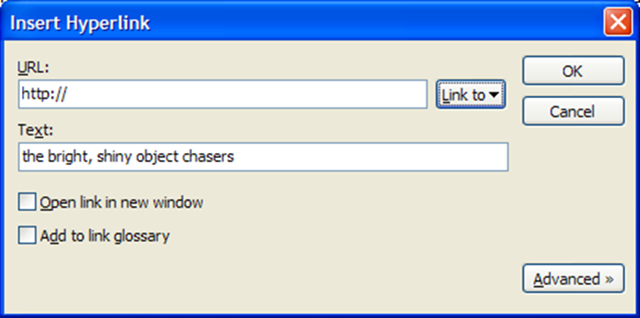
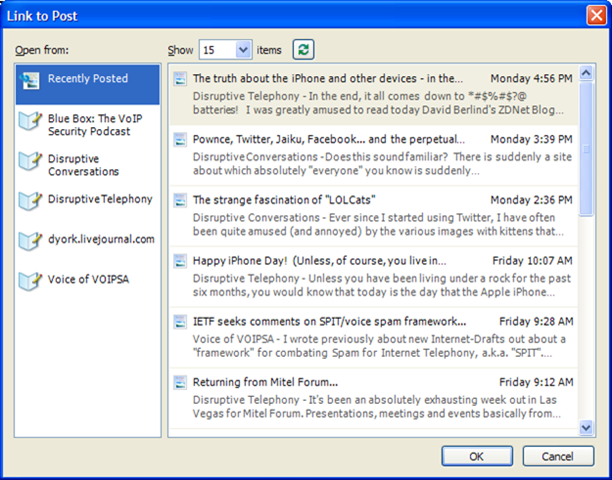
image So first up, I thought I’d mention the new capability to easily link to previous posts.  When you choose "Insert-> Hyperlink…" (or simply "Ctrl+K", which brings back old WordStar memories) you get the dialog box shown on the left (click for larger image) that allows you to enter the URL to link to and potentially edit the link text.  The cool part, though, is the "Link to" dropdown button which has as one of the two choices "Previous Posts".  If you choose that, you then see the dialog box shown on the right (click for larger image).

image In this window you see the recent posts you have made across all the blogs for which you use Windows Live Writer.  You can simply click on one of them and the link is automagically inserted for you.  Alternatively you can click on a blog title to see the posts to that specific blog. (The posts are retrieved from the blog itself so it does not matter whether they were written using WLW or through your blog web interface.)  If you want to go back in time, you don’t have an option to go back to a specific date (which my previous editor, Semagic, did) but you can see the last n posts, where n is 10, 15, 20, 25, 50, 100 or 500 and so you can scroll back that way.

All in all it’s pretty slick and has saved me already a great amount of time in linking to previous entries.  Given that I blog across multiple weblogs, the ability to link to entries in other blogs is definitely a great timesaver.  (Note that you need to have setup all the weblogs within WLW, which I have done for mine.)

If you haven’t checked it out (and are on Windows), do go to the Windows Live Writer Zone and download a copy. I think you might be impressed as to how well it can help you blog faster.