Category Archives: Blogging

MarsEdit is outstanding – but there is one reason why it doesn’t (yet) work for me for offline blog editing

200710041023After I asked in my last post about offline blog editors for the Mac, several people responded publicly and privately suggesting I check out MarsEdit, including the developer, Daniel Jalkut, who left this great comment. Naturally, I downloaded and tried it out – and I can see why people are saying great things about it. It’s a great offline editor.
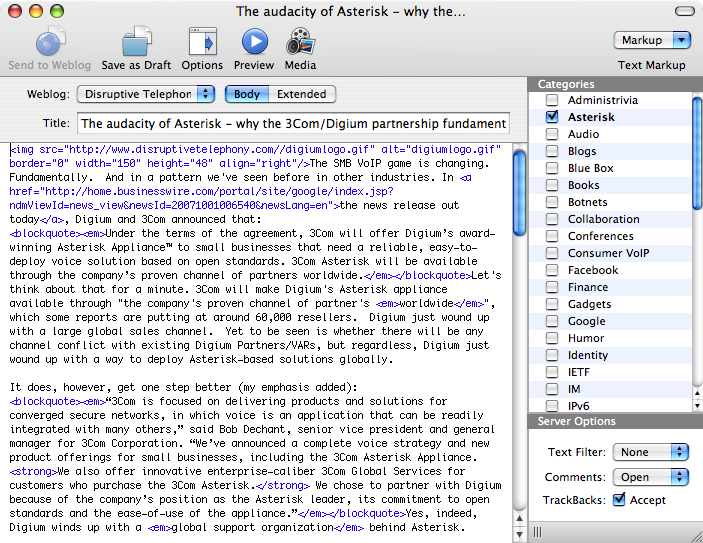
200710041050Makes it very simple to edit posts. Easy to use. Lots of macros. Tons of capabilities. Doesn’t do rich text editing like ecto or, on Windows, Windows Live Writer or Semagic, but it’s a solid offline text editor. If you aren’t using an offline editor and you’re on the Mac, I’d definitely encourage you to check MarsEdit out!

Unfortunately, unless I’m seriously missing something, it doesn’t work for me. For one simple reason:

Lack of support for pasting in images.

As readers know, I like to illustrate my posts with images. Specifically, and here’s the challenge – screen captures. However, what I don’t like to do is to save an image to a file, upload it, link to it, etc. That’s too slow. What I want to do is this:

1. Capture a part of the screen, typically either a region, or a window. On Windows I was using TechSmith’s awesome SnagIt program and on the Mac I’m using the built in capture utlity (Cmd+Shift+Ctrl+4 lets you capture a region or window and put it on your clipboard.

2. Click into the offline blog editor at the appropriate point and simply do a Paste.

Ta da… screen capture inside of blog entry. The blog editor automagically:

1) creates a thumbnail of the image at the location of your cursor;

2) creates a link to the larger image;

3) creates temporary files and filenames for both files; and

4) uploads all the files and creates the correct links when you hit “Publish”.

It’s magical. Drop in images, write your text, hit “Publish”… and you never have to worry about naming the files, uploading them, etc. The key for me also is… it’s FAST. I can just capture and write away.

Now, Microsoft’s Windows Live Writer still does this the best out of all the ones I’ve tried. Semagic also handles it well. And here on the Mac, ecto does it, albeit with the alignment issue that I mentioned in my previous post.

That’s a key requirement that I need to be able to post quickly. If I’m missing something in MarsEdit, I’d love to be clued into that. It seems that I have to save the file first in order to include it.
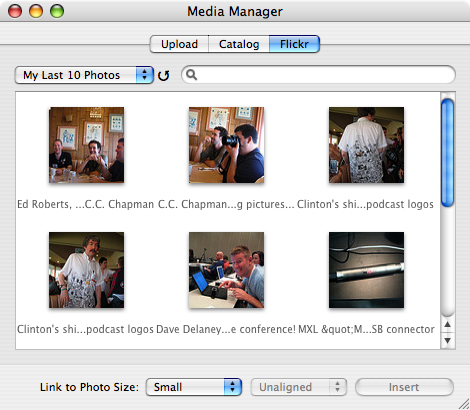
200710041111Having said all this, I should say that MarsEdit does have a VERY cool “Media Manager” component that let’s you easily link to your Flickr stream and also – and this is huge – a “catalog” of the images that you’ve used in your blog (since the time you started blogging with MarsEdit). The Flickr integration is awesome and for any blog entries where I want to use a Flickr photo, it’s a great benefit to be able to just pull in the image.

Likewise, the catalog is incredibly beneficial! Right now, I have all these various different images that I’ve screen captured and inserted into my blog entries. But if I want to link to one of those images again, I have to go find my blog entry where I use the image, right-click it and get the link, and then link to it in my new post… or… and this is usually faster… I have to re-capture the image which then results in more disk space being wasted in my TypePad account because I already have a similar image there. So this image catalog is excellent.

I just wish there was a way to paste in a screen capture! Add that in and I’d probably switch entirely. (This post was written in ecto so that I could include the screen captures.)

Outside of that, I definitely agree that MarsEdit is a great tool. If you don’t do screen captures, it’s a great one for you to consider for offline blogging.

Technorati Tags: , , , , , ,

What’s the best offline blog editor for the Mac? ecto? (and some issues I’ve had with ecto)

Mac users out there… what’s the best offline editor you have found for blogging? I’ve been using ecto for the past two weeks and started with it primarily only because I was familiar with it from the Windows side (where I’d actually moved to using Windows Live Writer almost exclusively). My trial period for ecto is winding down and so I have to decide whether to buy it or try something else. So I’m curious to ask you all:

If you are on a Mac, what do you use as an offline blog editor?

Are there other programs out there I should consider? I’ve actually been quite happy with ecto with only three smaller issues:

1. I like to include graphics at the beginning of my posts and like to right-align the images. If I put the image at the very beginning of a paragraph (which I often do with the first paragraph, but also may do so in the body of longer articles), the HTML code is initially like this:

<p><img …… align=”right”>….

And this usually works fine if I just write the entry in ecto and then immediately publish it. However, if I save the entry as a draft and then re-open it, or if I open up a published draft to edit it again, ecto automagically changes the HTML code to this:

<p style=”text-align:right”><img …… align=”right”>….

which, yes, indeed, right-justifies the TEXT of the paragraph. If I click in the paragraph and press the left-align button, it goes back to normal left alignment – until the next time I open it up. I have, however, forgotten to do so several times and wound up with right-aligned text. Clearly a bug and one I’ll be reporting to the ecto folks.

2. ecto does not support horizontal lines (<hr>) in its rich text editor and so if I want to use one (for instance, to separate an “UPDATE” piece of text from the main body) I have to switch to the HTML view – and remain in that view – or do the edit in TypePad’s web interface.

2007093006593. At least with TypePad blogs, it seems to set the time of the article to when I start writing it. However, when I go to publish the article, ecto does not seem to update the time. If I’m writing and immediately posting an article, the time it took to write the article is not necessarily a big deal, although it certainly could affect the placement of the article in sites like Technorati or other sites that list current articles (i.e. it will show up earlier than it actually was). However, when I work on a draft, save it and then come back to it a day or two later, I’ve been bitten several times by the fact that it posts with the original date… resulting in my “new” article not appearing at the top of the blog. I now have to remember to click the “Adjust Time” button before I go to post an article, which is something I really shouldn’t have to do. There should be some way to have it just automagically post with the current time. (And perhaps there’s an option here I’ve missed.)

Those are the only real issues I’ve had beyond the normal having to learn a new interface, new keyboard shortcuts, etc. Overall, I’m quite pleased with the editor. It’s worked well and unless someone can point me to something better I’ll probably pay to continue using it. I would, however, be curious to know:

What do YOU use for posting blog entries from your Mac?

Technorati Tags: , , , , , ,

This conference will be photographed and uploaded! (aka life in the always-on(line) world)

200709291047Being at a conference full of bloggers, podcasters, etc., one of the more subtle elements to be aware of is this:

There are a ton of people taking pictures – and uploading them all to Flickr!

Translation… just remember that whatever shirt you are wearing or however you style your hair – it will be up on the Internet for all to see. Forever. (Or at least as long as sites like Flickr are around.) Or if you are doing something funny with all those bottles of beer…. or dancing on the table… or whatever.

You will be photographed (especially if it’s funny). It will be uploaded. There you are. If you don’t like that… if you want to keep pictures like that off the Internet… well, you’re only real choice is to not attend a conference like this!

This conference will be photographed. Recorded. On audio. On video. And uploaded.

So it goes. You have been warned. Dress appropriately. Assume that anything you do could be online.

Welcome to life in the transparent always-online world.

By the way, if you want to see pictures from this show, the Podcast and New Media Expo, you can look at these links below. The tag the conference has been encouraging people to use is “newmediaexpo2007” but not everyone is using that. Here they are:

The last link is from C.C. Chapman, who is a great photographer among his many other talents. He took the picture I included above, which is of me and Terry Fallis of InsidePR fame.

Technorati Tags: , , , , ,

“Hi, my name is Dan. I am a screen shot addict.”

200709232007I had to laugh when I saw in my Facebook News Feed that several of my friends had joined a new Facebook group “I am a screen shot addict” (You must be a Facebook member to see the group). I laughed a bit more when I saw Betsy Weber’s blog post which in turn pointed me to the creator of the Facebook group, Bryan Eisenberg, and his post “Confessions of a Screen Shot Addict“.

You see, I am a screen shot addict. Always have been. Probably largely because I used to write a lot of courseware related to computer programs and so naturally I needed to illustrate those documents with screenshots. Now, I take screenshots galore for these blogs. I just like illustrating my articles with graphics… and screen shots are one of the best ways to do that.

On my Windows laptop, I was using TechSmith’s SnagIt and loving it. I was also using TechSmith’s Jing Project for quick screen shots that I wanted to reference in, typically, an IM conversation. Now that I’m on the Mac, I’ve got a wonderful built in utility (I love Shift+Ctrl+Cmd+4) and I’m also checking out Jing for the Mac.

So yes, I love screenshots… if you do, too, and are a Facebook user, feel free to “join the group“.

Technorati Tags: , , ,

Heading out to Podcast and New Media Expo next week…

200709211012I’m delighted to say that I’ll now definitely be at the Podcast and New Media Expo at the end of next week (and into the weekend) out in Ontario, California. I was debating whether or not to go because I’ll be at AstriCon the previous few days in Phoenix, Arizona. Originally I was intending to just do AstriCon, but I’ve changed my schedule a bit so that I’ll fly from Phoenix to Ontario, CA, on Thursday night so that I can participate in PME events on Friday through Sunday. Taking the good old red-eye home Sunday night.

I went to last year’s PME and very much enjoyed spending time with all the various podcasters and bloggers that I’ve come to know. Should be a good bit of fun this year as well, although my focus will be a wee bit different. One of the various new paths I’m very seriously considering is to head into consulting and may do more with social media work. I’ve already been advising several companies about podcasts, blogs, etc…. I may turn that into something more formal. So my trip to PME will be much more business-focused than last year… and I’ll be looking to talk to a number of folks about potential partnership opportunities. (Are you interested in potentially partnering with me? or engaging my services? Let’s talk. 😉

In any event, most of all it will simply be just plain fun to reconnect face-to-face with so many of the other members of the social media community whom I know now as friends!

If you read this and are going to be out at the PME, please do drop a line as I’m always interested to connect with folks.

Technorati Tags: , , ,

Why does the MacBook Pro camera give you a mirror image picture? (and a solution)

I have to blame Chris Brogan. Some time back he had a picture in his left sidebar of him with some other people, and in that picture, his hair was parted on his right. However, above that, he had a picture in his banner with his hair parted on his left (as you can see in his banner now). Other pictures he put in his header were also different from his left sidebar picture. Now, realizing that people do change their hair parts, I asked him this when we were in the middle of some other other conversation. His answer was something like this:

No, the issue is that the MacBook camera reverses the image.

So naturally when I bought a MacBook Pro, one of the things I did check out was the camera and it’s image. Sure enough, it gives you a mirror image. For instance, here’s the picture I just recorded in a Facebook video:

200709182352

Note that my hair is parted on my right. Now, if you were to see me, or take a digital picture of me, you would see that my hair is normally parted on my left:

200709182354

So this latter one is a more accurate representation of how I look.

Now, the issue with hair parts is not really a huge deal (at least to me), but where this gets more of an issue is with words. For instance, here’s some piece of advertising in my hotel room, shot through the normal MacBook Pro camera:

200709190010

Do we see a problem here? In fact, the image should really be:

200709190012

How did I correct the image? Well, it turns out that there’s a great little piece of software from ecamm network called (of course) iGlasses. For $9.95 you can download this little piece of software that will work with iChat, Photo Booth, Skype and pretty much any other Mac apps that work with the embedded camera. (Except, I discovered, for Facebook video, which seems to use some Flash applet that doesn’t appear to make use of iGlasses.) Here’s the control panel:

200709190017

Note the nice little check box at the bottom for “Mirror”. Ta da… words read correctly (and hair is parted correctly :-).

Now the question for me is why this isn’t something that Apple can just do automagically inside their software? Who at Apple decided that we ought to see mirror images through the camera? Very bizarre to me that they would make that choice. Hopefully sometime they’ll fix it.

In the meantime, I’ve paid my $10 and can show my image correctly (outside of Facebook video).

Technorati Tags: , , , , ,

Offline blogging with ecto on a Mac

200709171332One of the immediate challenges with moving over to a Mac was the fact that I needed an offline editor for blogging. As readers know, on my Windows PC, I’ve been a huge fan of Windows Live Writer, but obviously that doesn’t work natively on the Mac. My next thought was to use Parallels in Coherence mode to use WLW, and I may still ultimately do that, but right now I need to get XP running on Parallels first. And meanwhile I want to blog!

So I went back to a tool I used to use on Windows, before I become a fan of WLW….. ecto.

I have to say that I was immediately impressed by the fact that it went to TypePad and brought over the settings for all my weblogs. With WLW, I had to add each weblog individually. This was much nicer. Now I’ll start putting it through its paces.

Technorati Tags: , , ,

Version of Windows Live Writer now available for a U3 USB drive

image Courtesy of a tip from Neville Hobson, I learned that Scott Kingery at “TechLifeBlogged” has released a version of Windows Live Writer that works off of a USB drive.   As Scott writes:

This past February I posted a launcher for Windows Live Writer so that you can take it with your between computers and retain all your settings. Today I am releasing version 2.0 of the Launcher. Much has changed with Windows Live Writer and I have learned some new techniques for making it portable. This is a much cleaner implementation and it plays better with Windows Vista.

I don’t personally have a real need to be able to do this, but I do think it’s a cool idea.  I like the idea of being able to use WLW on any given machine.  Fun stuff!

My first launch of Windows Live Writer Beta 3 leaves a bad taste in my mouth… I have to re-add all my weblogs!

As I mentioned recently, it seemed like a new version of Windows Live Writer was imminent, and indeed, on Wednesday Microsoft released Windows Live Writer Beta 3 (I would have written about it then, but I was a wee bit distracted). You could download it from that announcement page for from the main Windows Live Writer page.  Reading Joe Cheng’s blog post about the release, it sounded interesting so of course I downloaded and installed it.

The first annoyance was that it’s now integrated into the full "Windows Live" installer and so when you go to install Windows Live Writer, the installer will also by default install a bunch of other Windows Live apps, ranging from Messenger to Mail to a search Toolbar and a "family safety" option.  Now, you can thankfully de-select all of these options and simply install WLW, but it’s something you have to pay attention to.  I understand Microsoft’s motivation.  They want to make it easy for people to install all  the Live apps, and they see it as a way to "upsell" people on the other apps (which are all free).  Get people hooked on their apps and search versus those of Google.  I do understand… and I can’t really complain because MS is giving us the really incredibly useful Windows Live Writer tool for free.  Still, it was slightly annoying that I had to un-check all those boxes just to get WLW.  (But yes, a small price to pay for WLW.)

The major annoyance, though, was the screen that greeted me when I launched it (once I found it!  My old QuickLaunch icon no longer worked and I had to sort through my Programs menu until I finally found it under the "Windows Live" sub-menu…).  The screen prompted me to start using WLW by adding a weblog! Huh?  What happened to the six weblogs that I already had configured WLW to work with?

Gone.

All the configuration data seems to be gone.  All my weblogs were no longer configured in WLW.  Now, this probably had something to do with the changes to registry locations mentioned in a recent WriterZone blog post.  Still, it was a rather unexpected and definitely annoying outcome of doing what I thought of as an upgrade!  (And yes, I realize it is "Beta 3", but I’m sorry, I would have expected an upgrade to pull across config info.)

Now, the process of adding a weblog is relatively trivial.  Just go to Weblog -> Add Weblog… , fill out the blog URL, username and password, confirm the results and you’re done.  Maybe a minute to do it.  Still… it was an unexpected step to have to take.

The good news is that all my drafts still seem intact (even all those drafts for weblogs which are no longer added to WLW), and the couple of plugins I use seem to still be there… so I seem to be set to go.  Now, maybe I can check out the new features

Is a new version of Windows Live Writer set to appear this week?

 Hmmm…. first this note in the Writer Zone on August 29th:

In an upcoming release of Windows Live Writer, we are…

and then Mary Jo Foley writes in ZDNet yesterday “Microsoft to unveil Windows Live suite this week“:

The Times is unclear whether Windows Live Writer is in there, too. But it looks like it might be.

pointing to a New York Times article out on Sunday that says this:

The release, though it includes the Windows Live Writer blogging application, carefully avoids cannibalizing two of Microsoft’s mainstays, the Word and Excel programs.

(which would seem to me to be NOT “unclear” about WLW!)

All in all, this would seem to point to an impending release. Perhaps even the “1.0” release??   We’ll see….