Category Archives: Design

Yikes! My new blog format doesn’t work with IE 6!

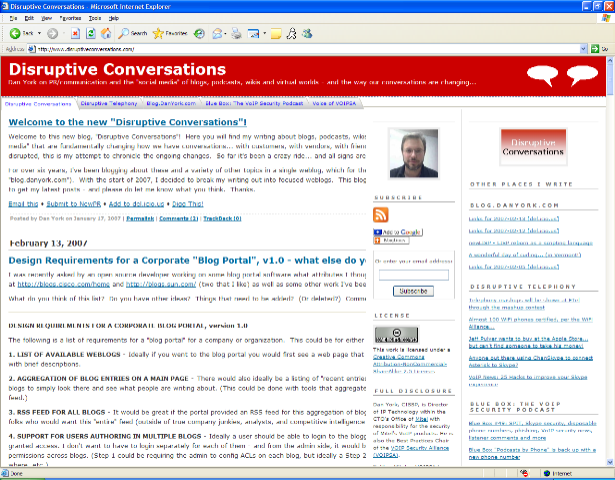
 A colleague called me this morning to tell me that he was only seeing half my text on this blog and that it was getting cut off by the right two columns.  I checked in both IE and Firefox on my own systems and, finding everything looking fine, asked if he had refreshed/reloaded.  He had, but the issue turned out to be… he’s still using IE6!  And, sure enough, when I found that IE6 was still on another PC at home and opened this site myself… yes, indeed, it was all cut off (as seen in the picture on the right).  IE6 loads the main column in first, and so you see the text going all the way across the page…. but then the two right columns overlay on top!  Cutting off the text below for the length of the sidebar columns.  As you scroll down the page, the sidebars eventually stop and you can see the text.

So… it looks like something funky is going on with IE6 and all the TypePad CSS and templates that I’m using to make this site (and Disruptive Telephony) have the look they do.  Now, granted, Microsoft is more or less forcing folks to move to IE7, but there still may be many pockets (like companies with non-IE7-compatible web apps) where they still have IE6.  So for them… these sites of mine aren’t working for those readers.

Well, I guess I’ll just have to try to find some time to muck around with the TypePad Advanced Templates again…

Technorati tags: , , ,

Design Requirements for a Corporate "Blog Portal", v1.0 – what else do you think should be there?

I was recently asked by an open source developer working on some blog portal software what attributes I thought a corporate "blog portal" should have.  Thinking about what I’ve seen at http://blogs.cisco.com/home and http://blogs.sun.com/ (two that I like) as well as some other work I’ve been doing, I came up with this list.

What do you think of this list?  Do you have other ideas?  Things that need to be added?  (Or deleted?)  Comments are welcome.


DESIGN REQUIREMENTS FOR A CORPORATE BLOG PORTAL, version 1.0

The following is a list of requirements for a "blog portal" for a company or organization.  This could be for either an internal or external (i.e. public) blog portal.

1. LIST OF AVAILABLE WEBLOGS – Ideally if you went to the blog portal you would first see a web page that listed all the various weblogs that are hosted on the website, complete with brief descriptions.

2. AGGREGATION OF BLOG ENTRIES ON A MAIN PAGE – There would also ideally be a listing of "recent entries" across all blogs. This would allow someone unfamiliar with different blogs to simply look there and see what people are writing about. (This could be done with tools that aggregate RSS feeds and display an HTML’ized version of the resulting mashup feed.) 

3. RSS FEED FOR ALL BLOGS – It would be great if the portal provided an RSS feed for this aggregation of blog entries. Think of it as the "everything" feed. There might not be many folks who would want this "entire" feed (outside of true company junkies, analysts, and competitive intelligence staff at competitors) 

4. SUPPORT FOR USERS AUTHORING IN MULTIPLE BLOGS – Ideally a user should be able to login to the blogging platform and then contribute to whichever blogs they have been granted access. I don’t want to have to login separately for each of them – and from the admin side, it would be nice if there was an interface that made it easy for the admin to set permissions across blogs. (Step 1 could be requiring the admin to config ACLs on each blog, but ideally a Step 2 would centralize that into an interface that shows who can write where, etc.) 

5. SEARCH ACROSS ALL BLOGS – On that same "main page" that lists all blogs on the platform, there should also be a Search box that allows you to search across all blogs for any entries in any weblogs that have the search words/phrase. Another search box (or the ability to use the same one with an option) for "tags" or "categories" would be a bonus. 

6. PRIVACY/PASSWORDS – However, there should also probably be the ability for a weblog author to "opt out" of the cross-blog search and appearance on the main page. Similarly, I could see the use in the ability to restrict access to *viewing* the weblog (and/or subscribing to its feed) to specific users. There could be a blog with content that is ideally only for executives, for instance. To me this is a lower priority because I think the greater value is in sharing information widely… private information can still be kept in email or on a specific hard drive. Still, I could see it being a request at some point. 

7. STATISTICS – Everyone loves stats and at some point champions of a blogging project will be asked how it is going. Anything that can give overall stats, typical web stats like number of page views, etc., but also more blogging-specific things like total number of posts, average number of posts per day/week/month, total number of comments, average number of comments per day/week/month, avg number of comments per post, subscribers to RSS feed (which I grant is tough to discern), number of posts in last day/week/month, etc.. If the portal was for external blogs, you could get fancier and give stats on number of trackbacks, external links, etc. Overall summary stats would be great, but also stats for individual blogs. Ideally even a page that compared all hosted blogs in those stats. This would enable the champions of the blogging program to see which blogs might be doing exceptionally well, which might be struggling and indeed which have stopped – without having to visit all the individual blogs. Bonus if the software generates nice pretty charts that can be used as eye candy in powerpoint presentations.

8. DESIGN INTEGRATION WITH MAIN WEBSITE – It probably doesn’t need to be said, but a company is going to want to integrate this with the rest of their corporate website, so there needs to be the ability for the web design to be modified, customized, etc. to seamlessly fit in with the rest of the enterprise web site. So full ability to modify CSS, change headers, footers, graphics, etc., etc.


New hack to TypePad – putting a graphic on right side of the heading banner…

Extremely astute observers of this blog – who happen to be visiting the web page versus reading it via RSS – will notice that the banner at the top of the page changed a wee bit over the weekend.  Over at the right side there are now two “conversation balloons” a la comic strips.  (Refresh your browser if you don’t see them.)  This was part of the vision of my original “blog split-up” back in January.  Each of the blogs (well, currently only this one and Disruptive Telephony, but I’ve probably got another in the queue) has a unique color for the banner but I also wanted a unique graphic. 

However – and this was a key point – I wanted the blog width to be “fluid” and the text to expand to the size of the browser window.  This naturally ruled out any fixed-size banner images and I knew that I was going to have to use CSS or something like that.  The answer appeared the other week when I noticed what a web designer was doing to change the format of an internal blog we are developing.  The code was really exceedingly trivial:

<div style="float:right;"><img src="imagename" align=left alt="somealttext"></div>

Now I also added a “margin-top:2px;” into the style attribute to move the image down a little bit, and you could also turn the image into a link if you wanted to. 

So now the trick is simply to put this into the right place in your TypePad templates.  As I mentioned previously, I used a “menu bar hack” from TypePadHacks.org to get the menu bar you see across the top of the page.  Because of that, I’m already deep inside TypePad’s “Advanced Templates” and already have a customized “banner-header” template.  I just inserted this one line (filled in with names, of course) into that template, republished the site and… ta da… I’ve got a graphic on the right side of my banner.  Well, I also had to create the image as a transparent GIF, but that’s a minor detail.  You’ll see I also have this over on Disruptive Telephony, although I’m probably going to change the image because I’m not sure that the white phone as I have it there is overly compelling or useful.  Need something a bit larger and more interesting… although I’m not sure exactly what.  For the record, I found that the images that worked best were about 50 pixels high.  (Larger images forced the banner to be thicker, and that’s not what I want.)

At some point when I have the time, I’ll write it up for John Unger’s TypePadHacks website.  I’d like to write up a bit more info about how to get the “banner-header” template if you don’t already have it.  Anyway, if you play with it, have fun…

Technorati tags: , , , ,

Multi-touch, the "next" computer user interface… and why can’t we have "Minority Report" now… why am I stuck using a mouse?

Why are we stuck using a keyboard and a mouse?  Why is the dominant paradigm for our computing?  Why can’t we do things another way… perhaps like Tom Cruise’s character did in the movie “Minority Report?”

Well, for some time now I’ve wanted to post about the demonstration done at TED 2006 by Jeff Han of a NY university.. the video is just far too interesting.  But then along comes Jeff Pulver yesterday pointing to this video:

It seems that this new company, Perception Pixel, is founded by none other than Jeff Han of the TED demo! Pretty cool stuff. (Do check out the video of the TED demo as well.)  Now it’s just a question of when we might ever see this type of thing actually available…   I’d like one.  I’d far rather just be using my fingers to point then using the mouse.  And for typing… well, why not have the keyboard popup where you want it to be on the screen?  With large enough screens, you could have several keyboards. I don’t know… maybe the ergonomics aren’t good enough.

Anyway, it’s good to see this kind of R&D going on… and hopefully we can see it out in the commercial world some year soon.

TypePad Hacks gives me "Applied Hacking Award" for blog redesign…

Last week, John Unger over at TypePadHacks.org dropped me a note to let me know that I was given an “AHA” award for my blog redesign.  It actually mentions “Disruptive Telephony“, but I’ll note the award here since this blog shares the same design and I write about blogging here.  He notes my use of the three-column hack and also the menu bar hack.  I do definitely appreciate the notice and feedback, so thanks, John, but I’ll really say thanks back to John and all the other members of the TypePad Hacks community who have put together the various “hacks”.  The site does make it very easy for someone to learn how to tweak their blog in different ways.  I’ve learned a good bit from the site and have more ideas for things I’ll do to these blogs once I can find some more of that mythical thing called free time…

P.S. Also check out the “landing page” of the other award winner, David Alexander. It’s nicely done and something I’ve been thinking about doing with another page (Hint… you’ll notice that I’m missing an “About” link here.  Stay tuned…)

CSS , navbars and browser compatibility (aka why does it look so bad in MSIE 7?)

Odds are, if you are looking at this page today in Firefox, you’re seeing a nice little horizontal navigation bar at the top of the page underneath the banner.  If you are looking at this page today in IE7… well… you are probably wondering what navigation bar I am talking about!

You see… I’m experimenting with a navigation bar at the top of the page just underneath the banner so that as I move from a single blog into a network of topic-specific blogs, I’d like readers (and myself) to be able to easily move between them.  Armed with the excellent tutorial over on Typepadhacks.org, I’ve been experimenting with TypePad’s advanced templates.  If you look over at the top of Disruptive Telephony, you’ll see that I’m using the “Overlapping horizontal tabs” style found at the excellent DynamicDrive CSS Library.  It’s all done with Cascading Style Sheets (CSS) and a few little images.  Pretty fun stuff.

However, I thought that I’d try another style as well to see how it works.  So I tried the “Shade Image” style for comparison.  The result, in Firefox, is quite nice (click for a larger image):

However, if you take a look at it in Internet Explorer (I’ve now tried either IE6 or IE7), you get this:

Not exactly what we’re looking for!  Now, the “overlapping horizontal tabs” menu looks okay in IE, although the horizontal line annoyingly doesn’t line up with the bottom of the tabs, so that may be the one I use for the other blogs – or I may try some of the other styles.

I do like the “Slanted Divider” menu and the “Chrome” menu bar isn’t bad either, but neither of those shows you visibly which blog you are on.  That’s what I liked about these other two – it was very easy to see which menu choice you are on.

Just too bad that the CSS for that menu bar works so nicely in Firefox looks so poor in MSIE!