Category Archives: Tools

FriendFeed Finally Fades… Farewell!

FriendfeedFarewell, FriendFeed! Goodbye! Ever since Facebook acquired Friendfeed back in 2009 we wondered what its fate would be… now we know. This past Monday, March 9. 2015, the FriendFeed team posted a simple note that said in part:

We wanted to let you know that FriendFeed will be shutting down soon. We’ve been maintaining the service since we joined Facebook five years ago, but the number of people using FriendFeed has been steadily declining and the community is now just a fraction of what it once was. Given this, we’ve decided that it’s time to start winding things down.

Beginning today, we will no longer accept new signups. You will be able to view your posts, messages, and photos until April 9th. On April 9th, we’ll be shutting down FriendFeed and it will no longer be available.

I saw some reminiscing on Hacker News and within FriendFeed itself… but I think we all knew this day was coming.

Before today I hadn’t logged into the site for quite a long time. I only have recent content posted there due to the fact that TypePad is still set to post articles (such as this one) over to FriendFeed. But for most of us the conversations left the site… off to other venues and places. (But I’ve seen that there are still some very strong communities that have been thriving within FriendFeed to this day.)

FriendFeed was remarkable to me at the time for it’s ability to aggregate feeds of all sorts of different services into one place. For quite some time http://friendfeed.com/danyork was the link I gave people to find “all of my writing in one place“. Sometime after the Facebook acquisition I realized it may not be around and so I wound up building my own aggregation site – http://danyork.me/ – but it was FriendFeed that first brought that idea to me.

It was also a great place for group discussions. For quite some time it was the home of the For Immediate Release (FIR) podcast listener community and we would all discuss episodes and other topics there. That’s all moved to the FIR Community on Google+ … which hopefully will last a bit longer! 🙂

The Wikipedia entry on FriendFeed has some good background. It was a great service back in its prime!

Farewell, FriendFeed!

P.S. If you’d like to export your data out of FriendFeed, there is a script available from Claudio Cicali on Github that may help.


An audio commentary is available:

Google Says Make Your Site Mobile-Friendly By April 21 – Or Drop In Search Results

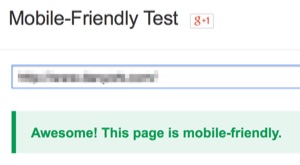
Mobile friendly testIs your website "mobile-friendly"? Does it display nicely on a mobile device such as an iPhone, iPad, Android or other smart phone? If not, you have until April 21 to make it mobile-friendly… or you will suffer a drop in Google search results!
In a February 26 post on Google's Webmaster Central Blog, Google very clearly indicated their direction (my emphasis added):

Starting April 21, we will be expanding our use of mobile-friendliness as a ranking signal. This change will affect mobile searches in all languages worldwide and will have a significant impact in our search results. Consequently, users will find it easier to get relevant, high quality search results that are optimized for their devices.

Google does not often clearly state what signals it uses for ranking search results… but here they are.

Get "mobile-friendly" … or drop in search ranking for mobile searches!

This last point is important – they say the mobile-friendly status will be used as a ranking status for mobile searches. I interpret this to mean that if your site is not mobile-friendly you might still rank highly in searches from regular computers/laptops/desktops, but your ranking would decrease in searches from mobile devices.

However, given how many people are now using mobile devices to access the Internet… and how that trend continues to increase over time… NOT having a mobile-friendly site is going to impact people being able to get to your site.

UPDATE: I also recorded an audio podcast, "FIR On Technology, Episode 4 – How To Make Your Website Mobile-Friendly" about this topic. More information and links can be found on that page.

Tools To Help

To help with the transition to a mobile-friendly web, Google has provided several tools. First, they have a "Mobile-Friendly Test" tool at:

https://www.google.com/webmasters/tools/mobile-friendly/

It will analyze your site and tell you if you are "mobile-friendly" in Google's view (which is presumably what they will use in the ranking signals).

Second, Google has a guide to creating mobile-friendly websites at:

https://developers.google.com/webmasters/mobile-sites/get-started/

A key section here is:

where they explain options you have to make your site mobile-friendly.

Moving To A New Theme

In some cases, such as this Disruptive Conversations site that is still hosted on TypePad, my only choice is to move to a new "theme" that uses "responsive design". I've already done this with danyork.com, but haven't yet done that here (but I will before April 21). This can be a larger process if you want to continue to use your existing style and design.

With other content management systems (CMSs) such as WordPress, Drupal and Joomla, you can also move to mobile-friendly themes as there are many available. When I've been creating new sites on WordPress in the past year or two I've made sure that all the themes I've been using have had "responsive design" as one of their attributes.

Using A Plugin

With some of the CMSs, there may be plugins that can help you make your site mobile-friendly without changing the theme. For instance, with WordPress, there are two that I've used to make sites mobile-friendly:

Both of those plugins essentially provide a responsive-design theme that gets used for your site when a mobile device connects to your site. You may not have all the design capabilities that you would have in having your main theme be responsive (in terms of having the mobile theme look like your main theme), but these plugins provide a quick way to get your site to be "mobile-friendly".

Other CMSs may have similar plugins, modules or extensions – you need to check with your CMS. Google's guide has links to help you get started.

Other Options

If you don't use a CMS or your CMS doesn't offer mobile-friendly themes or plugins… well… you may want to consider moving to a CMS that offers such capabilities (although that can be a huge task). Or you can read up on the principles of "responsive design" and see what you can apply to your website.

Getting To A Mobile-Friendly Web

The end result out of all of this will be a mobile-friendly web… and as all the millions and billions of new users come on to the Internet odds are pretty good that they will be using mobile devices, so the good news is that your content will be readily accessible on all those devices.

The bad news is that you may have some work to do between now and April 21 if you haven't already made your site mobile-friendly. (Well, assuming you care about ranking highly in Google search results – but if you are reading this site you probably do!)

If you've needed a deadline to make this happen… here it is!

Get mobile-friendly by April 21… or watch your Google search ranking drop!


An audio commentary on this topic is available:


Discuss this post:


Suggestions For An Editorial Calendar Tool/Service? (For Content Strategy)

Editorial calendarWhat kind of tools or services have you found most useful for maintaining an “editorial calendar” for the content creation your organization does? What have you found helps you best plan out your content strategy?
For the last 3.5 years at the Internet Society, I’ve been using the insanely awesome EditFlow plugin for WordPress to plan out the content we’ve been creating on our Deploy360 website. EditFlow is an amazing amount of awesomeness bundled into one plugin… and if you use WordPress and aren’t yet using EditFlow, I’d strongly recommend you check it out!

But here’s the thing – in my new role within the Internet Society looking at content strategy across all our different sites and channels, I need a tool that lets our team plan:

  • content across several different websites we maintain
  • content on external websites (ex. CircleID)
  • content in social channels
  • different types of content (ex. blog posts, articles, videos)

Unfortunately I can’t easily do this within WordPress. Yes, I could create a dummy “site” on a WordPress server and then use EditFlow as a tracking tool… but that would be a bit of the proverbial square-peg-in-round-hole.

Here’s what I love about EditFlow and use on a daily basis:

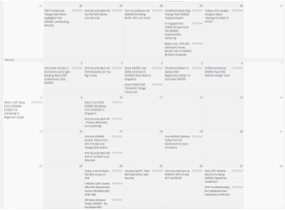
  • Convenient calendar view – with filters – I can just go into Dashboard -> Calendar and I’ve immediately go a view into everything we’ve published and everything we have planned. I can filter the view to see only items based on:
    • Status (ex. published, draft, idea)
    • Category (topic)
    • Author
    • Post type (ex. blog post, resource page)
  • Drag-and-drop re-ordering – One of the single biggest features we’ll use is the ability to just drag unpublished content around in the calendar view. When we have our weekly editorial calendar meetings, we will look at what is being planned and just move things around if we need to do. Super simple and easy.
  • Fast creation of new ideas – In those meetings as we talk about what content we want to create, we can just click a “+” button and add a new story idea directly into the calendar interface. (In the background it creates a draft WordPress post scheduled for the relevant day.)
  • Easy deletion of content – Similarly, if we decide to cancel an idea, we can just trash it from the calendar.
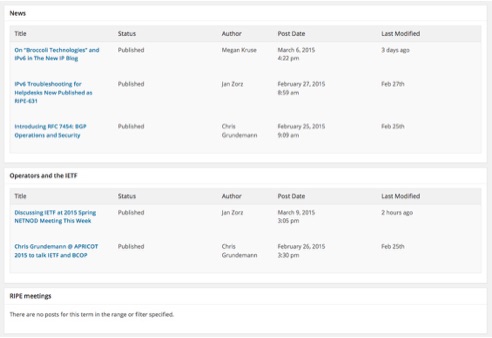
  • Story Budget – EditFlow also has another view that it calls the “Story Budget” where I can easily see over a given time period how many pieces of content were created for any given category. On a site where we write about many different topics, this is an easy way to see how balanced we are across the different topics. Similar to the calendar view there are many ways to filter the view.

    Storybudget

  • Multi-user – EditFlow works well because we can give access to as many people as we want (and you can control who has access) – they just need to have an account on our WordPress server. Our team simply logs into the server from wherever they are in the world and we walk through what we have planned for the week. After we move items or create new items, people need to refresh their browser view – but that’s it. It works really, really well.

Now, we don’t even use the editorial comments, editorial metadata, notifications and user groups that are part of EditFlow. Our Deploy360 team is small enough (4 people) that we haven’t yet really needed those capabilities.

But now I’m looking for something with those kind of capabilities that can be used by our larger Communications team and also other people across the organization. I’m NOT necessarily looking for something that will connect to our various publishing platforms. I’m okay if there is simply a way to check off that an item has been published.

Any suggestions or ideas? Some searching around online has shown me DivvyHQ, which is a hosted service that looks from the YouTube videos like it will meet many of what I’ve listed above. (Not sure about the “categories”… but I think that may fit into their “calendars”.)

Other suggestions for hosted services? Suggestions for software we’d host ourselves?

(Thanks in advance – and I’ll plan to summarize what I learn in a future post.)


View a discussion on this topic at:


Suggestions So Far


UPDATE: I’d also love it if the service/tool had some of the kinds of content creation statistics I wrote about desiring earlier.


How To Turn Off Sounds In The Facebook iPhone / iPad App

Do you want to turn off / disable the sounds that Facebook just added to the latest version of their iOS app for iPhone and iPad? If you are like me and find these kind of sounds associated with actions (such as “keyboard clicks”) annoying, here’s what you need to do.

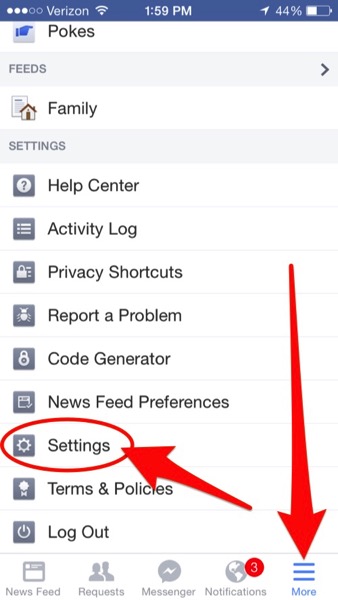
1. Go Into The Settings Inside The App – First you need to tap on “More” in the lower right corner of the app and then tap on “Settings”:

Facebook ios settings

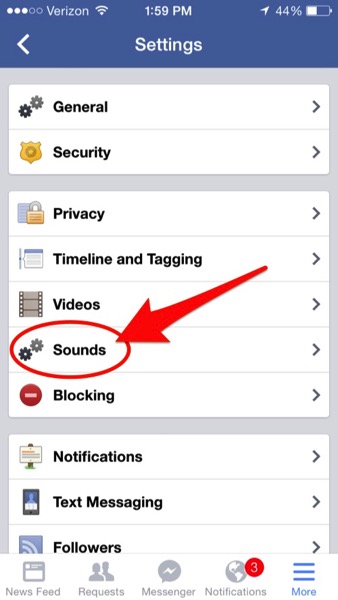
2. Go Into “Sounds” – Next tap on “Sounds”:

Facebook ios sounds setting

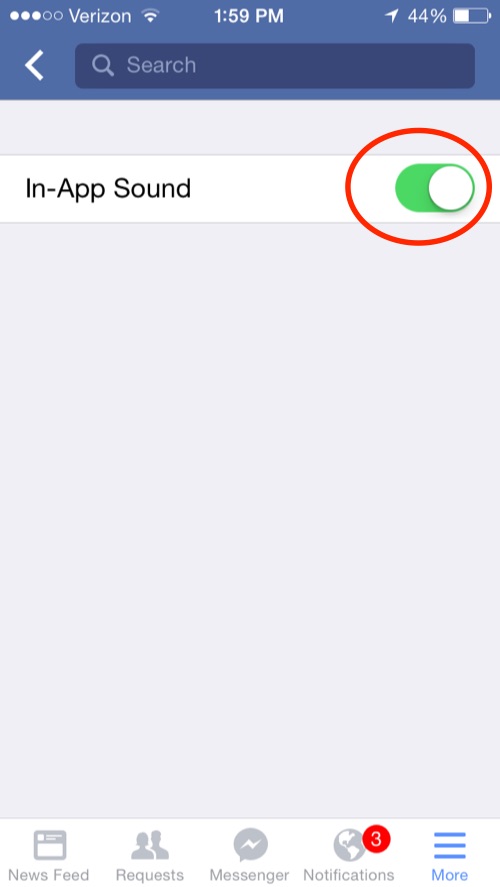
3. Turn Off “In-App Sound” – Finally, just tap the slider to turn off the sounds.

Facebook in app sound

Now, maybe you like these kind of sounds… but I personally don’t. I’m the guy who turns off “keyboard clicks” because I do NOT want to hear a sound whenever I tap a key.

I don’t want aural feedback.

Some of you may… and that’s fine. I don’t.

Someone at Facebook seemed to think that we all wanted this and so they added it in to one of the recent releases and… ta da… as soon as we updated the Facebook app on our iPhone or iPad we started getting clicks and swishes and other sounds.

This points to one of the larger issues with our new world of mobile “apps”:

We are at the mercy of whatever the app developer wants to do.

If this were a browser-based “app” (a set of web pages), we could typically configure the browser to not play any sounds – and then all web pages would be subject to the settings in the web browser.

But we’ve left that land where the web browser serves as our window to content. Instead we have custom-designed apps where we have to figure out where the settings are in each of the different apps.

For instance, when the sounds first started in the Facebook app, I went into the generic “Settings” app in iOS to try to find out how to turn them off. I looked under:

  • Facebook
  • Sounds
  • Notifications

and couldn’t any settings in any of those places to turn it off. Only then did I tap on the “More” inside the Facebook app to see if there were any settings there.

Now… the good news is that at least Facebook gave us a control to turn the sounds off! They didn’t have to and could have just made that a mandated part of the app.

But that’s back to the point… for the convenience and simplicity of using a mobile app, we’ve surrendered control to the whims of the application developers.

I’m personally not really thrilled about that evolution of the mobile Internet, but it’s hard to see how we walk back to a different path…


An audio commentary on this topic is also available:


If you found this post interesting or useful, please consider either:


Anyone Else Having TweetDeck Not Show Search Results?

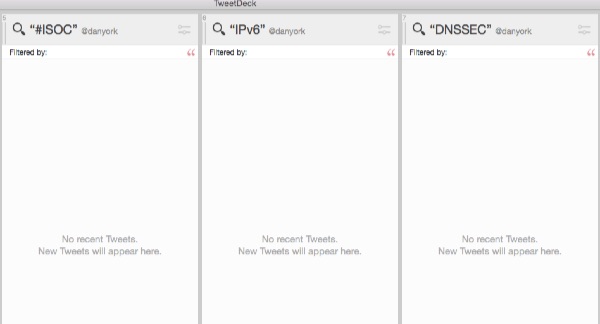
Anyone having trouble with TweetDeck not showing results for some columns? Today 5 of my 12 columns are failing to load with this error:

No recent Tweets.
New Tweets will appear here.

You can see part of what I’m seeing here:

TweetDeck NorecentTweets

They are all columns that are configured to show search results for certain terms. They’ve been working wonderfully until last night when I opened up TweetDeck on a home computer (an iMac) after being away for a week. I’ve tried:

  • Closing and restarting the application (multiple times).
  • Changing the search query to trigger a reload of the column.

Nothing works… and I know there are new tweets to show for some terms, in part because I can see them in other working columns… and in part because I have sent out tweets using the search terms.

TweetDeck’s Twitter account shows some issues with logging in, but that works fine for me. Tweetdeck is working fine for sending tweets, sending direct messages and for some of my searches… but just not for others.

I’ve tweeted TweetDeck asking about this, but not heard anything yet, so I’m just curious if others are experiencing anything like this.

Anyone?

P.S. And yes, I know there are now many other tools… but I’ve been a TweetDeck user since its very early days and have my searches and systems that, until today, have worked wonderfully for me.


If you found this post interesting or useful, please consider either:


Is It Finally Time To Dump Feedburner? All Subscriptions Go To Zero…

Is it finally time to suck it up and dump Google’s Feedburner for RSS feeds?

The writing has been on the wall for quite a long time that Google doesn’t really care about Feedburner. There haven’t been any substantive updates to the service in years and in fact they’ve removed services and integrations.

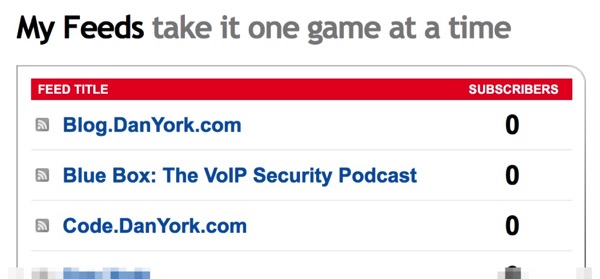
Tonight Dave Delaney posted an update to Facebook that let us know that Feedburner’s stats were now showing 0 subscribers for all his feeds. I logged in and sure enough…

My Feeds

I can’t find any mention of an outage or issue on Google’s pages… and so we have no clue whether this is a temporary transient outage – or whether this is a sign of a further decline in Feedburner’s service.

I’m one who has continued using Feedburner for most of my sites, in part just out of sheer inertia (i.e. having many other things I want to do that take higher priority to fixing things that aren’t broken) but also because I’ve liked the service provided by Feedburner, particularly around statistics. I’ve tried other services (although not in the last year) and hadn’t really found anything that gave as good a view into who is probably reading your feed.

Obviously I can just start promoting the raw RSS feeds that are the ones I added to Feedburner… but they don’t give a sense of how many subscribers they may be.

But if the statistics are no longer working, then perhaps there is no longer a reason to stay at Feedburner… and so maybe I do have to actually make the time to make the move.

What do you all think? If you used to use Feedburner and don’t, what are you using as a replacement?


If you found this post interesting or useful, please consider either:


FIR On Technology Episode 3 – Understanding Markdown

Firontechnology 300What is the Markdown language all about? How is it being used on sites like Ello, Github and in the Jetpack plugin for WordPress? Why should communicators and others involved in PR or marketing careabout Markdown? How can it help more rapidly create content for the web?

Those are all questions I sought to answer in episode 3 of FIR On Technology with Dan York that I published last Friday. The podcast is now available for listening directly on the FIR website or in iTunes or the podcast RSS feeds.

On the episode web page I also provided a list of links for people wanting to know more about Markdown, which I’m reprinting here: 

I’ve found using Markdown to be extremely helpful in rapid content creation. I’ve naturally been using it on Ello (where I also wrote about this FIR On Technology episode) and on Github, but I’m also starting to use it for some posts on a couple of my WordPress sites courtesy of the Jetpack plugin. As I note in the episode, Markdown is not something necessarily new… after all it first came out in 2004… but it has seemed to attract more interest in recent years.

One point I forgot to make in the episode is that Markdown is not the only “lightweight markup language” out there. There are definitely other similar languages, each with their own take on how to make markup simple. An example I’ve used on several sites in the past is Textile. However, my interest these days has been in Markdown, and there seems to be a good bit of momentum behind the language… and so hence this podcast.

Anyway… I hope you find it useful and helpful. If you do, or if you have other comments or ideas or suggestions about Markdown, please do leave a comment here – or over in the FIR Podcast Community on Google+.

Enjoy!


P.S. I also recorded a The Dan York Report episode providing a preview of this FIR On Technology episode:


If you found this post interesting or useful, please consider either:


Excellent Article on Medium About Podcasting Stats: Downloads, Listens and Listeners

Podcasting statsWhat do the number of podcast downloads, listens and listeners really mean? Which statistics can you really believe? And what do they mean?
Back on December 12, Pete Davis published a great article on Medium titled “Downloads, listens, listeners, and about those podcast numbers” that dives into all these different stats. Davies was reacting to the hype over the podcast “Serial” and wanting to make sure people understood some of the nuances of how you can measure podcasts.

As he points out, the number of people downloading an episode can be very different from the total number of downloaded episodes. One person, who we will call a “downloader” might download many different episodes. As he notes, people might have different devices or podcast apps that all pull down episodes.

And the number of downloads is VERY different from the actual number of listens that occur. I can personally attest to this – my apps download many different episodes of podcasts… but I only listen to a few of them. The others have been downloaded but will probably never be listened to.

The challenge is that finding out if people have actually listened to a podcast is extremely hard. As Davies writes:

Nobody really knows exactly how many people are listening to podcasts.

This has a lot to do with the many different ways people can listen to podcasts. They can play them in a web page… play them in a podcasting app… play them in a music program like iTunes… download them and play them in some other music app.

All we can do is make guesses… or use imperfect numbers like downloads to make some kind of estimate of the popularity of a show.

It’s a good article… and as he concludes, we do need better data around all of this. I also definitely agree with his conclusion that a large part of the success of “Serial” and “Startup” is that they offer compelling content! It happens to be in audio form… but the content and storytelling expertise is what draws people to these podcasts.


If you found this post interesting or useful, please consider either:


Opinion – A New iPhone App Aiming To Make Podcasting Easy For Everyone

How can podcast creation be made even easier on the iPhone? I recently stumbled upon a new iPhone app called simply “Opinion” that is aimed at making podcasting no longer just “a medium reserved for tech geeks and media corporations” but rather a medium available to everyone.

Given that it’s audio, it may be best to listen… so I recorded a “The Dan York Report” podcast today using the app and you can hear my thoughts in the recording:

Opinion main screen

UPDATE: One quick production note – I recorded this podcast on my iPhone 5s just using the internal microphone of the 5s. I did not attach a headset or any other kind of external mic. (People have asked about this.) I was sitting in a quiet room, but it was just with the raw iPhone 5s microphone. Nothing else.

If you are interested in trying it out yourself, you can download Opinion in the AppStore for the iPhone. As I note in the recording, it will install onto the iPad, but in doing so it just behaves as an iPhone app (i.e. it doesn’t make use of the iPhone’s screen and just looks like a huge iPhone app).

You can find more info, too, at www.opinionpodcasting.com.

A quick summary of some of my thoughts:

  • The app was extremely easy to use.
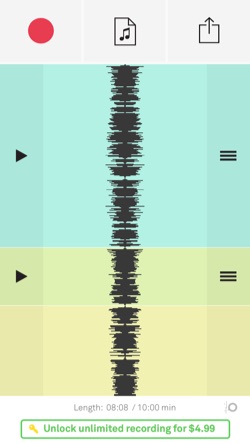
  • I liked how you could stop and start the recording, generating new tracks within the same session. You can then easily move tracks around if you wanted to. For instance, I realized that I had left something out that I wanted to include earlier, so I recorded another track and then moved that back into the earlier flow.
  • The editing tool nicely lets you split tracks so, for instance, I could split an existing track to insert a new track.
  • I also used the editing tool to remove / trim the ends of tracks. I would cut the track which would create a new track with the audio I wanted to delete – and then I would just delete the track.
  • The workflow right now involves having a single “session” inside of the app. When you are done with the recording you upload it to some site or service. When you want to record again you are doing so in the same session, i.e. you need to delete some or all tracks in order to record again. This is in contrast to another app I use, Hindenburg Field Recorder, that lets you save your recording sessions inside the app. I don’t think this is necessarily a bad thing, as most of the time I wind up simply deleting the older recording sessions in Hindenburg Field Recorder because they take up space. This “one session” approach has its merits.
  • One thing I like about it is that I could use this workflow to make a simple “intro” and “outro” for my TDYR podcasts. It could go like this:
    • Record an intro track.
    • Record an outro track.
    • Record a main episode track and then move it between the intro and outro.
    • Upload the finished episode to SoundCloud.
    • The next time… delete the main episode track.
    • Record a new main episode track.
    • Move it between the intro / outro tracks.
    • Upload the new finished episode to SoundCloud.
    • Repeat….

    This could be quite cool!

  • I haven’t tried it yet, but the app has the ability to import music from your iPhone’s Music library. You could then bring in songs or other audio. In my case, I could record my intro or outro on my regular computer, complete with music, then upload it to my iPhone via iTunes… and then have it available in Opinion.
  • The app worked really well from a usage perspective with having very nice touch gesture support.
  • Recording up to 10 minutes of audio is free – after that it is $5 for unlimited recording space. Definitely a reasonable price.
  • I’m not a big fan of the name as it’s really generic… but I can see what they are getting at.

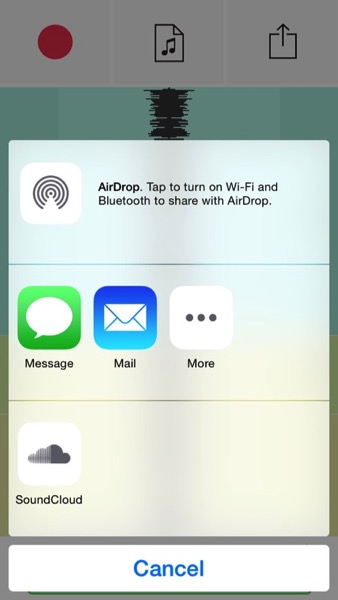
Let me end my just pointing out that Opinion has some nice export options. SoundCloud has a dedicated export function, but you can also send it via email or, more usefully, the “More” button lets up export to DropBox, Evernote or other apps and services you have on your iPhone:

UPDATE: Sadly, the Opinion app does NOT let you upload to DropBox yet. I asked the developers on Twitter about this, and they said they are considering this for a future version. (So I would encourage you to ask them on Twitter about this, too, to let them know you want it.)

UPDATE #2 Yea! The developers have implemented DropBox support and it will apparently be out in the next version.

Opinion export

All in all I found it a rather impressive app!

What do you think? Will you give it a try?


If you found this post interesting or useful, please consider either:


Ello Adds Feature To Share Posts Out To Other Social Networks

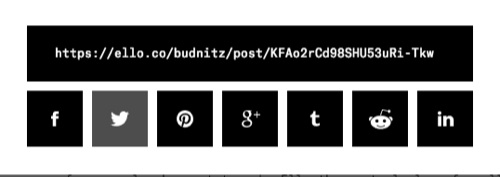
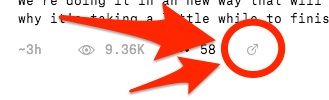
The team over at Ello yesterday added the ability to share out posts you write on Ello to other social networks. When you are logged in to Ello, there is now a small circle-and-arrow icon below a post:

Ello sharing link

When you click/tap the icon you get the typical kind of “social sharing” box that you see on many social networks:`

Ello social sharing

You click on the social network to which you want to share and you get the usual kind of sharing windows you see for that given social network.

As co-founder Paul Budnitz notes, there was internal discussion about whether to offer this capability, but they decided:

On the other hand, we’ve have had many requests from Ello users for this function — especially from people who want to make Ello the central place for all their online activity, and need to post out to friends and followers who are still using other networks.

It will be interesting to see how widely this gets used and whether this is an incentive for people to use Ello as one of the places they primarily post content.

If you use Ello, what do you think about this feature?

UPDATE: The Ello team also released a wide range of other interesting features and fixes.


If you found this post interesting or useful, please consider either: