Wow – Facebook Acquires Instagram!

InstagramWow… here’s one that I don’t think most (any?) of us saw coming – Facebook has acquired photo-sharing service Instagram!

It’s interesting to note Mark Zuckerberg’s focus on the continued separate growth of Instagram:

That’s why we’re committed to building and growing Instagram independently. Millions of people around the world love the Instagram app and the brand associated with it, and our goal is to help spread this app and brand to even more people.

We think the fact that Instagram is connected to other services beyond Facebook is an important part of the experience. We plan on keeping features like the ability to post to other social networks, the ability to not share your Instagrams on Facebook if you want, and the ability to have followers and follow people separately from your friends on Facebook.

Time will tell how that will work out, but it will be intriguing to see what the acquisition enables on both sides. It will also be interesting to see the reaction of the Instagram user community…

Kara Swisher at AllThingsD and Emily Price at Mashable are both reporting that the acquisition price was $1 billion USD in cash and shares.

What do you think? Smart move for Facebook? Good or not so good for Instagram users?

UPDATE #1 – TechCrunch is reporting that Instagram received a $50 million investment with a $500 million valuation just last week. And the best response I’ve seen has to be this one by a woman named Tonya Hall on Facebook:

Remember this day. 551-day-old Instagram is worth $1 billion. 116-year-old New York Times Co. $967 million.

Crazy times, indeed!

UPDATE #2 – Interesting view from Om Malik – “Here is why Facebook bought Instagram

UPDATE #3 – Some good answers to the Quora question about the Instagram acquisition


P.S. In full disclosure, I do have an Instagram account (danyork) but I have so far only ever posted one photo to it, preferring instead to still use Flickr, although that may change.


If you found this post interesting or useful, please consider either:


The Danger of Amazon’s Power

Amazon comAs an author, I have mixed feelings about the incredible power Amazon.com has within the publishing space. More specifically… the degree to which they are not just the proverbial 800-pound gorilla, but rather more like the 8,000-pound gorilla.

On the one hand, Amazon continues to be the largest channel for my own books, which are admittedly in some rather niche areas that would not be found in typical bookstores. As one who has long considered self-publishing for some of my even more niche ideas, I have celebrated the tools and services that Amazon has brought to the table such as CreateSpace and their Kindle Direct program. Amazon’s leadership in the ebook space has really helped create an entirely new way of reading.

The publishing industry is being incredibly disrupted by Amazon and in many ways that’s a good thing for authors and ultimately for readers.

BUT…

… on the other hand, the part of me that advocates for open networks strongly detests the “lock-in” of Amazon’s proprietary ebook format (Mobi) and their distribution network. Even more, I’ve been very concerned lately by the extent to which they’ve been using their massive distribution control in their contract negotiations. Here’s a view on one of the latest skirmishes:

Now, this is perhaps to be expected… Amazon needs the absolute lowest costs possible for their commodity model to work. If you want to sell your books through their service, you have to come to terms with Amazon.

Still, it’s troubling. As more and more bookstores close… as people increasingly move to using ereaders… we are increasingly getting to the point where Amazon really is the choice to buy books, particularly when they make it so incredibly easy to do so.

The great danger here lies in having that near-monopoly on our ability to purchase books. How else will they wield that power to extract concessions from others in the publishing chain? Will that be good or bad for authors and for readers?

O’Reilly’s Joe Wikert had a good post out recently:

While he obviously comes at it from the publisher’s perspective, it’s definitely worth thinking about.

How can we as consumers encourage the existence of multiple ecosystems of book/ebook distribution so that we can have a choice?


If you found this post interesting or useful, please consider either:


How To Auto-Update WordPress Custom Themes Using Github

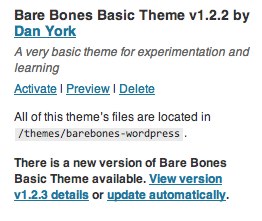
Have you wished that you could get an automatic update notification in WordPress for a custom theme that you have used? You know, like the "update automatically" notifications for "official" themes hosted on WordPress.org such as this one?

Themeautoupdate

Or perhaps you have created a custom theme and you would like to have a way for the users of your theme to receive notifications and updates whenever you update the theme? You can then fix up your theme, post a new version and… ta da… all your clients get the notification and can "update automatically" to the latest version?

UPDATE – 6 Apr 2015: The UCF "Theme Updater" plugin originally referenced in this article is no longer being maintained.  I would suggest using Andy Fragen's GitHub Updater plugin instead.  It uses the same syntax as the original UCF plugin.

If you've been looking to do this… and aren't afraid of (or enjoy!) working with the git version control system and Github, there's a very cool way to do all this that gives a very similar user experience:

Theme github

In fact, it winds up being a bit better than the normal WordPress theme auto-update process because after you do the update, you actually have the ability to roll back to previous versions of the custom theme if the new one causes problems:

Theme github rollback

This is something you can't do easily with the normal WordPress theme update process.


Initial Setup / Configuration

If you want to set this up for your own themes, here's the process…

1. Publish Your Theme To A Github Repository

You need an account (which is free) on Github, and you need to create a repository (a.k.a. a "repo") there for your theme. If you've never used git before, Github has some great help pages that explain the process. If you use a Mac, there is also a great Github for Mac app that makes the process super simple of updating your git repo locally and pushing the changes to Github.

The end result is that you need to have a git repo on your local computer that has your theme and that repo is synced up to a corresponding repo on Github.

I'll note that this process only works with public Github repositories, so your code does have to be open to the public. If you want to keep your code private so that only you and your clients see it, this process won't work for you. (Although see the notes at the bottom of the post.)

2. Modify Your Theme To Include a Github URI

The next step is to go into your style.css file in your theme and add one critical line containing a "Github Theme URI":

Theme Name: Example  
Theme URI: http://example.com/  
Github Theme URI: https://github.com/username/repo-name
Description: My Example Theme
Author: person
Version: v1.0.0

You can see an example in a demo theme I have. The URL you use is that of your repository up on Github. That's it.

Now you need to commit this change to your local repo and push the change up to Github.

3. Create a Tag in Your Repository

In your local repo, you need to "tag" the repo with a version number. THAT VERSION NUMBER NEEDS TO MATCH WHAT YOU HAVE IN STYLE.CSS for everything to work right. You then need to push this tag up to Github. Here are the command-line commands you need:

$ git tag v1.0.0
$ git push origin v1.0.0

Obviously with whatever version number you use.

4. Upload Your Theme To Your WordPress Site

Now your theme is all ready to be uploaded to your WordPress site. There are a couple of different ways you can do this, but one simple way is:

  1. Create a ZIP file of your theme on your local computer.
  2. Inside your WordPress admin menu (standalone) or network admin menu (MultiSite) go to the Install Themes panel and click on "Upload".
  3. Choose your ZIP file and press "Install Now".

You'll now have the theme installed in your WordPress site. You can now activate it and use the theme for your site.

5. Install the Theme GitHub Updater Plugin

UPDATE – 6 Apr 2015: Andy Fragen's GitHub Updater plugin can be installed using one of the different methods described under the "Installation" section of his "README" document.  I have found the simplest is to download the plugin zip file from his site and upload it manually to my WordPress site.

Unfortunately, you cannot simply add this GitHub Updater plugin directly from the standard WordPress.org plugin directory.   The plugin, as well as others such as the original UCF Theme Updater plugin, were removed from the main WordPress.org plugin repository as the operators of that repository felt it was not appropriate to include those plugins as they could be used to pull in code that was malicious or was otherwise not reviewed by the WP.org team.  You therefore have to use one of the other installation methods described.

Here's the part that makes the "update notifications" piece all work nicely. Some guys down at the University of Central Florida came up with this very cool plugin for WordPress called "Theme Updater" that is available here:

http://wordpress.org/extend/plugins/theme-updater/

You can either download it from that site or, much more simply, just go into the Plugins menu of WordPress, choose "Add New" and search for "Theme Updater".

(NOTE: The plugin does work with WordPress 3.3.1, so you can ignore the warning message about the plugin not being tested with your version. The meta-data for WordPress.org simply didn't get updated when the new version was recently posted. Given that I was doing some of the last testing, I can tell you that I did the testing on WordPress 3.3.1 on both a standalone and a MultiSite installation.)

Once you have installed the plugin, you simply activate it – or in WordPress MultiSite do a "Network Activate".

That's it. There is no configuration panel. No options. It just sits in the background and checks for updates of the Github-hosted theme.


That's all that is involved with the setup. Your installed theme is ready to be automatically updated. So, now you want to do the update…


Updating The Theme

When you have updates, the process is pretty straightforward.

1. Make And Commit Your Theme Updates

Edit your theme, make whatever changes, modifications, additions you need.

Commit your changes to your local git repo and push those changes to Github.

2. Update The Version Number in Style.css

In your style.css file, increment your version number, as in this example:

Theme Name: Example  
Theme URI: http://example.com/  
Github Theme URI: https://github.com/username/repo-name
Description: My Example Theme
Author: person
Version: v1.1.0

Commit the change locally and push the change to Github. (And yes, this could have simply been done as part of step #1.

3. Create a new tag and push the tag

Create a tag in git that matches the version number in step #2 and push that tag up to Github:

$ git tag v1.1.0
$ git push origin v1.1.0

That's it!

Now users of your custom theme will get a notification along the lines of this in WordPress MultiSite:

Theme github

or this in the "regular" standalone mode of WordPress:

Themeupdate standalone

and can simply "update automatically" to get the new version of the theme.


Other Notes

The "Theme Updater" plugin for WordPress is naturally hosted on Github:

https://github.com/UCF/Theme-Updater

You can see the source code there, download the latest, etc. If you are a Github user, you can "watch" the repo, fork it, clone it, etc.

If you find an issue with the plugin or have a feature request or suggestion, you can raise an issue (assuming you are logged in to your own Github account) in the Issues area.

I don't know but I get the sense that the UCF team made this plugin for their own usage and don't necessarily have grand plans for future versions (i.e. it works fine for them now). But if you want to add functionality yourself, like, oh, for instance adding in the ability to connect to private Github repos, you can certainly use the standard Github process of forking the repo, adding in code and then issuing a pull request to get your changes merged in. (And if that last sentence made absolutely no sense to you, don't worry about it and just have a nice day! 😉

All in all I've found this to be a great process to let me publish a custom theme publicly and then auto-update multiple sites off of that custom theme. Kudos to the UCF team for creating this plugin and making it available!


If you found this post interesting or useful, please consider either:


Three Critical Reasons High Schoolers Should Restrict The Privacy Of Their Facebook Pages

Tonight purely by accident I stumbled upon the Facebook page of a student I know at one of our local high schools. I didn’t know he was on Facebook but he had commented on a post in my NewsFeed by someone who turns out to be a mutual friend.

Curious to know if it was the person I thought it was, as his Facebook profile picture was not a photo of him, I clicked on the link to his name expecting to see the standard “basic info” you see for everyone and then the privacy message that usually greets you:

Privacy

Instead, I saw everything

Walls Wide Open

His Facebook “Wall” was wide open for all to see.  Anyone. I saw all his posts… all his photos… all the comments between him and his various friends. I clicked on the Info link and learned all about where he goes to school (which I knew), his musical tastes, the sports he likes, movies, television shows, games, religious views…

And I got to see all of his friends

… probably a good half of whom ALSO had wide open walls.

In the course of maybe 10 or 15 minutes of flipping around, I learned a good bit about some of the region’s high school age students, saw a whole bunch of photos, read a few conversations that probably weren’t meant to be public (or at least to be read by 40+ year-old men sitting at home on their computers)…

…and generally got increasingly concerned about the amount of information these students were perhaps inadvertently disclosing about themselves and their lives.

Now, this is, after all, what Facebook seems to want. They generally default to public sharing, and so if you don’t take active steps to protect your privacy, all your content will be shared with the world. And while some people are quite okay with that, I’m personally not.

If I could say anything to these high schoolers or their parents – and to all the others reading this post, it would be that there are three critical reasons why you might want to think about restricting your Facebook privacy a bit more.

1. Security

The most obvious one is the security angle. There are a lot of sickos out there. I’ve been online for now almost 30 years and I’ve seen all sorts of seriously warped stuff… information security has always wound up as part of what I’ve been involved with, and some of what I’ve had to do has taken me to seriously vile and heinous parts of the Internet.

There are warped people out there. There are thieves and scammers and fraudsters and perverts and others who prey on people online. They’ve always done this… Facebook just makes it ultra-easy to do. They can start commenting or “liking” your posts and photos. Striking up friendships. Sending you messages. Wanting to meet, etc., etc.

With your wall wide open, you are giving them all the info they need for “social engineering” to know exactly what to say to you. They know the music you like, the TV shows you like, etc. They’ve seen your photos, so they know what you look like, what you like to wear, etc. It’s insanely easy for them to gain your confidence and trust.

You are also giving them your location. You are letting them know where you are, what you are doing. It’s a wonderful way that your friends can know where to meet you (and it is. I personally use it that way.)… it’s unfortunately also a way for a stalker to find you. And sure, it may not ever happen in your town/city, but why give out all this info when you don’t really need to?

You also give away where you are not. Believe it or not, people’s homes have been robbed after they were posting publicly about going away from their homes.

Location info… and really all this personal information… is really best shared only with those you trust.

2. Employers Check Facebook

The second reason to restrict your info is because if you are a high school student looking for even a part-time job, guess what that potential employer is going to do?

Yes, they (or at least the smart ones) are going to search for you on Google and Facebook and see what turns up.

In 2012, you’re pretty crazy as an employer if you are NOT doing background checks on the Internet. Who needs to call references when you can just go to a search engine and learn more about potential employees than you probably ever wanted to know? (including all the “stupid sh__” they did last weekend?)

It’s real. It happens. And stuff lives on in Google’s caches far longer than you would ever think.

3. Colleges Check Facebook

In a similar way, college admission officials check Facebook. (Another article claims 80% of colleges use Facebook in recruiting.) Need I say more?

If you are in the process of applying to colleges, you probably don’t want admissions officials reading your wall conversation with a friend where you are trashing one potential college and talking about another. Nor do you potentially want them seeing your writing, spelling, photos, etc. (unless, of course, it’s awesome and might help you get into a school).

Managing your “online reputation” is something that you have to start thinking about NOW.

How To Close The Walls

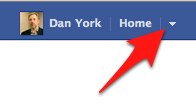
To start, the best thing to do is to go into Facebook’s “Privacy Settings” that, today, anyway, are found in the drop-down arrow next to your name in the upper right corner of the web version of Facebook:
FacebookSettings

Facebook unfortunately has a way of changing these settings around from time to time. But if you go down to “Privacy Settings” you’ll get the window you see below, where you can make two important changes:

  1. Set your default privacy to “Friends”.
  2. Change all past posts to be set to “Friends”.
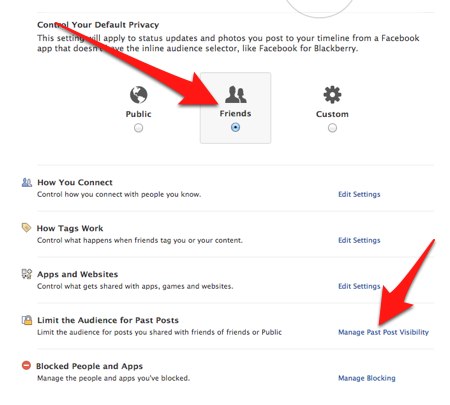
FacebookPrivacySettings

Note that when you click that “Manage Past Post Visibility” you’ll see a window pop up that warns you that all posts shared with friends or the public in the past will be restricted. Then you’ll get ANOTHER window just confirming that you really, really want to do this and warning you that you can’t undo it and will have to manually change it on each post if you want to share those posts publicly again. Finally, you’ll be able to change the setting.

You may also want to click “Edit Settings” next to “How You Connect” and restrict who can find your profile, who can send you messages, who can write on your timeline, etc. Here are my settings, which I have changed from whatever Facebook sets as the default settings (probably “Everyone” for all of them):
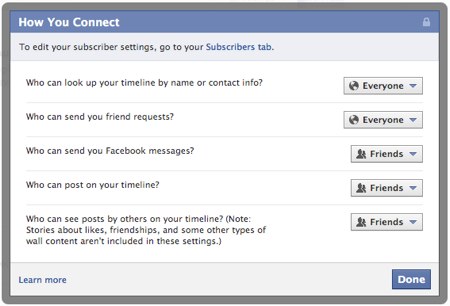
FBPrivacySettings

If you do these three steps,

nothing will really change for you on Facebook!

You’ll still be able to interact with your friends. You’ll still be able to write on each other’s walls. You can still tag each other in photos, send each other messages, etc.

It’s just that now when anyone who isn’t your friend goes to see your Facebook profile… whether they are other students who aren’t your “friend”, parents of other students, potential employers, college admission officials… or sick creeps… or just random people out on the Internet… all they will see is this:

Privacy

All that other personal information stays within the circle of the people you have accepted as “Friends” on Facebook.

And YOU are in control of what employers, college admission officials and everyone else sees.


NOTES:

  1. These privacy settings do not completely remove the chance your info can be publicly disclosed. Your info and photos go out to your Friends’ Newsfeeds, and they can then in turn “share” your info out to other people… and somewhere along the way may be someone whose settings are more public. However, you are greatly restricting the potential of that with these settings.
  2. There’s a separate conversation that could be had about how you could selectively post certain items publicly to create a public profile that would actually be positive for employers/colleges to see.  For instance, notes about awards you’ve won, volunteer activities you’ve accomplished, great photos you’ve taken or articles you’ve written, etc.  But again, you are in control of that information.

If you found this post interesting or useful, please consider either:


The Exquisite Beauty of an Ebook as a Living, Breathing Document

It's Alive!

What if a “book” is more than just a fixed collection of text at a given point of time? What if the “story” inside the book evolves and changes over time? What does this mean for the idea of a “book”?

Books have always changed over time, of course. There have always been “second editions”, “third editions”, etc. There have been different printings by different publishers – or differences between a hard-cover and paperback version. There have been translations… and other various different versions of books.

But those were historically very discrete “BIG DEALS”. I mean… whoa… there was enough interest to create a second edition? or a 3rd? or a 4th? Wow!

They involved great amounts of time, effort and perhaps most importantly money to go through the whole production process again to great the new “edition” of the book. It was not an easy process.

Ebooks fundamentally change all of that.

Last night I was working late into the night on an update to my “Migrating Applications to IPv6” book and thought about how bizarrely different ebooks are.

Consider this:

  • I originally wrote the book in May 2011 prior to World IPv6 Day on June 8, 2011. The original book refers to that event as coming up in the future.
  • Last night I updated the book to discuss some of the lessons learned from World IPv6 Day in 2011 and to also talk about the upcoming World IPv6 Launch on June 6, 2012. I expect this update to go out in a week or two.
  • In July (or anytime after June 6), I can then update the book to talk about World IPv6 Launch in the past tense and talk about anything learned out of that experience.

The “book” is no longer fixed to a specific point in time.

Again, sure, this has always been true with creating new “editions” of a book, but this is where ebooks make this so… trivial.

As an author, here is the full extent of my update process:

  1. I update the text of the book on my local computer. Have someone proofread it, check it, etc.
  2. I commit the changes to O’Reilly’s Subversion repository for my book. (Yes, O’Reilly is a geeky kind of publisher that lets authors work via SVN repos.)
  3. I send an email to my production editor with bullet points of changes.
  4. Assuming he’s fine with the changes, he triggers a process that creates the appropriate ebook files and puts them up on O’Reilly’s distribution site, Amazon, etc.
  5. Readers who purchased the book directly from O’Reilly get an email saying that they can download the updated version. I can blog about it, promote it. Anyone who buys the new version will at this point have the updated text.

Boom. That’s it!

Simple. Easy. Done.

Now, granted, O’Reilly has done a bunch of “magic” to make that step #4 “just work” from the author’s point of view… but it doesn’t matter to me. The point is that I can write my updates, commit the changes, ping my editor and… ta da… a new version is out there!

It’s that last step that is really the differentiator for ebooks. Notifying the reader that a new version is available.

Because, of course, the precise version of a book or an ebook is fixed to a specific point in time. When you download it to your computer or ereader, you have the version of the ebook as it exists now at this moment in time.

Without a notification/update system, you may never know that there are changes and updates that you can download.

But with such a system, the “book” becomes so much more… it is now a living, breathing document that will change and evolve over time. Perhaps slowly… or not at all if an author doesn’t create updates… but then perhaps VERY rapidly under changing circumstances.

The book that you read today may be completely different than that exact same book that you look at again in a month.

It changes the notion of the “permanence” of books… you have the capacity to enter into more of a “relationship” with the book and the author. You have the chance to see it grow and evolve. Or not.

As an author I actually find it incredibly exciting. A chance to keep a book always up-to-date. A chance to evolve the book based on reader feedback. A chance to change the “book”. Sure, there is a bit of a responsibility to your readers as you enter into a relationship like this where updates may come to be expected – and some authors will not want to enter into that relationship. They may want to simply throw the book out there and be done with it.

But for those of us who do want to treat the book as a living, breathing document, that is the exquisite beauty of an “ebook” (with an update/notification system).

The “book” is alive.

Image credit: drooo on Flickr


If you found this post interesting or useful, please consider either:


Storify Rolls Out New iPad App That Makes It Super Easy To Curate Twitter, Facebook

StorifylogoWhile I’ve not yet personally used Storify to a great degree, I’ve been watching what friends have been doing with it and been intrigued by the possibilities. Beyond the “collecting a twitter stream into a story” usage that people commonly discuss – and that is incredibly useful, I’ve been watching what, for instance, Shel Holtz has been doing to curate websites into ongoing collections. For example, his “Every company is a media company” or his “collection of social media policies“.

I may, though, start using Storify a bit more now that they’ve rolled out an iPad application. Given that the Storify app is free in the iOS App Store, I downloaded it and started playing with it this morning. It’s a wonderful example of how the touch interface of a tablet can be such a joy to work with. It’s so very simple and natural to drag and drop tweets, photos, etc. to create new stories. Definitely something I’m going to look at using more when I have stories or topics I want to curate into a larger “story” for publishing out to the web.

If you have an iPad, you can download the Storify app and try it out yourself… and if you don’t, you can watch the video that shows how it works:

Very cool to see how application designers are continuing to evolve our user interfaces… looking forward to seeing how this all continues…

O’Reilly Offers Free Ebook: “Publishing with iBooks Author”

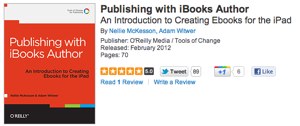
PublishingwithiBooksAuthorIn an interesting move, O’Reilly Media has made their brand new ebook, “Publishing with iBooks Author“, available for free download (assuming you have a free account set up with O’Reilly). As is standard with O’Reilly now, the ebook is DRM-free and available as EPUB, Mobi (Kindle) or PDF.

Now, I personally have serious issues with iBooks Author with regard to its deviation from the EPUB standard and the legal lock-in that restricts sales to Apple’s iBookstore. It also annoys me that books created with the tool will only work on the iPad, even while I understand Apple’s strategy.

Having said all that, I’ve played with iBooks Author and it is a great tool for creating ebooks. Apple has raised the bar on ease-of-use for ebook creation tools and that is definitely a good thing. As my attendance at O’Reilly’s Tools of Change conference last week in New York certainly showed to me, we need tools that are easier-to-use for even more people to be able to create ebooks.

My sincere hope is that creators of other ebook authoring tools will take a serious look at what Apple has done with iBooks Author and figure out how to deliver a similar (or better) user experience where the final output can also work on other ebook platforms. The tool vendor who can do that will certainly receive a lot of interest judging from the conversations I’ve had with people both at TOCCON last week and also in numerous other venues.

So to that end, I commend O’Reilly on releasing this new ebook for free and I do hope people will download it and understand just what Apple has done to make ebook creation so easy… and then use that knowledge to build even better tools!

P.S. In full disclosure, O’Reilly is the publisher of my most recent ebook, but that has nothing to do with why I am writing about them here. (And it was written entirely in DocBook XML, because that’s just the kind of author I am… )


If you found this post interesting or useful, please consider either:


Inspiring Video: LeVar Burton’s TOC Keynote On The Power Of Stories and Storytelling

One of the highlights of attending O’Reilly’s TOCCON last week in New York turned out to be a short but incredibly inspiring keynote presentation by LeVar Burton, who some of us may forever know as “Geordi LaForge” from “Star Trek: The Next Generation” and others may know from his 25 years with “Reading Rainbow” or as Kunte Kinte way back in days of “ROOTS“. As he is of course a professional actor, his delivery was wonderful to listen to, but even more I enjoyed what he had to say about the power of stories and storytelling. Some key quotes to me:

I am a firm believer in the link between that which we imagine and that which we create.

The stories that we tell each other, and have told each other, throughout the history of the development of civilization, are integrally important, are inextricably linked, to how we continue to invent the world in which we live.

That, upon which we focus our attention, is what we manifest in the third dimension.

The stories that we tell each other inform us about who we are, why we’re here and where we’re going.

You come here to use your imaginations in the service of storytelling.

He spoke, too, about the transition we are in now with publishing and the road ahead.

It was a very inspiring presentation and a great way to start the day… enjoy!


If you found this post interesting or useful, please consider either:


Attending O’Reilly’s Tools of Change Conference (TOCCON) This Week in New York

 This week I will be in New York City at O’Reilly’s Tools of Change for Publishing Conference, a.k.a. “TOC” or “TOCCON”. As I wrote about recently on the Deploy360 blog, TOC is really the premiere gathering of the people behind the technology behind digital and online publishing.  While there certainly are people there from the “traditional” publishing industry, the event really brings together all of those who are disrupting publishing as we know it. 

For my part, I am going to primarily to do a deep-dive into the technology and tools behind ebook publishing. While some of my own books are offered as ebooks, the publishers have been the ones doing the actual ebook creation. I certainly understand the basics, but want to really dig deeper. I have a strong interest in seeing what we can do within the Internet Society Deploy360 Programme to take some of the long-form content we or our partners have and make that available in an ebook form. Partly I want people to be able to take the content and have it very easily accessible in an offline form. Partly I want to offer people the ability to consume our content using an ebook reader. And partly I want to experiment with marketing our content through some of the various ebook stores. LOTS of ideas… now, whether I will be able to carve out the time to implement those ideas is a different question. 🙂

Anyway, if you are going to be down at TOCCON this week, please do say hello or drop me a msg via email or Twitter.

P.S. TOCCON will be an interesting event for me as I am not speaking, as I often do, nor am I staffing a booth, live tweeting, reporting or anything else. I am just there to learn, meet people and explore new ideas. I’m actually looking forward to the change of pace, bizarre as it will be for me.  🙂

Sorry, But No, I Won’t Add a Link To A Blog Post for $60!

Oh, the scammers and spammers…. I was amused in today’s normal haul of bogus comments across my various blogs to get this one:

If you’re willing to place a link to my client, <URL-deleted> with the anchor text “<client-name-deleted>” in one of your new articles then I will send you a one-time payment of $60 via PayPal.

<client-name-deleted> provides the best deals for <deleted> across the country. If you’re interested, please let me know the email address where you’d like me to send the PayPal payment and I will send it once you add the link.

I’d seen this type of message many times before, of course, but just deleted them as a matter of course.

This time, though, I picked up on “to my client“.

One wonders, does the client understand the sleazy way in which this person is going about their work? Does the client even care? Are they just paying for “results”?

I do wonder, too, how many people out there just go ahead and accept the offer… hey, $60 can buy a bit and… “why not? They’re just asking for a link!” Probably a number of folks… which then only leads to more messages like this…

P.S. And no, I’ve never taken money to put links in articles. And I certainly wouldn’t for only $60. Now… add maybe 2 or 3 zeroes to that number and maybe I’d start considering it… 😉


If you found this post interesting or useful, please consider either: