
Yearly Archives: 2010

Cleaning Out Your Queue! (of blog posts)

Sweeping the stairsDo you have a queue of blog posts waiting to be written? Do you come across great articles on the web and say “I should write a post about that!“? Do you scan your Twitter feed or Facebook NewsFeed each day and see 10 different links you would like to write about?

Do you wake up each morning with your head exploding with stories to be told?

What do you do with all those story ideas?

Do you…

  • jot them down on a piece of paper? In a Moleskine, maybe?
  • save them as bookmarks to a service like del.icio.us?
  • save them in a service like Evernote?
  • save them in a text file on your local system?
  • record them as “to do” items in a task manager?
  • leave the links open as tabs in your browser so you can find them? (which works great until your browser crashes)

What do you do to build your queue?

My own way is a bit of many of those. I’m a big user of Things for task tracking on my Mac and so I’ll write in there of posts I want to write. I use a keyboard shortcut to copy the URL into the notes of a task. I also will save bookmarks into my del.icio.us account (yes, I still use it) and have a special tag there I use for things I want to write about. And yes, I do leave links open in various tabs in my browsers. I also write almost all my posts offline using MarsEdit and so I will actually have a local queue of partially written posts right there.

BUT… the key question is…

DO YOU EVER CLEAN OUT YOUR QUEUE?

This is honestly something I struggle with myself. Each day I probably have 15 new ideas for posts … and time to write maybe 3 or 5 (or less). The queue I have stretches on to hundreds of post ideas… some of which are quite frankly no longer really relevant now that so much time has passed since I wrote them down. In talking to some folks about this, some suggestions are:

  1. SET ASIDE SOME TIME TO REVIEW YOUR QUEUE – AND WRITE – I’m trying to block out a couple of hours each week where I just go back into my queue and try to pound out a couple of posts. I might even reach back to something 6 months old that I still think is worth sharing and commenting on.
  2. SHARE YOUR QUEUE – Sometimes the question you have to ask yourself is: What is more important? That the story be written? Or that you write about it? If there’s something that should be written about and you just don’t see realistically how you are going to have the time to write about it… share that idea. Tweet about it… post it on Facebook… send an email out… pass it along to others who you know write on the topic. Get it out there. And then… remove the idea from your mental queue. Let it go.
  3. PURGE YOUR QUEUE – Sometimes there are stories that just lose their value with time. Writing about how excited you are about the latest iPod Nano may no longer be relevant in 6 months because Apple will already have come out with a new one. So carve out some time to just go through your queue (in whatever form you keep track) and discard ideas you just won’t have time to deal with.

The important thing is that you take the action of starting to do something about all those queued ideas. Otherwise, as admittedly happens to me sometimes, you can start to get overwhelmed with all the stories you want to write – and the lack of time you have to write them.

What do you do? What strategies have you found that work for you in dealing with all the ideas you have?

Image courtesy of pedrosimoes7 on Flickr.


If you found this post interesting or useful, please consider either:

How to add Google Analytics tracking to Unbounce landing pages

Lately, I’ve become quite a fan of using Unbounce.com for the creation of quick landing pages.  I’ve used the site now for various ad campaigns, email newsletter links, print ads and more.  What I like in particular is that it is so very easy to try out multiple variations of a landing page and see which one works the best.

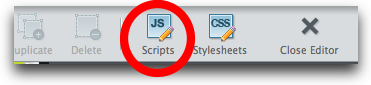
Naturally, though, I want to track everything about Unbounce pages over in Google Analytics. Turns out this is very simple to do, as mentioned in this Unbounce FAQ page.  First, after you open an Unbounce page into the editor, you click on the “Scripts” icon:

unbouncescripts.jpg

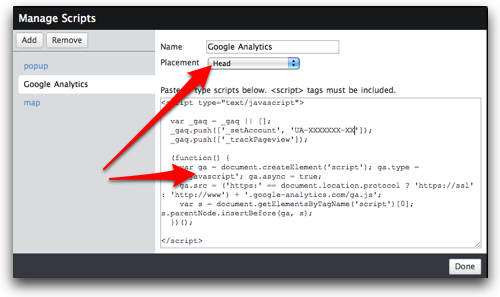
Next, you create a new script, set the placement to “Head” (for the new asynchronous GA tracking code, which you should be using!), and copy/paste your GA tracking code into the text box:

unbouncega.jpg

After clicking “Done”, you’ll need to save the landing page and then, if the Unbounce page is already published, you’ll need to re-publish the page so that the Google Analytics tracking script goes live.

NOTE: If you already have several variants of your landing page, you’ll need to go into each variant and add the GA tracking code to the page.

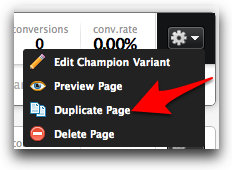
One tip to Unbounce users… I created an unpublished “template” page that had the basic background elements I want to regularly use – and also had this Google Analytics tracking code. When I want to create a new landing page, I then simply go to the Unbounce dashboard, and choose “Duplicate Page” from the gear icon of the template page:

unbounceduplicate.jpg

This gives me a new page – with tracking – and then when I create any new variants they, too, have the tracking code.

Now… why do I want to do this, given that Unbounce does provide some tracking stats of its own? Primarily because: 1) the Unbounce stats are very basic – Google Analytics delivers far more information; and 2) I’m already a heavy Google Analytics user and have all my systems set up.

The end result is that you can use a platform for creating excellent landing pages and also get all the tracking analytics you want to understand how people got to that landing page.

Any of you use Unbounce? What have you thought of it so far?


If you found this post interesting or useful, please consider either:

Will It Blend + Old Spice = Positively Brilliant!

By way of TechCrunch, who had a brilliant headline, “When Memes Collide“, I learned of this new video from the good folks at BlendTec… Enjoy!

Brilliant work on BlendTec’s part to merge their own viral meme with that of Old Spice! Kudos to them.


If you found this post interesting or useful, please consider either:

An iPad “modded” to include a Verizon MiFi

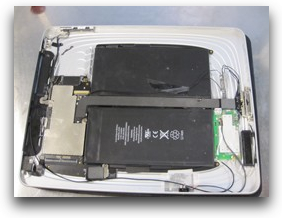
When writing my last post about iPad apps, I stumbled upon this post over on The Unofficial Apple Weblog (TUAW): “iPad hacked with Verizon MiFi innards“.  As the post explains, someone took apart their iPad and merged it with the contents of a Verizon MiFi:

ipadmifi.jpg

Not something I’m personally thinking of doing anytime soon… but it’s cool to see!

(And a sign of just how far people will go to NOT have to use Apple products with AT&T’s network!)


If you found this post interesting or useful, please consider either:

C’mon TypePad, can’t you catch this spam?

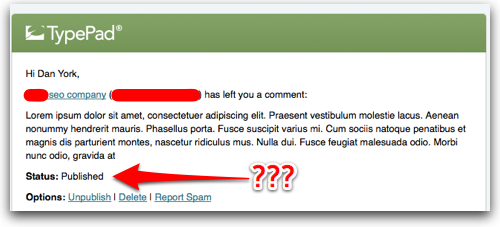
Um, TypePad … isn’t this a fairly obvious spam comment on my blog?  I mean… when the name includes “seo company” and it starts off “Lorem ipsum”….

typepadblogcommentspam.jpg

As I’ve noted, I’ve been increasingly unhappy with aspects of TypePad’s service… and the increasing number of spam comments that are getting through the “filters” TypePad has makes me wonder if the comment spam filters are being maintained and updated.  If this kind of thing continues, I think it’s only going to drive me and others increasingly over to WordPress…


If you found this post interesting or useful, please consider either:

Skype’s Fatal Flaw in their Blog Site Redesign

skypeblogs.jpgA while back, the good folks at Skype did a thorough redesign of their blog. They moved the blogs to the “blogs.skype.com” domain and created a nice portal page that shows blog posts across all their various blogs. That portal page easily lets you see the “top stories”.

They added in some great pictures of their primary bloggers. They spent some time just refreshing the overall artwork.

All in all the blog site looks great and the redesign was, to me, very nicely done.

Except…

While the form may be quite pleasing, the function is unfortunately not.

Here’s the problem… from the “blogs.skype.com” portal, you can easily get an overall sense of what is being written across all Skype blogs and can visit posts you want to read. However, within a single blog (like this one) you see only a single post followed by this lovely link:

skypeblog.jpg

Yes, indeed, there is no way to quickly browse through the contents of a single blog! Instead you have to view each post individually and step through them one-by-one. That may be fine if someone has the time to go through and sit there scrolling down and then waiting for pages to load. But if you just want a quick view of what they are writing about… it’s a mind-numbingly slow process.

For instance, I recently wanted to know what was new with the Skype client for Linux (not much, it turns out), so I went to the Skype Linux blog to learn more. The first post was quick and I could easily scroll down and click the “Old articles” link. The second post has 182 comments – and ALL comments are displayed! Given that the “Old articles” link ONLY appears at the bottom of a post, I had to scroll all the way down to the bottom to go back to the previous post.

RECOMMENDATIONS

If I were Skype (and I have no affiliation with them beyond being a very active Skype user), I would encourage them to:

  1. Provide a way to see recent posts for a blog – Either display the posts on the main blog page in full form or as abstracts – or at the very least provide a widget or box that lists titles of recent posts, allowing someone to jump to a post based on the title.
  2. Provide navigation on the TOP of posts – Forgetting about the issue with seeing all recent posts, if I am reading any blog post and want to go to the previous or next post, it’s annoying to have to scroll all the way to the bottom. (And yes, my blog (this one) goes the other direction in only having nav links at the top, which is fine for browsing but kind of annoying if you’ve scrolled all the way to the bottom. I personally like blogs to have both links at the top and bottom.)
  3. Consider not displaying the comments – If they left the blog as it is, I would at least not display comments by default. I personally like the display of comments by default… but if you have to scroll all the way down to see the navigation link, it can be a bit of a pain. I would not display them – as they seem to already do for the first post on each blog – and let people click the “Comments” link if they want to view them all.

What would you suggest? How could Skype make the navigation better?


If you found this post interesting or useful, please consider either:


“The Traveler’s Guide to the iPad” – a great list of apps and tools

ipadtraveler.jpgOver on the Socialized Software blog, Mark Hinkle came out today with a great post called “The Traveler’s Guide to the iPad.” He also included the great graphic I’m including here on the right. I love to see pictures like this that so aptly capture the intent of the post.

Anyway, Mark’s post contains a solid list of apps that any iPad traveler should definitely consider. I’m actually quite partial to the Apple case, but that’s just personal preference. I like his suggestion for the Verizon MiFi hotspot – I’m eligible right now to upgrade from my current Verizon data card to a MiFi and am definitely considering doing so.

I do like his app suggestions… DropBox and Evernote, in particular, are two that are now critical parts of my iPad routine. I also love the fact that an e-book reader allows me to read books on a plane that would be too bulky to carry in my already-space-optimized carryons. One addition that Alec Saunders recently turned me on to was “Rocket Taxi”, an app that uses your iPhone GPS to find the nearest taxi companies to call for a cab. It’s an iPhone app, but presumably would work great on the iPad as well.

There are a couple of other apps on his list that I’ll be checking out…

I don’t know about others of you who use an iPad while traveling, but for me the iPad has definitely become a key part of my travel routine… so it’s great to see lists like this offering suggestions for other travelers.

If you use an iPad while traveling, what apps have you found useful?


If you found this post interesting or useful, please consider either:

The Power of Facebook as a Tool For Local Response to an Accident

facebook.jpgLast week, I gained some fascinating insight into the power of Facebook for local organizing in response to a need. As some of you may know, my wife was injured last Wednesday when she was hit by a car while out walking. She’s doing much better now and our 17-month-old daughter seems so far completely unharmed. We’re extremely thankful.

What was fascinating to me, though, was the role that Facebook played in the response to the accident.

When my wife called me to let me know what had happened, I was 3,000 miles away in Los Angeles getting ready to go out for a run before a long day at the ITEXPO conference/trade show speaking on a panel, meeting with analysts and recording some video interviews. There was obviously not much I could do from 3,000 miles away beyond try to reach a couple of people on the phone to see if they could help.

But what I did do was post a status update on Facebook.

What happened next was what we in the security community would refer to as a “denial-of-service attack” on our phone line… our home phone started ringing and pretty much didn’t stop the entire day. (And the “DoS” aspect is that we do not have call-waiting, so new callers got a busy signal for most of the day.) Our truly wonderful friends and family in the greater Keene, NH, area reached out to my wife with so many offers of help and support… it was incredibly humbling and VERY much appreciated. Email messages and Facebook messages poured in… to the point that there was simply no way my wife could even begin to answer them all. The word spread from Facebook out through email and phone to other channels, as well, letting people know at our daughter’s school, for instance.

As someone remote it was extremely reassuring to me to see the comments on my status updates, to see the posts on my wife’s Facebook wall/updates and to see the messages coming in. As I rearranged my schedule and spent most of the day on planes flying home, those messages certainly gave me a sense of reassurance that even though I personally could not be there to help, others were there to help.

It was a powerful personal reminder of the power of a connected community – and an interesting view into using a global tool like Facebook for local action in your community.

And yes, we’ve had tools for building online communities for 30+ years now…. BBSs, email lists, online services (think CompuServe), web forums… and a hundred other forms. Facebook is only the latest major player in the well-worn space… and 5 years from now maybe we’ll still be on Facebook or maybe we’ll have migrated to something else.

There is power there, though… the power of bringing people together – and so easily distributing news and information. Much more to write on this, methinks…


If you found this post interesting or useful, please consider either:


Prezi + ScreenFlow + YouTube = Video/Screencast Awesomeness!

What do you get when you combine a presentation done with Prezi and the screen capture tool ScreenFlow?

A pretty cool way to quickly create a video to tell a story!

This morning our Voxeo Labs team was working on launching a new application called “Tropo AGItate“. They had a blog post, but it didn’t really go far enough in telling the story of how this new service worked. So our CEO Jonathan Taylor, who has been experimenting a lot with Prezi lately, whipped up a quick Prezi to explain what happens. A group of us collectively tweaked it a small bit … and then I launched ScreenFlow on my iMac, put Prezi in full-screen mode and recorded the presentation with a voiceover.

It did take me several takes to get the timing down right… but after that I simply went to the File menu in ScreenFlow, chose “Publish to YouTube…“, filled out the video description fields… and a few minutes later the video was exported and uploaded to YouTube!

Super simple and easy! And we were pleased with the result:

(Warning to my marketing friends: This is from our Labs team and so is on the geekier side of things 🙂

P.S. A tip to anyone who my try this kind of recording themselves… Prezi lets you advance using the right arrow key, so I didn’t have to use my mouse at all.


If you found this post interesting or useful, please consider either:


Dear Facebook, can you PLEASE give us notifications for new Page comments/links?

Dear Facebook,

Can you please help us out here?  You see, we’ve come to understand that so much of the conversation these days is happening within the pretty walls of your garden. We like it.  We write there. We play there. We post photos. All is happy.

Some of us have even created Facebook “Pages” for various parts of our lives.  We’ve created Pages for our businesses or employers, schools, churches, community groups, bands, bars, blogs, causes, projects and pretty much anything else we want to promote.  I’ve done it myself for a book I wrote and also maintain my employer’s Page (Voxeo).

facebookspam.jpg

Here’s the problem.  There are certain <expletives deleted> unethical people who believe that they have a right to fill up your Facebook Page with links to whatever products or services they are paid to shill.  So they find your Facebook Page and leave posts on your Wall or add them as Links.

They are slimy spammers – and their garbage pollutes our Page and detracts from the conversations we want to have.

Sure, we as “Page administrators” can remove the postings to our Page, BUT WE HAVE TO KNOW ABOUT THEM FIRST!

This is the crux of the problem.  After all this time, you still don’t provide any way for us to know when someone has posted something to our Page.  Sure, you give us a weekly email summary of the activity on our pages… but that doesn’t really help us know what has been posted.

We have to keep going to back to each Page and checking now and then to make sure spammers aren’t polluting our page!

facebookemail.jpgBut what I don’t get, dear Facebook, is why this is so hard to do… I mean, you send email notifications for practically everything else that goes on within your pretty walls!  Most of my personal email inbox these days seems to be filled up with various notifications of who commented on what and who wrote on my wall and who sent me this and who did what to whom…

In fact, I can even get all those notifications by text message and receive them “in the moment” on my mobile phone.

So you are already notifying-us-to-death, Facebook… but why can’t you give us the one notification that we as content creators within your walls really need?   I mean, part of the point of Pages seems to be so that we’ll buy ads to promote our pages and get more “Likers” (side note: what the heck was wrong with “Fans”? It was so much easier to say).

So if we’re creating pages to then create ads to then give you MONEY, wouldn’t it make sense to help us out a bit?

Just send us yet another notification or text message whenever someone posts something new to our Pages.  Can it really be that hard for you to do?

Thanks for listening (or not),

Dan


If you found this post interesting or useful, please consider either: