Dan York on the intersection of PR/communication and the "social media" of blogs, podcasts, wikis, Twitter and more – and the way our conversations are changing…
In my Voxeo Talks post, I included the abstract. I’m looking forward to passing along what we’ve learned and helping others build blog portals on top of WPMU. The more who use WPMU for such portals, the better we’ll wind up making the software in the end.
If you are planning to be out at OSCON, please do stop by and say hello.
So I’m thinking of changing the “avatar” image I use across all my blogs and social networks.
In truth, I quite like the current image I have been using (pictured on right), because I’m not really a big fan of most of the pictures of me that are out there. But with this particular one I like the profile… I’m almost smiling… and the purple and pink background is distinctive. My image can easily be found in a batch of other images. I’m also looking to the right, which is again just different from so many of the other images out there.
This image has worked well for me as I’ve used it across Twitter, Facebook, LinkedIn, all my various blogs, my Gravatar, and basically every other social network I’m in (and I’m in a lot as part of my job). Given that “Dan York” is a rather generic name in English, and that there are a good number of other “Dan Yorks” out there, I’ve tried to use one image everywhere so that when people see my account on some service, they have a very easy visual clue that it is, in fact, the Dan York they know. It’s part of my online identity… a bit of personal branding, etc.
However, there’s a fundamental problem with the image – I only have it in low resolution.
And in fact, very low resolution. For all the many positive comments I’ve received about that particular image, the truth is that it is simply a screen capture of a random frame in a video interview that Jeff Pulver did with me back at Fall VON in October 2007. That’s it. A screen capture of a web video. No pro photographers. Nothing like that.
The problem is that when conferences ask me for a “headshot”, in my ideal world I’d like to give them the same shot that I have on my website and social networks… but I can’t give them this one. So I need a new image for which I also have a higher resolution image.
I’ve thought of going to a local photographer for a shoot… and I may still do that, but as I wrote about over on a Voxeo blog, I was fortunate to have some great shots taken of me out at eComm by photographer Duncan Davidson (click any of the images to jump to his site – you can then click between the images on his site):
As Duncan has very kindly given speakers permission to use them for headshots, blogs, etc., I’m now toying with using a cropped version of one of those shots. Something like maybe one of these:
I’m thinking maybe the last one… mostly because it’s off-center a bit. What do you think?
All of this got me thinking and wondering these thoughts:
What do you like in an avatar shot?
What made you choose the one that you are using now?
Do you like close-up images or farther away?
Do you like just the person in them or with other people/kids/significant-others/animals?
(Or are you perhaps not the over-analyzing, over-thinking type that I am and just put up random shots and change them around all the time?)
There’s no right answer, of course… in this world of social media we all get to choose this part of our online identity… and that persona can of course change and morph over time as we ourselves do. Still, I find it interesting to think about – why do we choose the images we do?
UPDATE – Mar 26: I received confirmation from TypePad that they are experiencing a problem with comment spam:
Thanks for your note. We are currently working on a known issue with
comment spam, and we will have this rectified very soon. We apologize
for any inconvenience that this may cause!
Hopefully they will have this fixed soon.
Unfortunately, I have had to move this blog to moderating all comments, which I really did not want to do. I like having unmoderated comments because: 1) the comments appear quickly; and 2) there’s no interaction required on my part for the comments to appear.
I’ve been running the blog this way for a couple of years now – with just requiring a CAPTCHA to defeat automatic comment spam bots – but for whatever reason that approach is no longer working! Within the last day alone, I’ve had about a dozen spam comments get through the CAPTCHA and wind up being posted on the site. I don’t know if some spammer out there has figured out an automated way to defeat the CAPTCHA that TypePad is currently using, or if they are paying actual people to answer the CAPTCHAs so that the posts are posted, but whatever the case I’m sick and tired of both having the vile stuff on my web site and also in dealing with reporting the spam and getting it off my site.
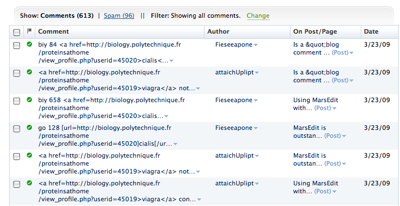
It’s strange to me, because it’s only this DisruptiveConversations.com site and not my other sites that are also hosted here on TypePad (at least not yet, anyway). I’m just tired of this:
So I’m still going to require the CAPTCHA, but I’m also going to moderate all comments.
I’m going to keep monitoring the flow of comment spam and perhaps at some point soon I can turn off moderation and let the comments just start flowing again.
If anyone else at TypePad is having this problem recently, I’d love to hear about it. Please do leave a comment and I’ll approve it as soon as I can. Thanks.
Which blog comment system is better – Disqus or IntenseDebate? That’s the subject in Scott Jangro’s great post: “Comment Systems Review Redux” as well as his earlier post about evaluating such systems.
I admit that I’m still a bit cautious about using either. I understand some of the arguments for using such systems instead of just the “regular” comment system of your blog platform… but I’m not yet convinced it’s worth doing. Scott’s review is very helpful, yet raises these questions:
Comment Spam – As Scott notes, human spammers will get through most anything. Part of my question is what do you get with Disqus or IntenseDebate that you don’t get with, say, Akismet?
Community – One of the more compelling arguments for using a system is that it will help create a “community” among those who frequently comment – yet Scott seems to indicate that this isn’t terribly useful so far. So what, then is the value of such a system?
I guess my other concerns include:
Load Time – Are there any metrics out there on what, if any, time is added to the load time of using a blog comment system? One of my concerns right now across all my blog sites is that by including all these various other services, I’m increasing the amount of time it takes to load the page. Look at the right columns of this page… content in some of the blocks there is loaded via pulling RSS feeds, which adds to the display time.
Availability – How “available” are these systems? i.e. what assurances do I have that they’ll be up and running? What happens if they are not available? Will people still be able to leave comments? Will the post still load?
Obviously I need to do some more digging and research. But I guess I’m still not clear on the exact problem that Disqus and IntenseDebate are trying to solve. Now I don’t deal with zillions of comments on this site, so perhaps I’m simply not the target audience.
Regardless, I’m still watching and monitoring… and I’m very glad to see articles like this that help differentiate between the different systems.
What are the benefits of microblogging within a corporation or enterprise? What value does it bring? How can it be used? And how do these new tools like Yammer, Present.ly, Laconi.ca and others measure up?
The benefits and use cases we’ve seen for corporate microblogging within our company over the few weeks we’ve been trying it out.
Our experience with using Yammer – the positive and negative aspects and how it does and does not compare with Twitter.
Some thoughts about how Present.ly compares to Yammer.
Some thoughts on how the open source Laconica could be used to build a corporate microblogging service.
Some thoughts on the wide range of companies leaping into the space right now.
Along with some general thoughts on what to think about when investigating these solutions and some pointers to the great work done by Laura Fitton and Jeremiah Owyang among others.
This was also somewhat predictably the topic of my weekly report into the For Immediate Release podcast today.
Rather amusingly, on the same day I published my review, the New York Times came out with two articles on the same general theme – one as an “article” in the main site and one as a blog post:
The comments on the NYT blog post make for interesting reading. Obviously we at Voxeo are not alone in experimenting with Yammer.
I’m sure lots more will be written in the months ahead about corporate microblogging – and I’m sure I’ll be writing more on it here. Meanwhile, please do enjoy my review of the tools and please do let me know what you think (either here or there). Have you tried Yammer? or Present.ly? or Laconi.ca? Or one of the other options? Do you see a role for microblogging within an enterprise?
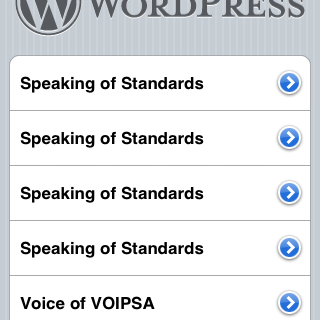
As you can see in this screen capture, I am using the WordPress iPhone app and it IS working to post to the Voxeo blog site that runs WordPress MU… However, as shown in that image, the app is confused about the names of the different WPMU blogs. It gave all four of them the same name, even though I went to different urls. I can though post to the different blogs. It is just a UI issue in the app. Maybe in the next version. Pretty cool, I have to say.
UPDATE (a few minutes after posting the text above): Now I posted this blog entry from the TypePad iPhone application, since this Disruptive Conversations blog runs on TypePad versus WordPress or WordPress MU. A couple of thoughts on that experience:
Using the TypePad iPhone app is clearly for just jotting a quick note and sending it up to your blog. Presumably I’ll get better at iPhone typing, but still, I can’t see me writing a length post.
More to the point, I didn’t see any way to either control formatting in the iPhone TypePad app. Now perhaps I can enter raw HTML… I didn’t try that, but I’m not really keen on that given the limited input capability on the iPhone.
Similarly, I saw no easy way to enter links… the links in the text above were added when I writing this text in MarsEdit and editing an already-published post.
I did not have any image formatting choices that I could see… I couldn’t align the image on the right (as I did here) or change the scale. The image was inserted at the top of the post with my text below it.
The TypePad iPhone app cropped my image to be square. Now, when I was adding the photo to my post in the app, I could “move and scale” the application, but there seemed to be no way to scale the screenshot down so that the whole screenshot would fit in the area. Everytime I scaled it down, it would pop back up to its full size (and maybe this is just because I’m an iPhone newbie).
Now those are issues with the TypePad app for the iPhone, but it looks like the WordPress app for the iPhone has similar issues. (Now maybe I need to learn more about what other options there are… perhaps I am missing some way to access other commands.)
Having said all this, it’s definitely very cool to have the option to post from either TypePad or WordPress to my various blog sites. I don’t see me using it too much when I have another option available… but I could see it being great for posting to the blogs while traveling.
What do you all think? Have you used either of these apps? Are there commands I’m missing?
The last one is a podcast versus a blog – but I didn’t put out a podcast that week, either. Now I did twitter and I did manage to send in my weekly 5-minute report to For Immediate Release, but that was it.
Now you would think with eight different blogs out there – and with part of my role at Voxeo being explicitly to blog (i.e. I am being paid to blog!) – you would think I would have written at least something somewhere! But I didn’t.
You see, I’ve been blogging now for over 8 years ever since starting a “diary” at a little known open source site called Advogato back in May 2000. I moved over to LiveJournal in 2004 and then to my current suite of blogs over 2005-2006 (and then launched Voxeo’s blogs in late 2007). At this point I’ve literally written thousands of blog posts across all those blogs. When I’ve been at my most prolific, it has largely because I’ve done what Jeremiah succinctly captured in his post:
I’ve paid “myself” first.
I’ve set aside some time at the very beginning of the day when I would just write. Write something… in some blog. Invest the time then to add content to the various sites where I write.
Before getting sucked into the screaming black hole vortex of e-mail… before getting sucked into all the many customer-facing projects on my plate… before getting sucked into the Twitter stream or RSS feeds… before getting sucked into whatever IETF mailing lists I need to be monitoring and documents I need to edit… before getting sucked into IM conversations…
Before all of that daily maelstrom, taking a moment to just… write.
I’d been doing that long before I saw Jeremiah’s post but just hadn’t really realized my own pattern (or named it). I remember seeing his post, realizing that it was essentially what I did and being pleased to understand it was something others did as well. (The ever-prolific Chris Brogan has mentioned in the past that this is also his pattern.)
When I’ve followed that pattern, I’ve found that I do post with some regularity. When I don’t, as I didn’t that week a while back… well, it’s way too easy to get sucked into the vortex that is daily life….
I find it’s extremely hard to do if you don’t make a focused effort… it’s way too easy to start plowing through email, scanning through IM group chats or, even worse, scanning through the Twitter stream… start doing that and of course one thing leads to another and pretty soon you wind up consumed in all the regular daily work flow.
After realizing that, I decided to change my own schedule a bit. My daily routine no longer lets me write early in the morning as I used to do (largely because a certain young member of the household snaps wide awake at 5:30am 🙂 ) but I have now taken the step to block of the first hour of my work day in my calender simply to… write. We’ll see how that goes. Now obviously I do spend other blocks of time writing… but the goal of the morning block is to ensure that I do write every day. That’s the theory, anyway. We’ll see.
What do you do to keep up with writing? Do you block out a specific time? Do you “pay yourself first” and start in the morning? Or do you block out time late at night? Or do you just write whenever it strikes you to do so? (Or have you not thought about how you write?)
I have to honestly say I haven’t really paid a whole lot of attention to the gender of who is writing the articles I read these days. The truth is that what social media I do consume is mostly in micro-blogging like Twitter or aggregators like Friendfeed where often I just see small names and pictures… and it all merges into a blur, really, and I guess in so many ways I just don’t really consider gender (or race or age) relevant… if an article is interesting, I’ll read it.
Yet as I look at a lot of the blogs I read (when I actually have a chance to do so), I do have to admit that my current list in my RSS reader is overwhelmingly male.
So it was interesting to see NxE’s Fifty Most Influential ‘Female’ Bloggers come out. A few of the bloggers listed are in fact ones that I subscribe to…. and there are predictably several female bloggers I subscribe to who are not on this list (it is, after all, only 50). Regardless, it’s a good list of interesting people. I like how the compiler of the list formatted it with information about the blogger, a picture and “Why She Matters”. Nicely done. There’s a lot of great folks on there who deserve the attention and credit for all they’ve been doing…
Do you want a quick way to record and embed videos in your WordPress blog? Would you like to make it so that visitors to your blog could leave you video replies?
If so, Loic LeMeur and the Seesmic gang have come up with a rather cool option in the form of a WordPress plugin for Seesmic video. First announced yesterday on TechCrunch and then on Loic’s blog, this plugin simply installs into your WordPress site and lets you both easily embed videos in your blog entries and also lets people leave video comments.
Given that I run this site on TypePad, I can’t demonstrate the plugin here… but I built Voxeo’s corporate blog portal using WordPress MU which does work with the video. You can see the plugin in action in this blog post in both the main post and also in the comments. (Please feel free to leave a comment as well! I’d love some more testers, especially “anonymous” testers without Seesmic accounts.)
CONTEXT MATTERS
One curious thing I did notice about using the plugin. If you have a Seesmic account, then the videos you create with the plugin also go out in your Seesmic feed. On one level, this is rather cool as it means that anyone following you in Seesmic will see the videos you create. However, when you are creating the videos you MUST remember:
Your video will be viewed in two different channels – with and without the context of the blog post.
For instance, here’s the video I recorded this morning when I got the plugin working with the site:
Viewed within the context of the blog post, this video makes sense. However, just as a raw video in my Seesmic stream, the context isn’t there. On what blog site was I testing out the plugin? Who is the “we” to which I was referring?
To make this make sense in both channels, I probably should have started off with something more like this:
Hi, this is Dan York and today I’m experimenting with adding the Seesmic video plugin for WordPress to our corporate blog site, blogs.voxeo.com, …
Or something similar that clued people in to the blog site I was talking about.
Likewise when leaving a comment to a blog post, you will be commenting on the contents of the blog post. Someone seeing that within Seesmic will have no clue what you are talking about. Should you then start your post with something like this?
Hi, this is Dan York commenting on the blog post at <URL>:… blah, blah, blah…
Now here we have a problem. Without an intro like that (“commenting on the blog post at…”), the video comment makes perfect sense within the context of the blog post, but doesn’t make sense in the Seesmic video stream. With an intro like that, the video seems a bit strange in the context of the blog post (you already know the URL of the site so why are you mentioning it), but does make sense in the Seesmic video stream.
Two different audiences viewing the same video with and without the context of the blog post.
SUGGESTION
Perhaps Seesmic needs to somehow add a field so that when a video is posted (either in the main post or as a reply) via the WordPress plugin there is a link in the Seesmic stream of the user back to the blog post where the video appears. Not sure how feasible that is, but perhaps it might address this issue.
In the meantime, users of the WP plugin should bear this dual audience factor in mind when you are recording videos.
If you do want to check out the Seesmic video plugin in action, you can visit the blog post I made earlier today and… seriously… feel free to leave a video comment if you have a camera. I’d love to get some more testing done of the plugin.
In the latest reminder that in the “rush to publish”, blog writers need to remember some of the basic rules of journalism, last Friday Duncan Riley over at TechCrunch came out with “Twitter Testing Advertising in Twitter Streams“. Given Twitter’s current prominence in the social media playground, this naturally set off a blogstorm of commentary around the potential of ads in Twitter.
And then Vasanth Sridharan over at Silicon Alley Insider did what should have been done at the beginning… he checked with the folks at Twitter! Their answer… no ads in Twitter.
Now, sure, Duncan Riley and the TechCrunch crowd are in the business of breaking news and in an era when gaining the credibility as a place to get breaking news means being only minutes (or even seconds) ahead of your competitors, I can understand why he ran with it. But it does seem odd given that it’s Twitter and all of us on the service are so interconnected, that a quick fact check with the folks at Twitter couldn’t have been done. (I also agree with Veracity: The Future of New Journalism” (although I agree with Mathew Ingram that spelling is also important!)

 So I’m thinking of changing the “avatar” image I use across all my blogs and social networks.




 As you can see in this screen capture, I am using the WordPress iPhone app and it IS working to post to