Category Archives: Blogging

Isn’t TweetLater missing the point of Twitter?

Schedule Future-Dated Twitter Tweets » TweetLater.com.jpgI have to admit that I don’t quite get TweetLater:

Now YOU Can Schedule Future Tweets For All Your Twitter Accounts

And this:

“Stuck on an aircraft? Back to back meetings? Taking vacation? Running errands? Playing with the kids?

Have peace of mind and more free time. Keep your Twitter feed ticking over with new tweets even when you’re not in front of your computer.”

Now, don’t get me wrong… I fully understand and appreciate the value in scheduling blog posts. Some time back when I was more interested in growing my readership, I did exactly that. I would write up a series of posts and have them set to publish on certain days at certain times. Do a flurry of writing and then let the posts just stream out there over the next days or weeks. Every now and then I consider doing that again. It makes sense to me if you are trying to maintain/grow readership and want to maintain consistency in posting.

But those are blog posts… usually larger blocks of text. And usually pieces that I really need to write on my laptop or other computer. They are took long to really type on a Blackberry or other portable device. (or at least longer than *I* want to type on a Blackberry!)

Do we really need this for Twitter?

Isn’t the point of Twitter really to talk about what you are doing now… or what has your attention now? Isn’t it really a tool for your life stream? Or for pointing to your blog posts? Or querying your network of people? Or hanging out at the virtual water cooler?

Now maybe those are just ways that I use it and maybe others have other uses where TweetLater might be useful. But given that you only type 140 characters or less and that you can do this from a zillion different interfaces (cell phones via SMS, cell phones via web, Internet cafes, any web access, other sites, etc.), it seems to me that it is easy enough to update Twitter from most places.

More to the point, if you are stuck on an aircraft or playing with your kids, why should you be twittering? In my book it’s perfectly okay to be offline sometimes.

Are we finding people who feel they MUST twitter all the time?

Are there people who feel that they need to twitter on a consistent basis in order to grow/maintain their followers? Will people really have more “peace of mind” if they queue up a bunch of tweets?

Are we just creating another rat race where Twitters feel they have constantly keep producing? (And isn’t that just a hamster wheel?)

That’s certainly not how I use Twitter, and it seems to me to be the polar opposite of the whole Twitter “What are you doing” mindset… but maybe there are some folks out there of feel “they have to twitter” in order to keep on going. (I would suggest that perhaps such folks need to “chill out”, but hey, that’s just my view.)

Where I could see it working

Now where I can see something like TweetLater being used is for Twitter accounts tied to an event where you tweet out parts of the schedule. For instance, let’s take a tech conference that has keynotes, breakout sessions, breaks, etc. The organizers could publicize that people could stay up-to-date on what is going on at the conference by following the conference twitter ID. The organizers could then use a service like TweetLater to queue up tweets to go out at certain times:

  • 8:55 – “Keynote with XXX, CEO of YYY, starting in 5 minutes in Grand Ballroom I”
  • 10:30 – “Morning refreshment break in Foyer II sponsored by XXXXX”
  • 10:55 – “Concurrent sessions starting: XXXX in Panama 1, YYYY in Panama 2..”
  • 11:00 – “Exhibit Hall now open. Visit booth 1234 to win an iPod.”

Etc, etc. You get the idea. The conference staff could queue up these scheduled tweets to go out but then also send out unscheduled tweets as the need arose (“Session A in Panama 2 has been cancelled as the speaker’s flights were cancelled.”). Attendees who followed the conference name could get those updates on whatever device they found useful. All in all I could see that being useful at a conference.

So there I could see it being useful. But for individual twitter users? I don’t see it… but maybe I also don’t see all of how twitter has evolved.

What do you think? Would you use a service like TweetLater? Do you know of people you think might?

Technorati Tags:
, , ,

Chris Brogan’s new site design…

chrisbrogan.jpgOrdinarily I would probably not bother to note that someone has a “redesigned web site”… I mean, that happens all the time, right? But seeing Chris Brogan’s new redesign is also a good time to mention Chris again. If you are interested in social media and aren’t reading Chris’ blog, I think you really owe it to yourself to check it out. Chris posts great pieces on all sorts of topics related to social media… and he’s a great writer, too, which helps. (He’s also become a friend over the last few years, so I’m admittedly biased. 🙂

He’s also got a great story about how he met the people who helped with his site redesign… through social media, of course!

Technorati Tags:
,

Chris Brogan’s free eBook on “Social Media Starting Points”

chrisbrogansebook.jpgChris Brogan yesterday released a free eBook “Social Media and Social Networking Starting Points” that does a nice job outlining what you need to think about as you look at starting to use social media and social networking for business communication. It’s a well-done piece. As I commented, the only additional item I thought should be included was a comment policy, but that’s mostly due to my recent experiences with the need for one! However, I’d still definitely recommend this eBook to people… it’s great that Chris is putting together material like this.

Technorati Tags:
, , , , , , ,

Skitch is my new friend! (Especially when used with MarsEdit!)

skitch.jpgOkay, tonight I am one VERY happy blogger!

I <3 Skitch!

You see, ever since leaving Windows back in October and moving onto the Mac platform, the one single biggest application I have missed – and really the only app I have missed! – has been Microsoft’s Windows Live Writer. It truly rocks as an offline blog editor and I’ve been trying to find the same level of functionality ever since I moved to the Mac. I tried ecto but found it had some quirks that didn’t work for me (however, I did buy both ecto and MarsEdit). I’ve mostly been using MarsEdit, but it has had one big glaring hole for me:

I can’t easily paste in screen captures!

In fact, there’s a good bit of irony to me that my last post, about using MarsEdit, was actually posted using ecto simply because it was the easiest way to incorporate screenshots!

However, I have seen the light! In the form of this little app called Skitch!

A number of people, including Daniel Jalkut who develops MarsEdit, had encouraged me to try it out, but for a whole variety of reasons I didn’t get around to it. Until tonight.

skitchdrag.jpgPerhaps the single greatest feature of the app for me is this little tab on the bottom of the app that says “drag me”. Media Manager.jpgYou see, MarsEdit has this great “Media Manager” to which you can simply “drag and drop” files, but you can’t easily drag-and-drop a screen capture on a Mac. Oh, you can easily take a screenshot of a region – using either the magic keystroke of Cmd+Shift+Ctrl+4 or through using the “Grab” application, but in neither case could you easily drop it into MarsEdit’s Media Manager. Instead what I would do would be to paste it into ecto’s WYSWIG editor.
So I wound up in this bizarre blog editing world where I would use MarsEdit for all my blogging… unless I wanted to incorporate screen captures, in which case I’d switch to ecto! A real pain-in-the-neck.

But now, with Skitch and this little “drag me” tab, I simply take the screen shot, resize it if I want, and then drag it over to MarsEdit’s Media Manager.

In fact, it even solves one of my frustrations with MarsEdit’s drag-and-drop. I always found it annoying that when you dragged an image from a web page, for instance, into MarsEdit, the image would get named some really long ugly temporary filename. Now, if you only use MarsEdit’s Media Manager, that’s not too big of a deal, but sometimes I do go into TypePad’s File Manager and right now there are a ton of image files with really ugly names that are meaningless to me. Anyway, with Skitch I just enter a name into the field right above “drag me”, hit Enter, and then when I do drag the file to MarsEdit, it comes across with this nice new name. VERY cool!

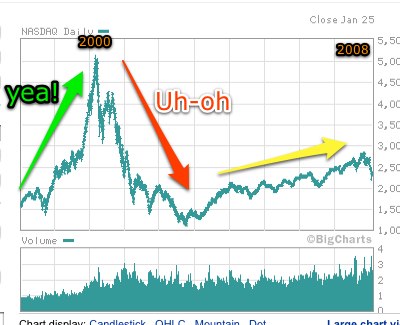
NASDAQ1998-2008.jpgSkitch also comes comes with a whole range of annotation tools, so you can do stuff like what I just did to a NASDAQ 10-year chart I pulled off of CNN.com a few minutes ago. Skitch did the screen shot and then let me annotate away. The nice thing is that I can go back and edit my annotations, change them around, delete them, change colors, etc.

When I’m done, I just drag it over to MarsEdit and… ta da.. there it is!

Now, Skitch also has a “Skitch.com” service where you can host your images, and there’s a handy little “webpost” button at the bottom of the user interface that will post your image. The cool part, though, is that you don’t have to use Skitch.com. You can use the “webpost” button to post to flickr, .Mac or other sites via FTP, SFTP or WebDAV. Again, VERY nice!

Now I see why people were telling me I should check it out. It’s the solution to my screen capture problem on the Mac… and it’s free!

In fact, I’m not really sure what the business model is for the Plasq crew that made it, except perhaps that it gets them publicity and may draw people to their other products. Perhaps it’s only free in the beta period and then they’ll be asking people to buy it. (I probably would.) Regardless, all I can say is that I’m grateful to them for making such a cool app available!

If you are a Mac user and have not yet tried it out, do head on over to Skitch.com and check it out… it will probably change the way you work with images very quickly.

Technorati Tags:
, , , , , , , ,

Using MarsEdit with NetNewsWire to accelerate posting from blog articles (i.e. what the “Post to Weblog” button can do)

In recent weeks I’ve started to use NetNewsWire for my RSS feed reading and have quite enjoyed one very cool aspect of it… this button in the top menu bar:

200801271655

With one click, the text of the post appears over in MarsEdit where I can then write additional comments and post the entry. What’s very cool is that if you select/highlight a block of text before clicking the button you get only that part brought across into MarsEdit. So if there is a paragraph you want to include in your post, simply highlight the paragraph, click the button and you’re off and blogging.

(NOTE: In order for this to work with all the fields, you need to be in the “News Items” screen in NetNewsWire and not a “browser window” opened up inside of NNW. You can still use the button in those other windows, but it won’t bring across the name of the blog and the URL of the blog itself.)

However, one thing I noted right away was that the format of how the text was brought across into my blog was not the way I wanted to have it appear. I would have to do extra work to go and change it around to fit the style of how I write here. For instance, I like to put “quoted” text in a <blockquote> and in italics. So each time I used the magic button, I had to do this re-formatting.

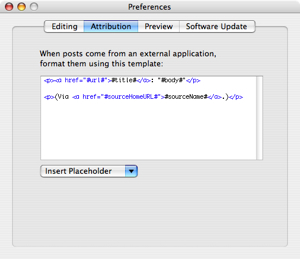
No more. I discovered in the MarsEdit preferences this little tab:

200801271650

Which by default contains the text:

<p><a href=”#url#”>#title#</a>: “#body#”</p>

<p>(Via <a href=”#sourceHomeURL#”>#sourceName#</a>.)</p>

It was then a simple matter to change that to the style that I want to use:

<p>Over on <em><a href=”#sourceHomeURL#”>#sourceName#</a></em> the post “<em><a href=”#url#”>#title#</a></em>” contains this text:</p><blockquote><em>”#body#”</em></blockquote>

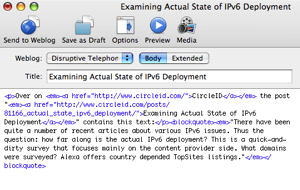
Now when I do this highlighting and clicking the button, I get something like this:

200801271705-1

which looks like this when published:

200801271705

Obviously once it is in MarsEdit I can write additional text, modify the text I’ve brought over. Many times I will change the text after it’s brought over to say something like “Over on his blog, Lee Hopkins writes an excellent piece called… ” but the bulk of the work has been done for me. I have links and the text and it’s formatted in the way I want it to be.

Very nice integration between NetNewsWire and MarsEdit!

P.S. Naturally this only works with Macs… sorry about that Windows users! (On the other hand, you have the awesome Windows Live Writer!)

Technorati Tags: , , , ,

Allen Stern: Would You Pay $1 For A Feed?

Over on his Center Networks blog, Allen Stern asks a reasonable question: Would You Pay $1 For A Feed?

“What if blogs and journals offered a full feed for $1 per month with no ads, mobile access, etc. Would you subscribe for a buck? What I am proposing is the following forms of monetization: standard Web site with ads, partial feed with no ads, and a full feed with no ads for $1/month.

So many of the people I speak with daily subscribe to a ton of full feeds and never visit a site after picking up the feed. Some say that feeds strengthen the interactivity with a site because when they read the post, they are more likely to come to the site to comment. Sure, it’s easy to jam an advertisement into a feed, but what if there was another way to provide a revenue stream for a blogger to live off of and for the consumer to enjoy the media knowing they are supporting the content they enjoy?”

Allen’s piece and the ensuing comments are well worth a read. It’s a good discussion point… if you are blogging as a living is it unreasonable to expect to people to subscribe to your work?

I’m skeptical, given the zillions of other websites out there… but I’m also certainly personally open to keeping on paying for content if it is valuable enough that I can’t get it anywhere else. For instance, I do pay for a subscription to LWN.net because the crew there continues to provide the best coverage I’ve seen anywhere on Linux issues. (However, I had been reading them – for free – for several years before they asked readers to buy subscriptions… so they were already a known (and valued) entity to me when they moved to a subscription basis.)

In any event, it’s a worthwhile discussion to have… check out Allen’s blog to join in the conversation.

Technorati Tags:
, ,

Ending the year as I began it… introducing a new blog! (This time, “Behind The Blog” from Voxeo)

BehindTheBlogBanner.jpgThere is a certain delightful symmetry to the fact that I began 2007 rolling out a new blog, Disruptive Telephony (followed shortly thereafter by this Disruptive Conversations blog), and now I end 2007 rolling out another new blog. In today’s case, though, the blog in question is for my employer, Voxeo, and is simply titled “Behind The Blog“. As I explained in the introductory post, the goal of the blog is to tell the ongoing story of what it took us to create the blogs.voxeo.com corporate blog portal and what we do to evolve the site in the time ahead. We’ll write about WordPress plugins, code we have to change and other things we do. The intent is that it will be a fairly technical blog diving into the innards of WordPress MU.

To a large degree, the point of the site is to help others who want to create blog portals using WordPress MU – hopefully they can learn from what we’ve gone through and not necessarily suffer some of the pain that we did. If you are considering running a blog portal on WordPress MU, feel free to join us as we explore the world of running a corporate blog portal using WordPress MU. If you use a feed reader, you can subscribe to the direct feed for the blog or simply get new posts as part of the “all Voxeo blogs” feed. (Behind The Blog posts also appear in our new Twitter feed.)

I’m delighted to bring out this new blog… and am very definitely looking forward to more blogging and podcasting in 2008!

Happy New Year to you all!

Technorati Tags:
, ,

Where have all the Blognation editors/writers gone? (Martyn tells us…)

95A061ED-E53F-488A-83BC-C29B17E05AE9.jpgWith the demise of blognation (also here), an obvious question is: where did all the excellent Blognation writers/editors go? Say what you will about Sam Sethi’s business practices… he did, though, pull together a top-notch team of writers. So where did they all go?

Well… Martyn Davies has compiled an excellent list of where all the Blognation writers/editors are. Many thanks to Martyn for putting that list together!

Of special note, I’ll mention that Tris Hussey has now landed at b5 media. Congrats, Tris! I look forward to seeing what evolves there.

Technorati Tags:
, ,

Blognation ends in fire and mud…

95A061ED-E53F-488A-83BC-C29B17E05AE9.jpgAnd so it ends.

Earlier this month I had written that it looked like Blognation was in trouble, but Sam Sethi now has confirmed that with his post.

I’m not going to dignify that post with any further discussion here as there is just way too much mud being thrown around right now. There’s definitely room for a higher level of professionalism on a number of different fronts.

Right now my thoughts are more with friends like (ca.blognation.com editor) Tris Hussey, who has now naturally posted that he is looking for a new role. Whatever Sam’s personal failings may have been, he did pull together a great team of writers! And now they are needing to find something new just as the holidays are upon us.

Personally, I’ll miss blognation. The sites had great posts on a range of topics. They brought a great range of commentary on emerging technology and were a good voice to have out there.

What a mess.

Technorati Tags: , ,