Category Archives: Twitter

On the need to aggregate status updates, a.k.a. why do I have to update my status and check friends’ status in so many #$@%@# places?

Over the weekend, Ross Mayfield posted “Status Contests and Attention Aggregators” which speaks to an issue I myself faced this morning.  As I have been talking about my impending trip to Stockholm for VON Europe/Podcamp Europe for the past while, I felt an obligation to tell folks that I was not going to be there.  So what did I feel I needed to do:

  • post a note at my blog Disruptive Telephony
  • post a note on my blog Blue Box: The VoIP Security Podcast (assuring people that tonight’s dinner was still on)
  • post a note on my blog Disruptive Conversations
  • post a Twitter update
  • update my Facebook status
  • change my Skype IM mood message (for a little while, anyway)
  • send out email to various folks with whom I had discussed meeting while there

This actually was a good bit of work.  Now, granted, part of it was self-imposed by virtue of my splitting my blogging out from my single blog (curiously, the only one of my major blogs that I did not feel compelled to update).  I also did not update my other IM services because for most of the people with whom I was corresponding, Skype seems to be their IM client these days.  But let’s just collapse this list and also drop out the direct email which is just kind of an obvious item – so here were my updates:

  • blogs
  • Twitter
  • Facebook status
  • IM mood/advisory messages

Still a good number of places to update[1].  And still a pain in the neck that takes a bit of time… perhaps not a lot, but still, a bit of time.  What I really want is a tool that lets me update my status once and then have it automagically posted across all my various “status services” and blogs.  As Ross posts:

Maybe they can work out a way to let you write your status once, publish everywhere, and remove dupes when aggregating.

Or to invert it, I need some way for all of those sites to pull my status from a central location.  Perhaps it’s like the widget displayed on this page that pulls my info from my Facebook status… but, of course, that widget isn’t integrated into my RSS feed for this blog so those who read by RSS will have no view of that widget and my current status in Facebook.

The challenge goes back in part to my previous discussion of the “walled gardens” of social networking.  Part of why I feel compelled to update my status in different places is because there are different “communities of interest” with whom I communicate in those different areas.  There are some who only read one of my blogs.  There are some who only read my Twitter stream.  There are some who live online inside of Facebook… while others really only pay attention to IM.

There are different audiences within different walled gardens.

I am the same way.  There are some people I only follow in Twitter.  Others only in Facebook.  For a good number, I see their Facebook updates, Twitter updates and their blog updates.  But they don’t know that.  If they want to post a message that they want all of their various friends and followers to see, what do they have to do?

Post everywhere, naturally.

Breaching those walls – or at least running communication conduits through the walls – will become increasingly important as people continue to understand the utility of these various different “status services”.  I agree with Ross Mayfield that new forms of status aggregators will need to evolved.  The walls must be torn down – or at least eased a bit – because the current situation can’t really last long, especially if these services are to move up the curve into mass adoption.  (Either that, or one or two of the biggest sites will win out as the place that people use for status updates.)

[1] And yes, I could throw my MySpace page in there, too, but I don’t really use it all that much and so have not attracted people who follow my updates there.

TwitDir – a way to find out info about – and search for – Twitter users

image In one of the various groupchats I monitor, someone mentioned TwitDir the other day and I have to say that it’s an interesting little site.  You can obviously search on someone’s Twitter name, but you can also just search on more generic terms, like part of a person’s name or a location.  Searching on just “Burlington” showed me that there are two other Twitter users from Burlington, VT. (Well, or at least there are two other Twitter users who have identified themselves as being in Burlington, VT.  There could be others here who choose to leave the location blank.)

The various “Top 20” lists were also entertaining. On the “Top 20 updaters“, it is rather amazing to think that someone has posted 32,244 updates.  It would be curious to know the frequency at which they update.  (Unfortunately, this particular person is writing in what looks to be an Asian language and I have no clue what they are writing!)  The BBC World Service is in there with 27,224 updates as well. On the “Top 20 followed” (when it eventually appeared), it was no surprise to see Scoble on there, but I didn’t expect Dave Troy (the man behind Twittervision) to be on the top with 6,766 followers!

Anyway, if you are a Twitter user and haven’t checked the site out, you may find it useful – or at least briefly entertaining.

Technorati tags: ,

How to send messages to Twitter from Skype – and using Skype to view/search your tweets (and wishing OpenID could be involved)

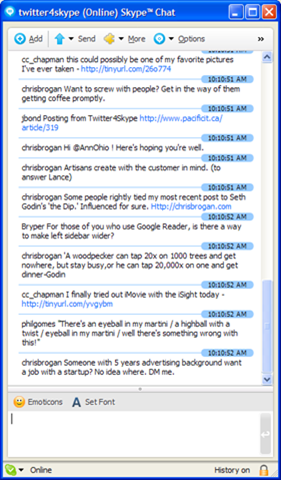
image In one of the ongoing Skype public chats today, Julian Bond clued the rest of us into a post he had found “How to Twitter from Skype“.  This actually takes you out to the “Twitter 4 Skype” site in Japan that is essentially running a Skype “bot” that acts as a gateway between Skype and Twitter.  You add the “twitter4skype” user to your Skype contact list, and then you can send/receive messages to Twitter.  Since I have been trying with very limited success to use the existing IM service to post to Twitter via Jabber, I thought I’d try this service out as well.  My immediate issue, though, was this:

You have to give this “twitter4skype” service your Twitter password!

Naturally… how else is it going to connect to Twitter and post as you?  But that’s the issue… who is behind this service?  It’s some site in Japan?  Do I trust them with my login credentials?   Who are they?

This would be a great place for something like OpenID where I could give them my account name, but not have to provide my password… but for that to work, of course, Twitter would need to support OpenID as well.

image Given my interest in experimentation, I did, of course, suck it up and provide my credentials.   The result was the chat window you can see on the right.  Now, what Julian Bond pointed out to me – and that I admit is very cool – is that you now have a list of your Twitter messages in a Skype persistent chat window…. where you wind up with a history that is very easily searchable!  Rather cool!

Sending a twitter update (aka “tweet”) is as simply as typing it into the Skype chat window.  Of course, you don’t get the bit of Javascript that tells you how close to the 140 character limit you are.  I also don’t know yet about automatic tinyurl wrapping… but it seems like it is going into Twitter’s web interface, so one would imagine that this works.  (I’ll know in a moment.) (Update – yes, it does the automagic tinyurl wrapping.)

All in all an interesting service.  If you are interested (and willing to give your Twitter password to an unknown service out there), you can follow the instructions on the website

P.S. Do note that to make it work, you send in a message like:

/account
danyork
password

When I first tried it, I followed the instructions too literally and did “twitter danyork” and “twitter password” (which, of course, is not my password!).

USA Today mentions Twitter…

From Dave Troy, I learned today that USA Today mentioned Twitter (and Dave’s own Twittervision).  The significance of this, of course, is really in the massive free distibution of USA Today to hotel chains across the USA.  Will be interesting to see if there is any measurable growth in Twitter.  Maybe, maybe not… on the one hand it may not be the right crowd to be interested, but on the other hand I’ve often saved articles I’ve found reading USA Today in some hotel.

Technorati tags: ,

Twitter’s outages sure do get tiring… (even with the cute kittens!)

Cute pictures of kittens aside, it’s getting increasingly hard to remain a Twitter fan.  Readers are aware that I’ve been a fan of Twitter and have an account there where I post small entries to links and/or notes while travelling.  It’s been definitely an interesting communication experiment and has provided a great amount of interesting links, connections and more. I’ve enjoyed using it and found it of value both personally and professionally.

But you can only enjoying using it if you can get to the site! And lately, that hasn’t been a given.  Now, maybe it’s just been my timing, but there have now been several times in recent days when I went to go post something and wound up seeing the kitten.  While it’s definitely an amusing and cute way to do an “Please stand by” page, it doesn’t get around the fact that the service is unusable.  I do realize that Twitter is suffering under growing pains and I’m certainly willing to give them the chance to fix it.  I just do hope that I stop seeing that darn cat soon…

As I write this, the service is back now and it appears that I did not lose my last post, so, like a good addict, I’ll go back to my usage… at least, until the next time the kitten appears.

Technorati tags:

Facebook, MySpace, Twitter and the Return of the Walled Gardens of E-Mail

"Email? I only use that when I have to contact old people!"
      – frequent quote these days from teenagers

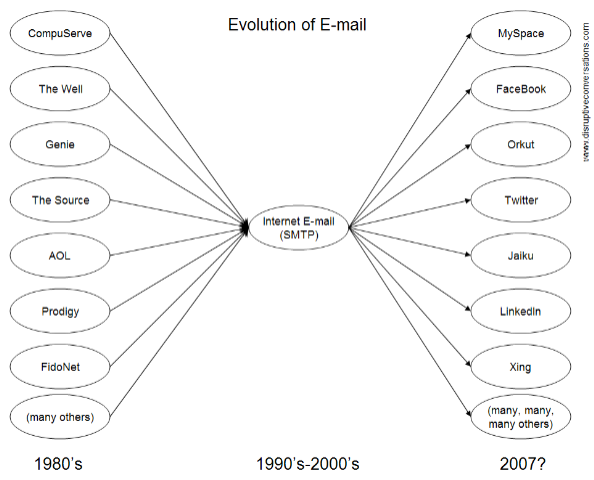
When I started using "the Net" back in mid-1980s, the world of "e-mail" was an incredibly fractured place.  There were the big services of CompuServe, GEnie, The Source, The Well… there were the thousands of small BBS’s… there were "corporate services" like MCI Mail and IBM PROFS… and there were all sorts of others services in the middle (my particular focus in those days was EcoNet, given my involvement then in environmental activism).  They all shared one thing in common:

They were all walled gardens.

Users on the system could only e-mail other users on the same system.  CompuServe users with their (then) numeric accounts could only talk to other CS users.  GEnie users to GEnie users, MCI Mail to MCI Mail… and so on.

But a funny thing happened along the garden path… the walls started to slowly break down.  UUCP started interconnecting UNIX systems.  FidoNet started linking together BBS systems.  X.400 came out and had corporate interest.  And then along came SMTP, which ultimately became the "one email protocol to rule them all" (paralleling the emergence of TCP/IP and the "Internet" as the dominant network in the midst of all the network walled gardens). 

While the fight against the interconnection continued for quite a long time, especially with some of the largest services continuing to try to go it alone, eventually all the services succumbed to the inevitable and provided SMTP gateways that allowed their members to send messages to everyone else. 

All was good – and everyone could send messages to everyone else.

However… a curious thing seems to be happening more and more on this thing we call the Internet.  Increasingly, our messages are NOT moving over what is traditionally known as "email" but instead are migrating to other services.

You could argue that this started some time ago with the walled gardens of instant messaging.  Users of AIM, Yahoo!Messenger, MSN/WLM, Jabber, Skype, IRC, etc. all can have really nice conversations with each other… but no one else.   As IM has continued to grow in usage and replace "traditional" email (which we could argue about why but I personally think it has a lot to do with "presence", but let’s save that for another post another day), we’ve moved to a different messaging paradigm where we write shorter, quicker messages.  And we’ve also become quite comfortable with our IM walled gardens.  It’s routine for people to run several different IM clients (or use something like GAIM that works with multiple services).  Looking down at my task bar, I count 4 IM clients, and I know there are 3 more on my laptop that I could be running.  Now, the walls of IM are slowly breaking down… there’s "federation" now between MSN/WLM and Yahoo.  GoogleTalk can work with Jabber.  Other interconnection services are appearing.

But looking beyond IM, so many conversations now are moving to "social networking services".  The quote I started this article with did not come from any particular place, but it’s the kind of thing that I’ve seen repeated again and again in any interview with teenagers (or even those in their 20s).  The service we know as "email" is today just a "communication mode of last resort" or "least common denominator" to communicate with those too old or clueless. All meaningful communication occurs within the worlds of MySpace, Facebook or any one of a zillion other websites that seem to be popping up on a daily basis. 

And all those sites are chasing each other.  Facebook started out as something of a "college/university version of MySpace"… now it’s added "professional" settings like LinkedIn.  LinkedIn has gone the other way in adding "college" features to attract the college/university crowd.   Orkut started out as more of a dating site and then added other fields and settings. MySpace continues adding new features.  Not a day goes by when there isn’t some notice about a new service that has been launched.

Even Twitter, which I personally use more as a micro-blogging platform, is used as a messaging platform by many.  And the "status" format of Twitter can be found in Facebook as well as newer services like Jaiku.

What do they all have in common?  Simple:

They are all walled gardens.

Each one is a messaging world unto itself.  Facebook users can only see messages from other Facebook users – and only generally when logged into the site.  Ditto LinkedIn…. Xing… MySpace… and others.  Twitter allows the public viewing of messages, but you can also change it to give only updates to friends.  (To "reply" in Twitter, of course, one would need to be a member… and also be "followed" by the person you are replying to.)  Sites like YouTube and Frappr blur the lines by providing messaging as well.

The result, of course, is that like running multiple IM clients, we all have multiple social networking accounts.

How many do you have?

For me, I can remember at least:  LinkedIn, Xing, Facebook, MySpace, Orkut, Twitter, ecademy…  There’s probably a dozen others where I signed up to try it out and then forgot about it.  In each one, I can send and receive messages to and from the other members.  I can post updates and see messages from my "friends".

Interestingly, most all of these sites fall back on that "least common denominator" of good old e-mail to let me know that I have messages waiting for me.  I have to go back to those sites, of course, to read the messages.  Yes, some sites do updates via SMS and some let you subscribe via RSS, but generally you have to go back into the site.

The other intriguing difference is that within those sites, you can generally only see messages from the people you choose to see.  Within Facebook or Twitter, you only see updates from people who you have added as a friend.  Your friends or contacts can send you messages in many services, but others can’t until they are your friend.

We’ve gone from the closed communities of email services to the complete openness of Internet e-mail and now seem to be returning back to those gated communities, with email/SMS helping keep us aware of updates.  Given the amount of spam plaguing email, this may in part a reaction and a desire for purer message flow.

So how do you communicate with others within this space?   Or stay up on what someone is doing?

It’s not enough even to follow someone’s blog anymore, because they may be posting more updates to their Twitter, Facebook or other account.

Given that email may not be the best way, how do you best reach someone?  Which IM service?  Which social networking site?  Which ones do they use?  Which ones do they monitor the most?

In which walled garden do they spend most of their time?

twitter.com/felch and the knee-jerk action of reciprocal "friend adding" – are people just looking for "friends"?

Yesterday I received the standard email that Twitter users get telling me that someone named “felch” had added me as a friend and indicating that I could follow the link http://twitter.com/felch (now dead but worked yesterday) to add the person back as a friend.  Not having a clue who it was, I naturally followed the link and, as I twittered, found that this person had added 7812 friends!  Huh?   Why would you do this?  How could you realistically follow updates from some 8000 people?

I became a bit more suspicious because there was no personal information there about whoever “felch” was and there were only 4 updates with one or two words that were basically trivial or meaningless. Unable to see any reason whatsoever to add this person as a “friend” so that I would wind up following their updates, I didn’t add them…

But at least 929 people did!

That’s the number of “followers” the account had when I noted it yesterday.  I have no idea how many followers the account ultimately had. I was hoping to catch a screenshot to include here, but that account is no longer there… either removed by Twitter admins or, I suppose, removed by the person who created it. (My bet is on the admins, but you never know.)  Why did someone do it?  Was it an experiment to test how many people would blindly add friends?  Was there some other SEO purpose?  Or was someone just bored and looking for something to play around with?

And what about those 900 people – why did they just add someone who: a) they did not know; b) provided no information about themself; and c) seemed to have nothing to offer so far?

Now I suppose I should put it in perspective… at the time I noticed, 6,883 Twitter users had not added “felch” to their friend list.  Of course some may not have yet seen the email and perhaps did later. But if we take those numbers as they were, it amounts to about 12% of the people “felch” added doing a reciprocal add of “felch”.  So the vast majority did not (at the time I noticed)… but 12% did.

Why?

Is it because of the natural sense of reciprocity?  (i.e. if you are so kind as to be a follower of me then I should be a follower of you)   Is it because people are still experimenting with Twitter and so are just adding people who add them?  Is it because people saw no harm in adding someone else to the list of people they follow?  Is it perhaps because it was very obvious that “felch” was new to Twitter and so there was an assumption that he/she might soon start posting real information?  Is is because people just want to have more “friends”? Why?

For my part, I only have a limited amount of “attention” that I can give to things and with so may things clamoring for my attention I am very picky about the amount of “attention clutter” around me.  If you look at my twitter page, there is an assymetry of attention there…  I currently follow 59 people and (for whatever reason) have 93 followers.  For some reason, I didn’t add 34  people.  Now it could be that the email telling me they added me is still in my queue.  It may be that I went to their page, found that I don’t know them, and just didn’t seen any updates of interest to merit adding them at that time.  It may be that when the email came I was just grumpy and not feeling like adding anyone. I don’t know. 

What I do know is that I hardly have time to scan all the other information coming at me in so many ways.  If anything, I am constantly trying to reduce and streamline my information flows to make them more efficient and useful.  So before I do something that is going go take away some attention, such as adding a Twitter friend or adding a RSS feed to my reader, I do give it some thought.  Is it really going to help/amuse/inform me?  Or do I know the person?

But it would seem that some percentage of people just click “add” when offered Twitter friendship.  Why?

Giving Twitter its due… (addition to blog navbars)

If you notice the horizontal menu bar going across the top of this site or on Disruptive Telephony (sorry, RSS readers, you’ll need to actually visit the site to see this), you’ll notice a new addition to the list of the various blogs at which I write (you may have to refresh/reload your browser) … yes, indeed, I figured it was probably time for me to add my Twitter page up there.

I’ve been experimenting with Twitter since the beginning of the year (courtesy of a tip from Chris Brogan) and as Jeff Pulver’s “twitter is…” posting this morning shows, the definition of what Twitter is really useful for keeps evolving. 

For me, I’ve found it a great way to keep up with what some friends are doing… kind of like a RSS reader showing snippets from their blogs… but with occasional personal content.  It’s also been a great source of links to things that are happening “now”. Items that are “breaking news” within the circle of people that I find interesting… along with quirky offbeat things that people throw in as well.  I’ve posted some questions and received some great answers.  I’m not one of the “Twitter addicts” who seem to live on it… but I do check it a couple of times a day (more than I honestly check my RSS reader).  I have noticed in my own workflow that Twitter has replaced the “travel blogging” I used to post to my personal blog when I was on a trip. The ability to easily SMS from a phone helps with that.  I’ve also found it definitely driving traffic to my sites when I’ve posted a link there.  All in all I’ve found it quite useful.

Useful, enough, anyway, that I figured I ought to add it to my blog navigation bars… it is now one of the places I “blog”.

Technorati tags: ,