UPDATE – April 9, 2008: Four months later, I revisited the ways I’ve learned to use Twitter and added a few more.
 How have I learned to use Twitter in my online communication? Let me count the ways…
After Chris Brogan posted his "Twitter Revisited" piece last week and on the same day Jeremiah Owyang talked about popularity and Twitter, I put some thought into how Twitter has substantially changed the ways in which I communicate online. Some of this I talked about in my segment into Mitch Joel’s Yuletide podcast, and some of it listeners to For Immediate Release will hear in my report into today’s FIR.
In this post, I want to lay out in a longer form (< 140 characters!) both why and how I use Twitter. Comments are definitely welcome – I’d love to hear your experience: how do you use Twitter? So here goes…
1. Twitter as a News Source
This morning (US Eastern time) former Pakistani Prime Minister Benazir Bhutto was assassinated. How did I find out? When I sat down at my laptop to start my day and did a quick scan of the recent "flow" of my Twitterstream, I saw tweets from Steve Rubel and Jim Long referencing something going on in Pakistan and then there was a tweet from Nik Butler with a URL. Ta da. Subsequently I watched other URLs being passed around and watched the tweets from Jim indicating that he was enroute to get video of President Bush’s statement (Jim Long, aka newmediajim, is a cameraman for NBC and is currently in the press pool covering the President in Crawford, Texas.) I also learned of the existence of "BreakingNewsOn", which aims to be "your most credible Twitter news source".
Most days are certainly not (thankfully!) so dramatic, but yet this is a very valuable role Twitter plays for me. I learn of new events going on, new services, new sites. How? I follow a wide range of people… many of them are people I do actually know and trust. Others are people I’ve stumbled upon, often by way of those people I trust. Many of them are leaders in their particular fields and are generous enough to share information and links.
In fact, there are many days when I don’t read RSS feeds at all, but instead find myself relying on information passed along through the Twitterstream. Where do these people I follow think I should spend some of that extremely rare thing: attention? Mitch Joel just yesterday referred to Twitter as "the Social Pulse" and it is indeed that.
[TANGENT: Over at ZDNet, Dennis Howlett has an interesting piece about Twitter and the coverage of the Bhutto assassination: "What I have seen today is the convergence of new media forms like Twitter and its add-ons, Seesmic, blogs and traditional TV media providing a powerful example of how important events are going to be reported, dissected, analyzed and ultimately acted upon from here on. Not some time in the future – but now."]
2. Twitter as a Knowledge Network
Another huge use I have found for Twitter is as a "knowledge network". A "network" of people to whom I can pose questions and – usually extremely rapidly – get back responses. Sometimes the questions have been a bit dramatic, such as "Uh oh, left my boots at home. Where can I get cowboy boots in Ottawa?", which, interestingly, took place entirely through using Twitter (and Facebook) while mobile on my Blackberry. Most times it is something more mundane like "what’s a good basic graphic editor for the Mac?" In almost all cases I have had a relatively rapid reply. This works in part because I follow a good number of people (150+ right now), some percentage of whom are checking their twitterfeed at any given time. It also works because people are willing to answer questions – something I do as well in return.
3. Twitter as a Virtual Water Cooler
If you work in an office environment, both #1 and #2 above happen just as a matter of course. I’m sure that this morning in offices across the globe, the word was being passed among the cubicles and offices "Hey, did you hear that Benazir Bhutto was just assassinated?" Perhaps some people stood up and shouted it out. Odds are that if you are a cube/office-dweller you have more than once gone over to someone in a nearby cube/office and asked something like "Hey, what graphic editor do you use on a Mac?" At least when I worked in a cube world, that was very common.
Beyond news and questions, though, there is all the other information you learn just from being in the physical presence of others. When you leave your cube/office to get a drink of water or go to the bathroom… when you walk through the corridors to a meeting… when you go down to the cafeteria for lunch, or out to the smoking area if you are a smoker (I’m not)… when you have all those random encounters with people you learn about other parts of their lives. I learned a bit about building treehouses from a cube neighbor who was building one. I learned about trips to new locations… new foods… new restaurants… new websites or services. I learned about wives and husbands and sons and daughters and family. I learned about sports and hockey (I was in Canada at the time) and politics and religion and all those other things. (And yes, on the negative side these conversations also included "gossip", which was not always helpful.)
From this minutiae of daily life we learn the fabric that binds together the stories of our colleague’s/friend’s lives. We learn their "backstory". We learn what is important to them. Their passion. Their hunger. We are exposed to new topics and new ideas that we might never have discovered on our own. We develop a richer and fuller understanding of who they are as individual people (which isn’t always a good thing, mind you).
If you are a cube/office-dweller, perhaps you never thought about all those trivial conversations in that way, but unless you are unfriendly these conversations are part and parcel of your daily life.
On the other hand, I work in a home office. Alone. For much of the day it is me and these four walls. Two cats are off somewhere in the house but they don’t come into my office. There are many aspects to working in a home office that I absolutely love, such as the fact that almost every day I get to have lunch with my wife and 5-year-old daughter. Or that I can take a break and go chase the ice-cream truck down the street with my daughter… or see her latest creation. I can "timeshift" my work day around to go to events or appointments. I get to participate at a richer and deeper level in her life and that is a wonderful thing to me.
But a downside of working in a home office, to me, at least, is that you don’t get that random social interaction with other people. Certainly IM and video have made it very easy to work remotely. I’ve done a ton of video conferencing (largely because I have a built-in webcam) and it’s all great. But you don’t get the "Hey, did you hear about… " kind of "hallway conversations" that are, for better or worse, part of office life.
Twitter, for me, has wound up providing that role to a degree. From time to time I can take a look at the flow of Twitter messages and see what people are saying. I learn about things. I learn about people. Even from the proverbial "Just had ____ for lunch" you learn about the people and what their story is. I actually don’t mind those mundane posts (well, as long as they are not all I see!) because they do give a sense of the people behind them. I wind up hearing "hallway conversations" with people all over the world. (And yes, the negative "gossip" unfortunately propagates as well… at the rapid lightspeed of Twitter.) Overall, it is to me a valuable role that it fills.
[TANGENT: It would be an interesting research exercise to look and see how many of the top "twitterers" work out of home offices (or work alone in office). Is there any correlation?]
4. Twitter as a way to stay up-to-date with friends
Among the people I follow are certainly some that I have been "friends" with (in the traditional sense before the word became overloaded by social networks) for some time and Twitter has provided a way to stay up-to-date with what they are doing. Yes, I could equally read their blog or website, but Twitter provides an easy – and convenient – way to do this.
5. Twitter as a Travelogue
I travel typically 1-2 weeks each month. Speaking at various conferences. Attending different events. My schedule has been that way for several years. In the past, when I was traveling to places, I would often update my dyork.livejournal.com blog with information about my travels. Where I was going. What flights I was on. If flights were delayed, etc. While I am definitely aware that there is a dark side to doing this, overall it’s been extremely useful over the years.
Today I do this with Twitter. In large part because it’s so incredibly simple to do. Just use the web browser on my Blackberry… or use SMS if the data side isn’t working. Simple. Easy.
The effect of doing this has been quite interesting and useful. I’ve wound up discovering that other people are in the same city I am or attending the same conference (something I’m also using Dopplr for these days). I’ve had recommendations for sites to see or restaurants to check out. I’ve queried the network (#2) for tips or recommendations. I also have to admit I’ve enjoyed the messages of sympathy when I’ve groaned about cancelled or delayed flights. Undoubtedly I’ve turned off some followers who really don’t care that my plane was delayed yet again in JFK… but others have been very helpful.
6. Twitter to Track Conferences
I’ve found Twitter to be immensely valuable to stay up on what is going on at some of the various conferences out there. If I can’t attend one that I thought sounded very interesting, odds are that someone (or several people) may be tweeting about it, often "live blogging" the conference and providing companion URLs. It’s been a great way to stay up… pseudo real-time… on what is going on. It’s also something that I can ignore if I have other events and then just check in on sometime later in the day or at night.
7. Twitter as a PR/marketing Tool
Yes, I admittedly use Twitter as a tool to drive traffic to blog entries I write or web sites with which I am involved. I don’t tweet about every blog post I write. I tweet about the ones that I think might be of interest to those who follow me on Twitter. I’ll obviously tweet about this post (which is way more than 140 characters!). I tweet about the posts where I’m looking for comments. I tweet about those I think might help people.
I know that it has certainly worked, as I’ve seen the traffic come in that way. As I’ve thought about why it works, I refer back to my point #1 above. For those who dive deep into Twitter usage, it can become even more of a news source than RSS feeds and other mechanisms.
8. Twitter as a Learning Tool
Perhaps this really an offshoot of the others, but a distinct use I have found for Twitter is to learn about new topics or new areas to think about. From random tweets from people, I’ve wound up learning about whole new areas of information that I had no previous exposure to. I separate this out in part because it is something of value that Twitter brings to me. Expansion of knowledge for the pure sake of knowledge. A large part of what I do in my work now at Voxeo is to analyze emerging technology… to look at technology from a holistic point-of-view. Being exposed to other areas of knowledge help greatly in that assimilation and evaluation and analysis.
9. Twitter as Fun
Sometimes, you just want to have a little bit of fun. Telling jokes around the water cooler. Sharing that incredibly stupid thing you just did. ("Oops… didn’t mean to do XXXX and wipe out all my work!") Twitter can be that. (Of course, you have to keep in mind that everything you write is (unless you choose for it NOT to be) globally readable and archived by the mammoth Google disk caches… so you do have to be careful what you say.)
10. Twitter as a Daily Lesson in Humility (and Brevity)
As this post should show, when they had the class on "brevity", I must have been out sick that day. I am a writer who loves to write. And I tend to write long. Part of that is my training background. I have this innate desire to ensure that readers completely understand what I am trying to say. So in typical training style ("Tell ’em once, tell ’em again, and then tell ’em a third time"), I may go on too long at times.
This, however, doesn’t translate well into the modern world of the Blackberry. Long, explanatory email messages are out. Short, bullet items are in. If you can’t get your points onto the first screen in a Blackberry, your reader may or may not choose to scroll down. Brief. Concise. To the point. Another day I’ll write my lament about what this is doing to our language… but the net of it is that this is the reality of the corporate world today. We are going too fast with too many messages being thrown at us. We must distill all those complex thoughts into sound bites… bullet items. Distill them down to their very "essence".
Twitter, with its enforced 140-character limit (115-ish if you are going to include a tinyurl!) forces you to think that way. To distill your message down into something short and sweet. Or, admittedly, to cheat and spew out several tweets (or write a blog post and link to it).
Twitter becomes my daily exercise in practicing… brevity.
Uses I did NOT list
You’ll note that I did NOT list "Twitter as a Conversation". Unlike Jeremiah Owyang (see "Some Conversations have shifted to Twitter") or Chris Brogan or Jeff Pulver, I find that I do not really use Twitter as a conversation tool. I don’t expect that I’ll ever be listed highly on Tweeterboard. Yes, I do participate in some "conversations". Yes, I do think of Twitter as a "global conversation". There are, however, a good number of Twitter users who do use Twitter as a kind of giant, asynchronous IRC chat room. In fact, Chris Brogan and Clarence just wrote about this – and the challenges – yesterday in their excellent piece: "Keys to the Gates (of Social Media)". I can see the value in that… and do participate directly in that conversation from time-to-time, but I just don’t find myself doing it all that often. (which, I know, does seem a bit in contrast with some of the uses I listed above)
Another use I did not list that I think is rather cool, but not one I do, is "Twitter as Fiction". Scott Sigler did this wonderfully with his "iPhone War" series of tweets. Eric Rice has done something similar a time or two, if I recall correctly. I think it’s a fascinating use of the medium and I look forward to seeing more people trying such things.
A final note – HOW I *technically* interact with Twitter
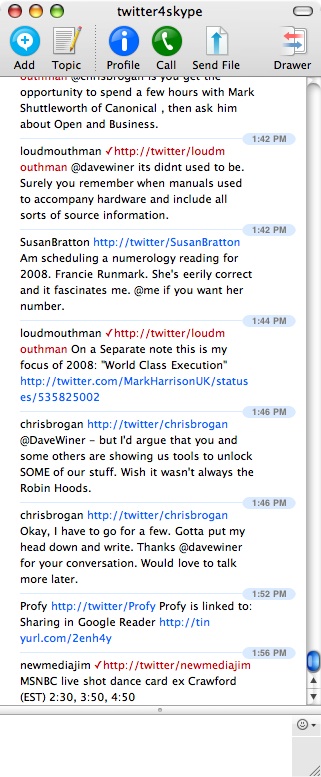 If you have actually read this far along (thank you, if you have! ;-), you might have come to the conclusion that I spend a lot of time using Twitter. The truth is that I really don’t, but I have found a way that works very well for me to fit occasional glances at the twitterstream into my regular daily workflow. The secret of what works for me? Simple… I read and post to Twitter using IM programs. My primary way of interacting with Twitter is through the Twitter4Skype program which connects my Twitter stream to a Skype chat window. So all the posts in my Twitter stream simply wind up as yet another Skype chat window. Posting to Twitter is as simple as flipping to that chat window, typing in a message as you would any other IM message. This has several distinct advantages:
- It is searchable. In the Skype chat window I can search on a person or term and find related tweets.
- You can easily scroll through the history. You don’t have to go back a page at a time… you just keep scrolling back through it.
- The length of the history is open-ended. Skype’s chat windows will preserve all the messages that are received in the window (they are stored locally on your computer) so you can always go back and find messages. (You also can ignore the window for quite a long period of time and then go and scan through it when you finally have the time to do so.)
- When you post, URLs are automagically turned into tinyurls. The window on the Twitter home page used to do this, but now does not seem to do so. Posting via Twitter4Skype does this.
Now, Twitter4Skype does have its issues. Sometimes the server goes offline for a while or seems to need a kick to start sending you messages again, but it works great for me because I use Skype on a daily basis.
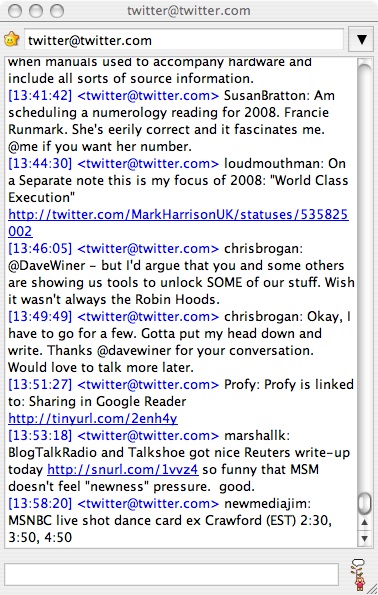 As a backup, I also have a Jabber IM window running that provides the similar functionality. (I just added "twitter@twitter.com" as a contact.) Again, it’s searchable, maintains a longer history and auto-shortens URLs.
That is how I am personally able to integrate Twitter into my daily workflow without it becoming a major time-suck. When I am traveling, I generally use the mobile interface, m.twitter.com, on my Blackberry. Very seldom do I find a need to actually use SMS, although I am set up to do so. This works for me. Obviously, it may or may not work for you.
Wrapping This Up
So there you have my list of how I have learned to use Twitter in 2007. I think there is another topic to discuss at some point about how Twitter and the whole "microblogging" movement, including Jaiku, Pownce and even Facebook status messages, have changed the way in which we write online.
For the moment, though, I’ll end this here. I’ve gone way past 140 characters, 140 words… and probably past 140 lines!
What do you think? Do you use Twitter in similar ways to the ways that I do? Do you use it as a virtual water cooler? How do you interact with Twitter? Do you use the IM interface? web? mobile? Did you, too, miss the class on brevity when it was being given?
Technorati Tags:
blogging, twitter
 Why do you use Twitter? After the folks at Twitter added a “Share Your Story” link yesterday where they are asking people why they use Twitter, this has prompted a number of folks to blog about why they use Twitter. One nice piece was from Paul Colligan: “Why I Twitter – And Why It Just Might Make Business Sense” – and then there was Stowe Boyd’s that I’ll mention later.
 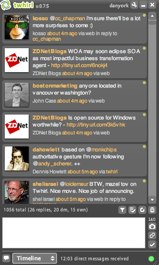 I would also note that the way in with I interact with Twitter has changed dramatically since I wrote that piece in December. At the time, I was reading my Twitter stream in a Skype chat window (or alternatively a Jabber chat window). While that worked great, since that time I discovered Twhirl, and now there is no going back! In fact, I’ve now turned off the notifications in both the Skype and Jabber chat windows. I find Twhirl useful for a number of reasons: