
Category Archives: Blogging

BlogWorld and New Media Expo Coming To New York May 24-26, 2011

BlogworldNews out today is that BlogWorld & New Media Expo is coming to New York this May, finally bringing one of their events to the East Coast of the US. Interestingly it is being co-located with “Book Expo” and they offered this explanation:

Two year’s ago at BlogWorld Leo Laporte said during his talk “We are not new media anymore. Now we are just THE MEDIA”. While we all believe that to be true, many in the traditional media are not convinced yet. Since our inception we have had a couple of Big Hairy Audacious Goals. One of them is to foster and accelerate the convergence of traditional and new media. We can’t think of a single better opportunity to help us accomplish that goal. New York City is the center of the traditional media universe. For four days Book Expo America is the center of the traditional publishing universe. By locating BlogWorld and Book Expo side by side we are bringing the best and brightest from both communities together for the first time anywhere. By the way the folks at Book Expo are just as excited about this as we are.

It will be interesting to see how the program evolves. You can follow @blogworldexpo on Twitter and watch the website at http://www.blogworldexpo.com/2011-nyc/. They note in the blog post that they are looking for speakers.

Kudos to the BlogWorld team for bringing their event to New York and I look forward to seeing how it works out!


If you found this post interesting or useful, please consider either:

New Version of WordPress App for iPhone and iPad has TONS of Fixes

For those of us with an iPhone or iPad, going into the “Updates” section of the AppStore is a bit like Christmas… you never know what gifts you are going to receive! What apps will have updates? What new features will be in them?

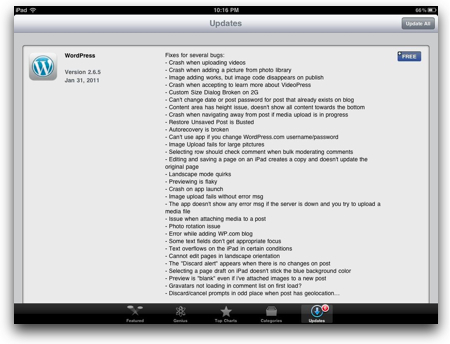
Today’s round of updates didn’t bring many new features for the WordPress app, but it sure did bring a veritable TON of fixes!

wordpressappupdate.jpg

Kudos to the WordPress team for: 1) fixing so many things; and 2) being so VERY open about it. (Other app vendors might have just said “Many bug fixes” and left it at that.)

And if you haven’t tried out the WordPress app for a bit, you should give it a try… I particularly like how well it works on the iPad.


If you found this post interesting or useful, please consider either:


Suggestions for an Offline Blog Editor for the iPad?

on the plane

Have any of you iPad users come across a decent offline blog editor for the iPad? I haven’t yet… so I thought I’d post a note. Here’s what I want to do:

  1. Start writing a blog post when I’m somewhere without access (such as on a plane).
  2. Add some degree of formatting and add in links. Potentially add in pictures as well.
  3. Save that blog post and work on another blog post.
  4. When I finally get somewhere with network access, be able to either hit “Publish” and have all the posts be posted… or at least open up each local copy and press “Publish” to have the post be posted.

On this last point, I want the app to be able to use the various weblog APIs to be able to upload the posts directly to my weblogs.

I’m interested primarily in using plane trips as a time to be generating content. I do this all the time on my MacBook Pro using the offline blog editor MarsEdit, and love to use it for writing posts. The problem is that while MarsEdit is truly an awesome editor, the reality is that the airlines keep shrinking the space you have. It’s a whole lot easier to bring out the iPad and write on it than it is to bring out the full size MacBook Pro.

I’ve tried a number of different apps, but so far not found what I’m looking for. There are some great blogging apps but they seem to assume that you will always have a connection. The WordPress app for the iPad is the closest I’ve seen, because you can create local drafts offline and then upload them… but that assumes you are using WordPress everywhere, which I’m unfortunately not yet doing.

My approach thus far has been to write up text in Evernote on the iPad and then copy/paste that into the web interface for one of my blogs. While that works, it’s not as seamless as I want. I’ve tried a few of the HTML editors, too (because I write most of my posts in HTML, anyway), but again haven’t found an ideal app yet.

Any iPad users found anything like this yet?

Image credit: wader on Flickr


If you found this post interesting or useful, please consider either:

Watching ReadWriteWeb Content Scrapers in Action – Via WordPress Pingbacks

Admittedly it’s been fascinating to watch the content scraping in action…

Last night the great folks at ReadWriteWeb wrote about one of my blog posts (about Node.js) in their “ReadWriteHack” channel. How did I first find out?

One of the spammy sites that scraped RWW’s content sent a pingback to my blog post!

In WordPress, which I use on Code.DanYork.com, a pingback comes in as a comment… and over the next few hours I received more and more… I’m still getting them now. I’ve visited several of them and they are the typical content scraping sites – they take someone’s legitimate high-quality content and surround it by various ads (and without any links back to the original article)… hoping you will find their site first. These are the kind of sites that Google needs to keep working on devaluing (and they are).

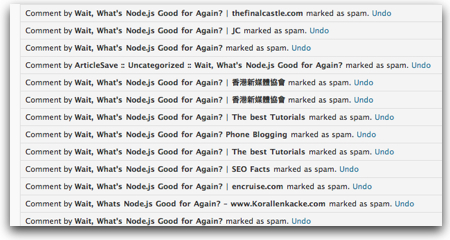
You can see here some of the ones I’ve already killed as spam:

contentscrapers-1.jpg

Now, I’m sure this is not all of the sites scraping RWW’s content… I can see many other links in a Twitter search that certainly could be spammy sites, too.

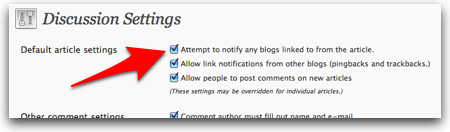
I do wonder whether these sites wanted to send a pingback or whether they just installed WordPress and kept the default checkbox checked:

discussionsettings.jpg

It very well may be that they do want the pingbacks, as they would appear as legitimate comments on my site which might then drive traffic over to them. They might be trying to game SEO, but WordPress sets all the comment links to rel='external nofollow' which will kill any SEO value.

Regardless… it’s been interesting to watch… and, frankly, as a content creator myself, sad to see. But it is just another facet of this world of online content we live in today…


If you found this post interesting or useful, please consider either:

Will OnSwipe Give You A Flipboard For Your Own Blog?

Viewing this post and video from TheNextWeb today, I couldn’t help but wonder if OnSwipe will be like Flipboard for your own blog? The video makes me think it is perhaps some type of WordPress theme that would reformat your content for an iPad in a similar fashion to all the various themes that will reformat your blog for a mobile browser like the iPhone.

But is it purely a theme for WordPress? Or is it a hosted service? That’s not clear from the video… and you can only sign up to be notified of the beta whenever that will happen.

Regardless, I definitely like what I see here! Being a heavy user of the iPad, I’d love to present my content in a format like this…

The Next Web / OnSwipe Interview from The Next Web on Vimeo.

What about you? Would you like a service or tool like this that took your existing content and made it look awesome on the iPad?


UPDATE: In the comments to TheNextWeb article, founder Jason Baptiste (shown in the video) says this:

We no longer and won’t be offering the Flipboard look with OnSwipe. That was a technology demo we did previously as PadPressed.

Too bad on one level as I definitely like the look, but yes, it does conflict with what Flipboard already offers. It will be interesting, then, to see what they come up with…


If you found this post interesting or useful, please consider either:

What’s new in WordPress 3.1? Watch this tour of screenshots…

What’s new in WordPress 3.1 that is currently in beta? How is it different from WordPress 3.0? My friend Sallie Goetsch recently gave a presentation to the East Bay WordPress Meetup (in the San Francisco area) and made her slides available via SlideShare:

It’s a nicely done tour that can help all of us who are using WP to see what is coming up in the next release! Thanks, Sallie, for putting it together.


If you found this post interesting or useful, please consider either:

Want to get blog comment spam? Perhaps get on the first page of Google search results

It seems that a quick way to get a blog post loaded up with spam comments is to get it up on the first page of Google search engine results. Or at least, that’s how it appears to me.

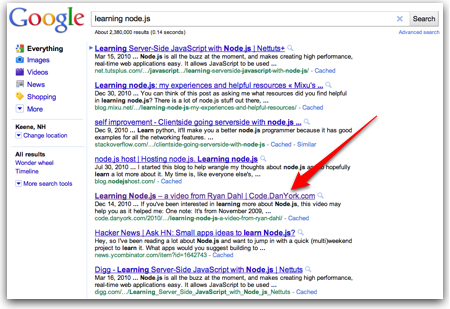
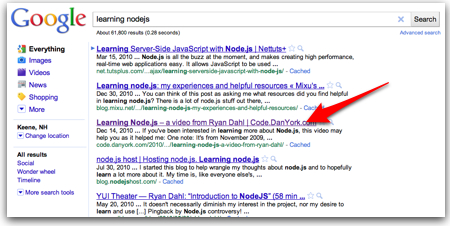
Recently I started getting a lot of comment spam, almost daily, on one specific post I wrote on Code.DanYork.com, a blog where I write about programming and other developer topics. It puzzled me because that particular post was really just an embed of a video and wasn’t very deep or detailed. A trip into Google Analytics, though, showed that a significant driver of the traffic to that post were the Google search keywords “learning node.js” and “learning nodejs“. So I popped those into Google and sure enough, there I was… #5 for “node.js”:

learning node.js - Google Search.jpg

And #3 if you drop the period and do “nodejs”:

learning nodejs - Google Search.jpg

So perhaps, I thought, that was the reason that post attracted the comment spam when none of the other posts did…

But that doesn’t really answer it to me. When I head over to the AdWords Keyword Tool, the reality is that pretty much almost no one is searching on those particular terms! So even though my post may place highly in the results, it doesn’t really matter because only a trivial number of people are actually searching for that term.

I should note, too, that none of the blog comment spam had anything whatsoever to do with Node.js. It was all the typical comment spam linking to various silly products… watches, pharmaceutical products, websites, etc.

In the end, I don’t know… perhaps some comment spammer is trying to post comments on blogs that have long-tail terms related to topics getting buzz these days. (“Node.js” is a hot topic in developer circles right now.) Perhaps that particular post just got tweeted or retweeted and caught someone’s attention.

On one level, it doesn’t much matter to me, since I moderate all comments from people who haven’t commented before. So the comments are going live on my site… it’s more just the annoyance of having them come in (and a number of them are not getting caught by Akismet).

Still, it’s a curiousity… why that post? I’ll probably never know…


If you found this post interesting or useful, please consider either:

2011 Target: 365 Days of Blog Posts

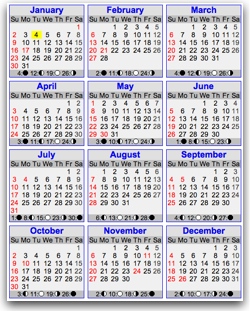
2011calendar-1.jpgAs part of my 3 Words for 2011, I’ve set myself an aggressive personal goal for my “CONTENT” focus…

I want to publish at least one blog post every day of 2011.

To define that a bit better, my target is to publish at least one post across my personal blogs:

(and any other personal blogs I launch in 2011). I’ll also count any videos I upload to my personal YouTube account.

Additionally, I’ll certainly publish posts at the Voice of VOIPSA blog and will be steadily churning out content over on Voxeo’s blogs… but I’m leaving those sites out of my count.

Now the reality is that many days I’ll probably publish more that one post across those four blogs… but there have been many days in the past when I haven’t published any posts at all. And I generally have not been publishing any posts on most weekends.

To do this will take some discipline. I’ll also be using the “scheduling” feature of my various blog platforms to schedule posts on weekends, vacations and when I’m traveling.

WHY am I setting this target? Partly just as a target to aim for. Partly to force myself to clean out the very large queue of blog post ideas I have. Partly to force myself to write and not get lost in all the distractions we have today. And partly as purely an interesting exercise to see IF I can do it.

Let’s see how it goes… the good news is that you all will be very able to see whether I hit that target! 🙂


Note: Calendar image from Timeanddate.com


If you found this post interesting or useful, please consider either:


Great Content Matters! – The Atlantic on the Unknown Blogger Who Helped Explain WikiLeaks

WikiLeaks.jpgThe Atlantic has a great story out on “The Unknown Blogger Who Changed WikiLeaks Coverage“. The Atlantic’s article is a profile of Aaron Bady and his lengthy piece, ‘Julian Assange and the Computer Conspiracy; “To destroy this invisible government”‘, that did do much in explaining the underlying motivation of Julian Assange.

I remember reading Bady’s piece back in the midst of everything going on and viewing it as one of the more intellectual and useful analyses of the underlying thinking behind WikiLeaks. Like I’m sure most readers, I had no clue who was behind the actual article – nor did I take the time right then to go learn more about who he was.

Given that the Atlantic piece is rather short, I won’t steal their thunder and leave it to you all to read more. But I will quote this one bit:

And we should all be thankful that good writing can be recognized and quickly disseminated.

That is indeed the beauty of this new world we are in… anyone can publish their thoughts online, without the gatekeepers of the traditional media…. and maybe, just maybe, they, too, can wind up having the global impact that this one “unknown blogger” had.

Kudos to the Atlantic for getting the rest of the story.


If you found this post interesting or useful, please consider either:


Note to PR People: PLEASE INCLUDE A LINK TO YOUR RELEASE!

/doh

It happened again today… I received a news release via email from a PR firm that had some great news in it about which I want to write (and I will). However, there was one fundamental problem:

THERE WAS NO LINK TO THE NEWS RELEASE!

Not in the email from the PR firm. Not on the company/organization’s website. Nowhere!

Here is the thing:

I WRITE CONTENT ONLINE!

I LIKE TO ***LINK*** TO OTHER ONLINE CONTENT!

When writing about news, I generally like to include a sentence along the lines of:

Today Company XYZ announced that …

with a link to the news release.

Help me out here… give me a link and I’ll link to it!

To me, this should just be part of PR 101. (And I do this myself… when I sent out a Voxeo news release this morning, I made sure that a copy was available for linking online from our news release page… and I’m also distributing that link in our media outreach.)

When you send me an email with a news release either in the email itself or as an attachment, please also include a link. Don’t make me go search for it… if I care enough, I might… but odds are that I won’t… and maybe that means I won’t write about it.

Now maybe this means that you have to coordinate with whomever manages your website so that the news release goes live on your site at or before the news release hits the wire. Maybe this means that someone has to come in earlier than he or she normally does – or sign in remotely.

Do it!

Get that URL out there on your site. Or if you can’t do that, at least send out the URL for where your news release is at the wire service you are using. (And I would argue to make it happen on your site so that you are driving the traffic to your site and content, versus that of the distribution service.)

And then send out that URL along with the news release!

Flickr photo courtesy of striatic.


If you found this post interesting or useful, please consider either: