Category Archives: Blogging

My 2 Favorite Things about the WordPress 3.1 Admin Bar

Having now worked with WordPress 3.1 for a good while on my personal sites (and just recently rolling it out across all Voxeo’s blogs), I have to say that one of the features I thought would be big definitely is: the Admin bar.

Here are my 2 favorite things:

Wp31adminbar

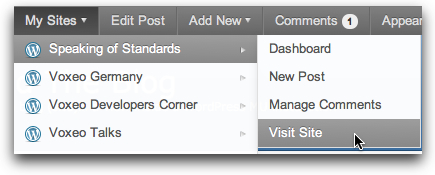
On a site like the Voxeo blog site, I literally working with 20 blogs. The ability to rapidly switch between those sites using the “My Sites” menu on the admin bar is HUGE. Further, I love that you can switch not just to the admin backend for the sites, but also to just view the site or to quickly create a new post:

Mysites

My second favorite thing is the “Edit Post” button (which becomes “Edit Page” on a WordPress “Page”). This is wonderful because if you are looking at a post or a page and see something that needs to be fixed, you are just one click away from fixing it. Sure, you could always do this in the past in most themes from a “Edit post” link in the footer… but first you had to scroll down and find it.

These two features alone have made me incredibly happy to have upgraded my sites to WordPress 3.1. The third favorite feature would be the ability to manage comments very easily from the admin bar… which is also very cool.

If you haven’t upgraded WordPress to 3.1 yet, I’d definitely encourage you to consider it. Well worth it, in my opinion.


If you found this post interesting or useful, please consider either:


The Automattic WorldWide WP 5K: Are You Going To Run It on April 10th?

rundanrun.jpg

Given that to my great amusement I am now a runner[1], I love the idea that Automattic had for a WorldWide WordPress 5K. As they say in the post:

We had a great idea: Get all 80 Automatticians from 62 cities to run/walk a 5k on the same day! This way we can get some exercise together as a company even though we’re apart (though we won’t rule out a softball or Texas scramble at our next meetup).

We want to invite you to join us, WordPress.com users (and self-hosted WP users, too!), in the Worldwide WP 5k – the 5k blogged around the world! The date is approaching, so read on to find out how to participate.

And so they are encouraging people to run (or walk or skip or roll) on Sunday, April 10, 2011… or anytime in the week prior to that. And, of course, blog about it or otherwise tell the world about it.

Naturally, I’m in. 🙂

Of course, since I just ran a 5K loop around Keene, NH, this morning the distance will no longer be a challenge for me… I’ll just make sure that that Sunday is one of my “run” days. (I run every other day.)

[1] And if I can now be a “runner”, I think pretty much any of you can be one, too… as my post says, I didn’t set out to become one, and never pictured myself as one… it was just the natural evolution of deciding to start exercising every day originally in the form of walking…

MarsEdit v3.2 Released – Continual Improvements for Offline Blogging on MacOS X

MarseditThis week, Daniel Jalkut over at Red Sweater Software released version 3.2 of his MarsEdit desktop blog editor and while the release notes show really just minor additions:

  • New Word Count feature displays in post status bar
  • Now reads previously used Tags from WordPress on refresh
  • Now more resilient to malformed XML and “bad characters” in downloaded posts
  • Performance improvements in media browser and autosave features
  • Now code signed to prevent need for re-authorizing keychain access every release

… the truth is that they continue to show the ongoing improvements to what is already an excellent desktop blog editor. For instance, the word count in the status bar may be a minor thing, but it’s very cool to know how long your post is in terms of word count.

Yes, it’s commercial software that you have to pay for. But if you use a Mac and write across multiple different blog platforms like I do, MarsEdit rapidly becomes a key part of being able to crank out content on a consistent basis.

Sometime I really need to do a screencast to show why I like using it so much…

Anyway, if you’re on a Mac and do a lot of blogging, do check out MarsEdit if you haven’t already.

P.S. And no, I don’t have any kind of commercial relationship with Red Sweater… in fact, I paid them for the software. I’m just a very pleased user!


If you found this post interesting or useful, please consider either:


One Simple Example of Why We Need Akismet and Other Anti-Blog-Comment-Spam Services

Need I say anything more beyond this actual comment received on one of my blogs today?

Hi, i just wanted to come here to show you about a super cheap service that posts comments such as this on millions of WordPress blogs. Why you may ask, well you may want to sell a product or service and target webmasters or simply just improve the amount of backlinks your web site has which will improve your Google rankings which will then bring your website much more visitors and cash. Take a quick look at this website for much more info.

Naturally I will not include the link to the spam service.

These are the kind of services that need to be blocked, because they seriously pollute the conversations out there. I run blog comment anti-spam services on all my blogs – and/or moderate all comments – precisely because of this kind of garbage.

It’s a shame that we have to… because it potentially puts blocks (or at least delays) in the way of conversations… but we do.


If you found this post interesting or useful, please consider either:


Why Is India’s Dept of Telecom Blocking All TypePad-Hosted Blogs?

typepad.jpgWhy is India’s Department of Telecom blocking all blogs hosted on TypePad? What could they possibly accomplish by doing this?

Tonight Stuart Henshall contacted me on Skype IM to let me know he couldn’t reach my Disruptive Telephony blog from Mumbai, India to read my recent post about Google Voice and SIP addresses. The site was very definitely up, so I asked him if he could see this Disruptive Conversations blog. Nope. Danyork.com? Nope. All of which are hosted on TypePad. Stuart could see my Code.DanYork.com site, but that’s separately hosted on a standalone WordPress install.

Wondering if this was a block on all of TypePad, Stuart tried

(I just pulled those off TypePad’s list of “showcase” blogs and gave them to Stuart to try.)

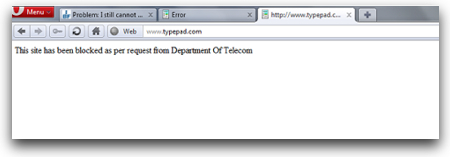
Given that Stuart uses “Airtel Broadband” in India, he did a quick search online and found this report in an online forum that Airtel was blocking TypePad! The forum included this response with a graphic clearly showing the problem:

Typepadblocked

The text says:

This site has been blocked as per request from Department of Telecom

And all I can say is:

HUH?

I mean, yes, I know that India’s Department of Telecom has been blocking VoIP calls since Feb 2009, so sure, I could maybe see an argument for blocking my DisruptiveTelephony site since I talk about Skype and other VoIP services (but would the Indian Dept. of Telecom really notice my little blog? Seems a stretch). But blocking Seth Godin? Come on!

Even better… blocking the National Geographic blogs? I mean… Hello? What has NGM ever done to India? And I guess there is the assumption that no one in India will want to read news from Marriott? Or from any of the 10s of thousands of other people writing blogs on TypePad?

Curiously, Stuart could get to the main page of www.typepad.com, something that others mentioned in the most recent posts to this online forum, but he couldn’t get to any of the actual blogs hosted on TypePad.

So what’s up? Why can’t people in India read any of our blogs? (And TypePad folks, are you talking to the Indian Dept of Telecom about this?) It seems crazy for a country to block an entire hosting provider!

I’d say that “if you are reading this in India, please contact your government”… but obviously that’s the point, you can’t read this in India. I guess if any of you reading this outside of India can somehow clue people inside of the country to this problem, perhaps they can be asking questions of the Dept. of Telecom.

Meanwhile, if you are in India and you click on one of the links in my tweets and find it doesn’t work… well… it was probably a link to one of my blogs on TypePad! (Not that you’ll ever know, since you can’t read this post.)

UPDATE – 3/9/11: Aswath Rao reminded me on Twitter last night that in this post I am only reporting that one ISP in India is reporting that the government of India has asked to block certain sites. His contention was that you could not jump to a conclusion that all of India is blocking access to TypePad. He is correct in that, although in IM’ing with Stuart Henshall he indicated that he had heard of similar blockage by other ISPs. Regardless, the point is that for at least some number of people in India, TypePad is blocked.


If you found this post interesting or useful, please consider either:


365 Days of Blog Posts in 2011 – Missing The Goal On Day 64

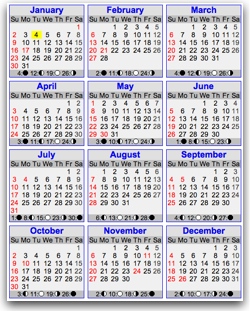
2011calendar-1.jpgOuch… I was doing so well… I have been well on my way toward my goal of 365 days of blog posts in 2011. I published a blog post every single day of January and February, including the entire week I was on vacation.

And then I blew it and missed the goal instead on just a regular, mundane Saturday…

I did NOT publish a blog post on Saturday, March 5, 2011.

Not on any of my personal blogs… not on any of Voxeo's blogs… nowhere. 🙁

Now, yesterday I did create my weekly audio report for the For Immediate Release podcast, but that doesn't count since it won't actually be online until Monday. I did post some photos to Facebook and post some status updates there. I did put out a few tweets, too…. but none of the longer-form content on my blogs that this goal was all about.

I could, of course, rewrite history a bit and publish a post today that was dated yesterday. None of you would know just from reading the blogs… but of course that wouldn't be honest and, besides, close examination of my Twitter stream would show that I didn't publish any posts (and… (gasp!)… I only tweeted twice yesterday). 🙂

I can't claim it was any big distraction… it was just a regular Saturday. I was exhausted after a crazy week of travelling and was just enjoying my first full day back with my family. Doing some errands, taking a small road trip to see a local curling club, hanging around the house… just reveling in the normalcy of time at home. And completely spacing the fact that I didn't have a post queued up to go out.

And that's the key that has helped me achieve my goal thus far:

I have been scheduling my posts out several days in advance.

Acting on my own advice, I have been writing posts and queuing them up across my blogs. In effect I have had a blogging "buffer" that worked great for days like yesterday when I got busy and didn't think of writing (or thought about it, as I did several times, but didn't do it). For my vacation week, I had almost all the week queued up in advance for both my own blogs and the Voxeo blogs. I have had a queue of posts to go up online and then have added more posts that have been responding to breaking news or events. It's been working great.

So what happened?

Well, I unfortunately let the queue of written posts run dry. It certainly wasn't from lack of ideas… my brain continues to be constantly exploding with ideas. But I hadn't turned those ideas into actual written posts… which was exactly the discipline that this 2011 goal was all about.

So what now?

I will continue, of course. The goal will now be for 364 days of blog posts in 2011… and if I don't blow it again and continue the process into 2012 perhaps I will be back here on March 6, 2012, writing about how I wrote posts for an entire year!

I wondered if I could make it the whole 365 days… but didn't expect to miss it on day 64. Ah, well. (On the other hand, I had a truly wonderful day with my family yesterday, and at the end of the day that is what is most important! 🙂


If you found this post interesting or useful, please consider either:


The Best Comment Spam I’ve Ever Received… (That Made Me Laugh)

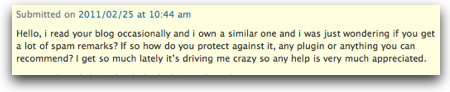
I just had to laugh when I received this comment to one of my blogs (pointing to a spammy site that has left many spam comments before):

Commentspam

There’s an exquisite irony to receiving a spam comment asking about spam… 🙂


If you found this post interesting or useful, please consider either:

Oooo, shiny… WordPress 3.1 Gives Easy Internal Linking, Admin Bar, More…

The big news in the WordPress world this week was the release of WordPress 3.1 with all the goodness a new WP release brings. The release blog post and the more detailed entry in the WordPress Codex mention a number of features, but two that I definitely like are:

1. The New "Admin Bar" – This shows up on the top of your WordPress window and does indeed give you easy access to common functions. When you have comments, the number of comments shows up to the right of the word "Comments". Seems to be quite nicely done.

Wp31 adminbar

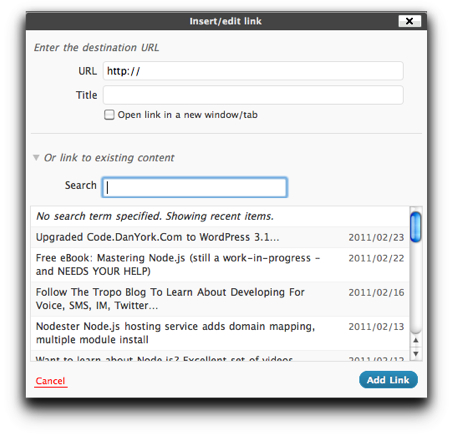
2. Internal Linking – Hooray!!! If you are writing frequent blog posts, like I do, and want to easily reference older blog posts, it's always been a bit of a pain to have to find and reference those older posts. Now, when you use the visual editor in WordPress 3.1, you can simply select the text and click the link icon in the editor. The standard window to insert a link pops up, but with a new option "Or link to existing content". You can then simply search through your older posts (or choose from your list of most recent posts). Click the post you want, press "Add Link", and… ta da!

Wp31 internallinks

This is truly an awesome capability for those of us who want to frequently reference older posts.

The blog post announcing WordPress 3.1 references a number of other goodies, including improvements to the "Network" support, that I'm definitely looking forward to trying out.

If you use WordPress and have upgraded to 3.1, what do you like the best?


If you found this post interesting or useful, please consider either:


365 Days of Blog Posts: How Did I Do in January 2011?

365posts jan2010Given that I publicly set myself a goal to write at least one blog post every day of 2011, it’s only fair to check in on that goal and see how I’m doing.

How did I do in January 2011?

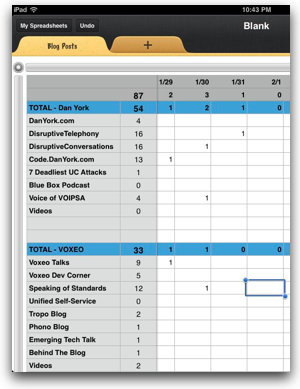
Well, the image on the right shows the picture. In the 31 days of January, I published:

87 total blog posts, of which:
54 were on my personal blogs – 1.7 / day
33 were on Voxeo blogs – basically 1/day

And for my personal blogs, I did publish at least one post on each and every day of January.

Now, my original goal was just to track what I published across my personal blogs… and that’s still my overall aim. But I figured it couldn’t hurt to also track the Voxeo blogs and see how I do there.

I should note, of course, that this Voxeo number is not all the posts across all the Voxeo blogs – it is all the posts that I wrote. There are other contributors, although my posts do make up about 2/3 of the content that we publish (but, gee, that’s my job at Voxeo :-)).

So… yes, I hit my target for the month of January. Let’s see if I can keep that going all the way through February, particularly given that I’m taking a week of vacation.

For those interested, I’m simply manually tracking the number of blogs in a Numbers spreadsheet on my iPad. I toyed with creating a script that would count up my Friendfeed feed or something like that… and maybe I’ll build some kind of counter like that this year… but at the moment I’m just using a spreadsheet on my always available iPad.

Fun stuff… the challenge continues…


If you found this post interesting or useful, please consider either:


Do You Need to Hit The Publish Button RIGHT NOW?

PublishbuttonDo you need to publish your blog post right when you finished writing it? Right at that precise moment?

Or could it wait to be published for an hour? or a day? or even a week?

Could there be a better time to publish this particular post? Or a better day of the week?

When you finish writing a blog post, it is tempting to just hit the “Publish” button right at that moment because, well…

you’re done!

Or at least… you think you are.

You want to just get the post out.

Move on to the next post coming out of your brain.

But when you are about to hit that button…

STOP!

For just a moment… and ask yourself…

Does this post NEED to go out right now?

Maybe it does… maybe you are breaking some news or chasing a topic that is breaking on a site like Techmeme…. maybe time is critical. Maybe you’ve set a personal goal and need to hit it (been there, done that).

But maybe it doesn’t. Maybe if you let it sit overnight or for a day or two you’ll have some additional insight to add. Maybe you’ll see a better way to word the post if you look at it again later. Maybe you’ll spot that typo that you just didn’t see in the heat of writing the post.

Maybe you can instead schedule the post to come out at some future time. Instead of having a spiky publishing schedule where posts come out at whatever random moments you write them, you could have a more consistent schedule where posts come out every day or every couple of days.

Most blogging platforms have a scheduling feature, and there are even some great tools like the Editorial Calendar plugin for WordPress (see also another review I wrote about it) that give you a view of what you have coming out when. (I use it and definitely like it.)

Admittedly, I struggle with this concept myself… it is soooo tempting just to press “Publish” and get your content out there… but if you pause for just that moment, it may in fact wind up working out better for you!

What do you think? Do you schedule posts? Or do you just hit Publish? (Or will you now try to schedule some posts?)

P.S. This post was in fact scheduled for a future time… even though I was sorely tempted to just hit that dang “Publish” button!


If you found this post interesting or useful, please consider either: