Category Archives: Blogging

Do You Hook Your Reader From Your Opening Sentence?

Question Mark

Do you reach out and grab your reader by the throat from the very first line of your text? Do you evoke some mystery or emotion in your first sentences that makes the reader NEED to learn more? Do you make them ask “WHY?” or “HUH?”

Three Examples of Powerful Openings

Recently in talking about this topic with someone I randomly grabbed three popular novels that I had nearby and to no surprise all three of them had powerful openings. Consider these examples:


Foreign Influence
by Brad Thor[1]

Inner Mongolia

The strategic military outpost was such a closely guarded secret it didn’t even have a name, only a number – site 243.

It sat in a rugged windswept valley far away from cities and centers of industry. Its architecture was minimalist; a cross between a high-end refugee camp and a low-rent university. Tents, trailers and a handful of cheap concrete buildings made up its “campus.” The only outward signs of modernity were the Pizza Hut, Burger King and Subway mobile restaurant trailers which made up the outpost’s “food court.”

It was just after three a.m. when the attack began. Lightweight Predator…


Right away the use of “Inner Mongolia” means to most of us that it is somewhere very far away and remote. The first sentence immediately makes you wonder “what is so secret?” Who operates this base? What kind of “strategic military outpost” is it? The second paragraph is just a bit of description but then the third sentence drops you right into a conflict. Who is attacking it? Why?


Angels & Demons
by Dan Brown[1]

Physicist Leonardo Vetra smelled burning flesh, and he knew it was his own. He stared up in terror at the dark figure looming over him. “What do you want?”

“La chive,” the raspy voice replied. “The password.”

“But… I don’t –“

The intruder pressed down again, grinding the white hot object deeper into Vetra’s chew. There was the hiss of broiling flesh.


That very first sentence immediately causes you to want to know “WHY?” Why is his flesh burning? Who is doing this? Who is this physicist? What is the password for? Who is the intruder? Why is flesh burning? Plus you have the evocative emotion of flesh burning, something against which we can all recoil in horror.


A Storm of Swords
by George R.R. Martin[1]

The day was grey and bitter cold, and the dogs would not take the scent.

The black bitch had taken one sniff at the bear tracks, backed off, and skulked back to the pack with her tail between her legs. The dogs huddled together miserably on the riverbank as the wind snapped at them. Chett felt it, too, biting through his layers of black wool and boiled leather. It was too bloody cold for man or beast, but here they were. His mouth twisted…


The dogs would not take the scent… of what? Why are the dogs acting this way? What is causing this behavior? And for those who have been reading this series of books (this is book 3 of 5), who is this “Chett” character? And why are he and they out in this cold?


Does Your Text Do This?

All three of these openings pull the reader in. From the very first lines you NEED to know more. You want to continue. You are hooked from the start.

Does your text do this?

Whether you are writing a news article, a book, a blog post, a novel, a short story… or whatever… do you hook your audience from the start?

If not, how can you change your piece so that you do hook them? Can you write a more powerful opening? Can you set up some mystery? Can you evoke some emotion?

How can you leave them wanting… indeed NEEDING… to read more?


Image credit: Boris SV on Flickr

FTC Disclosure: These links to the books include my Amazon Associates ID and as a result if you actually were to purchase one of these books I might earn a few pennies. If you think this has anything whatsoever to do with me mentioning these books, I can assure you it doesn’t.


If you found this post interesting or useful, please consider either:


How Meta Can You Get? A Blog Spam Comment About Spam

/doh

Loved checking my email this morning and seeing this comment submitted to one of my posts on this blog:

Can you recommend a blog comment anti-span service? I’ve basically abandoned my blog because of all the comment spam.

The comment was, of course, spam!

The “name” of the commentor was “buy _____” (I’m not going to give them the dignity of saying what the product was), and the URL was a completely spammy URL.

You wonder if the person/people behind it understand the irony and are just out there somewhere chuckling wondering how many sites will actually post their comment as a legitimate comment…

P.S. And unfortunately TypePad did go ahead and publish this comment despite the spammy name and URL and so I had to remove the comment…


If you found this post interesting or useful, please consider either:


MarsEdit Offline Blog Editor For Mac OS X Has a New (Minor) Version Out

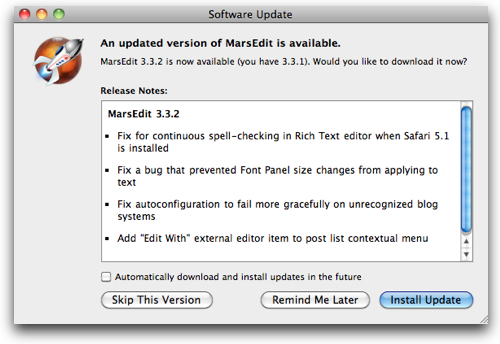
Yesterday Daniel Jalkut released a minor update to MarsEdit, my favorite offline blogging tool, and while the 3.3.2 release itself was really just about bug fixes, I thought I’d mention the tool again here on this blog for those who may have recently moved to Mac OS X and are looking for an offline blog editor. I’ve written about MarsEdit a number of times before and continue to find it probably the program I use the most on my Mac outside of email and web browsers.

Granted, I write across a lot of blogs… but that’s the point! MarsEdit gives me a consistent editing interface across all the blogs, no matter what platform they are running on. I also never have to login to any sites because I’m doing all the editing on my local Mac. For the same reason, it’s very fast to get in and start editing… and I can easily drop in graphics… and everything else I want to do to write posts.

If you are on a Mac and write blogs posts, do check out MarsEdit. Yes, it’s NOT free software… but I’ve found it well worth the price.

Marsedit332

P.S. I have no financial relationship with Red Sweater Software other than being a happy customer, i.e. I am not getting any compensation or anything else if you buy the software.


If you found this post interesting or useful, please consider either:


Do You Have A Favorite Time of Day To Write? (And What Happens If You Miss It?)

Clock

Do you have a favorite time of day when you like to write your blog posts or other online content? What happens to you when you can’t write during that time?

Yesterday (Wednesday) morning, I found myself just a bit jittery in the morning and seemingly out-of-sorts. I couldn’t quite figure out what was going on… and then it hit me:

I was missing out on my “normal” writing time!

You see, my wife is recovering from breast cancer surgery and during this period she can’t do things like, oh, lift up our 2-year-old daughter and change her diaper! Or simply hold our 2-yr-old if she falls … or just wants to be held. (Needless to say, this is immensely frustrating for my wife!) Or reach up into kitchen cabinets to get plates or glasses. Nor can my wife drive right now with her limited range of motion.

The result is that for this week my mornings prior to 9am have been spent getting both kids ready and off to camps or friends. (Our 9-year-old has been in a day camp and our 2-yr-old has been visiting each day with friends or family.) Plus all the other typical morning activities in a household.

Now, don’t get me wrong… I am definitely glad to help in doing all this. My wife has been making an amazing recovery and each day she’s getting better and better. It’s no big deal for me to do what I’m doing to help her out – and I’ll keep doing it as long as she needs me to do so.

What I didn’t expect was the disruption to my own habits by starting my work day one hour later.

Here’s the deal… for years now I have always started my formal “work day” around 8:00 am. And yes, I’m often checking email and Twitter, etc. before that time… but 8am has generally been the time when I go “into my office“.

And what’s the first thing I do when I go into my office?

Write!

Indeed, I have formally blocked off 8-9am every morning on my calendar as “Blogging Time“. It is a time when I try my best to just FOCUS on writing.

Before getting sucked into the zillion Skype group chats that are part of my IM-centric company.

Before getting sucked into my email inbox.

Before getting sucked into the mega-timesuck that is Twitter/Facebook/Google+/whatever.

Before getting sucked into whatever Voxeo projects are on my plate for that particular day.

Before any of that… I try… to just spend an hour where I’m entirely focused on writing.

Typically my focus is on cranking out at least one post for Voxeo’s many blogs and then often a post for one of my many other blogs. My goal is to try to always have a queue of posts that will be going out over time to keep content flowing out online. (Confession: right now with everything going on, I don’t! My queue of written posts is empty – tons of ideas, no text!) Sometimes my focus is on an article for some other site… regardless, I try to spend that time writing.

Sometimes that block of time stretches on beyond an hour… maybe it turns into a couple of hours. Sometimes it winds up only being 15 or 20 minutes before something high priority interrupts the time.

This week, though, I haven’t had that block of time in the mornings. And to my chagrin I’ve found that this does have an effect on me. 🙁

Now, the effect on me will be temporary as next week we don’t have quite the same schedule of camps and such and I’ll probably be able to resume my early writing block. And if it’s not next week it will be the week after…. or somewhere in here as my wife keeps getting better. So I’m not too concerned in the grand scheme of things.

But this whole episode has made me realize just how important that little block of time has become to me!

How about you? Do you have a favorite time of day to write? Have you formally blocked out a period of time? Or do you just try to catch some time when you can? Does it bother you when you can’t write?

Image credit: kobiz7 on Flickr


If you found this post interesting or useful, please consider either:


365 Blog Posts In The First 146 Days of 2011….

Yesterday I passed a milestone in writing for 2011… I posted my 365th blog post across my own network of blogs and Voxeo’s blogs. Doing the math, that works out to an average of 2.5 blog posts per day for the first 146 days of 2011.

If you go back to the goal I set for myself in January, my aim was for 365 DAYS of blog posts. I missed that actual goal by dropping a day in March and in truth I also didn’t post for an entire weekend in April.

Regardless, the average seems to be pretty good! 🙂

And admittedly, it was kind of fun to look yesterday at the spreadsheet I’ve been keeping to track my blogging activity and realize that I was going to pass by the 365 mark.

And now… the writing continues… (this post is actually now my 367th…)


If you found this post interesting or useful, please consider either:


How To Use Flickr’s Advanced Search To Add Creative Commons-Licensed Photos To Your Blog Posts

Gamma Ray Gun

I love to add photos to blog posts. Choosing the right image can add to the feeling of the post… or can help emphasize the point of a post. Sometimes, they can just help visually break up what would otherwise be a big wall of text.

When you want to use a photo for your blog post, though, you can’t just go grab any random image off the Internet.

JUST BECAUSE A PHOTO IS POSTED ON THE INTERNET DOES NOT MEAN YOU HAVE THE RIGHT TO USE THAT PHOTO!

As a photographer myself, I’m very acutely aware of this. I don’t generally mind my photos being used by others, but I don’t, for instance, want someone to take a photo of mine and start making money off of it.

So I pay close attention to the license associated with the photograph. And if there isn’t a license on the photograph, 99% of the time I will move on and find some other photo to use. Occasionally I may find one I really want to use and so I may contact the person who posted the photo.

For blog posts, I typically use Flickr to find images, and through the Flickr Advanced Search I can nicely find photos that are licensed under one of the Creative Commons licenses. Here is what I do…

1. Go To Flickr Advanced Search

First step is to go to Flickr’s Advanced Search at:

http://www.flickr.com/search/advanced/

I use the site so much that I have created a button on my bookmarks bar in my browser so that it is always available.

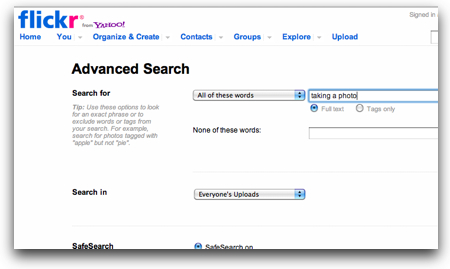
2. Enter My Search Term

So yes, this is sort of “DUH!”, but it is a step in the process…

Flickradvsearch

There are obviously other options you can use to further filter your search.

3. Choose to Search ONLY Creative Commons-licensed Photos

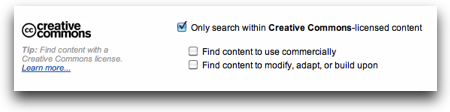
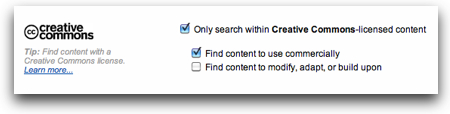
Now here’s the trick… scroll down to almost the end of the Advanced Search page and find the Creative Commons area:

Flickrcreativecommons

Check off the box as I’ve done in the photo to only search for photos with Creative Commons licenses (see Flickr’s explanation).

Now, for my own blogs, which do not run any kind of advertising and in my mind are “non-commercial“, that’s generally all I do. However, when I am searching for photos to use for one of Voxeo’s blogs I go the extra step to check off “Find content to use commercially”:

Flickrcreativecommonscommercial

I may not need to do that… I mean, I’m not using the photos in a printed Voxeo marketing piece, or as part of a direct sales effort or email blast. But in the spirit of the license, Voxeo is a commercial company, and so I’d prefer to just keep it simple and find photos where the photographer is okay with someone using his or her photos in a commercial setting.

I also don’t generally modify the photos, or use them in a collage or other work, so I don’t typically check off that second checkbox… but it’s there if you do make modifications to photos.

With the relevant checkboxes checked, you can just hit “Search” and start looking at the resulting photos…

4. Continue Searching

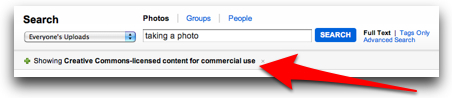
After you have gone to the Advanced Search page once and initiated a search, notice the Search box at the top of the results page:

Flickrsearch

You now do NOT have to return to the Advance Search page and instead can just enter new search terms in the search box and you will find more Creative Commons-licensed content.

All in all I’ve found this a very smooth way to work and am very pleased that Flickr offers us this option.

5. Attribute The Image In Your Post

Week 52/52

Flickr credit: kirstea

Once you’ve found your image and inserted it in your blog post, the remaining task you need to do is to actually go ahead and attribute the image to the photographer.

THIS IS INCREDIBLY IMPORTANT!

All of the Creative Commons licenses require attribution, so if you use a CC license, you need to give credit back to the licensor of that image.

Now… HOW you attribute the image is usually left up to you. But not always…

IMPORTANT: Sometimes photographers will have very specific instructions about how they want the attribution. They may want you to use a certain name (like their professional name) or link back to a specific web address. You need to look in the description of a photo on Flickr to see if there are specific instructions.

Without specific instructions (which is probably 99% of the time), I generally just link back to the Flickr page for the photo. For me personally, most of the time I only have a single photo in my blog post, and so I just put a link at the bottom of the post like the one you see at the bottom of this post.

If I am using multiple photos, I might then have a list at the bottom, or I might do what I’ve done with the small photo in this section and put the credit directly under the image. A few little <div> tags can make that easily work. (You can look at the HTML source of this page to see what I’ve done.)

I used to do that for all the images I used, but then I found that because I put the image first in my post, the “credit” text was showing up first in the description for the page in Google search results… which didn’t make much sense. So I’ve chosen to move the link to the end of the page.

I also use the Flickr HTML code to insert the photo (rather than using a screen capture of the photo), which means that someone clicking on the photo itself will be taken directly to the Flickr page of the photographer.

This is how I would want people to link to my photos… so that’s how I do it.

You can put the attribution text and link wherever makes the most sense for you and your site and text. The key is just that you DO include the attribution somewhere.

With all that… you should be in business with adding Creative Commons-licensed photos to your blog posts!

NOTE: To make this simple for me, I’ve added a couple of macros to MarsEdit, the blog editor I use, so that I can just easily drop in the code into my post that has the image attribution text or link. It may be something to consider if you have a blog editor you use.

Image credit: tk_five_0 on Flickr

Like WordPress? Check out WordCamp Central to find an upcoming WordCamp near you!

WordCampCentralWould you like to learn more about WordPress and how you could use it for even more than you do today? Would you like to meet with and learn from other WordPress users? If so, checkout:

central.wordcamp.org

There you will find a great list of upcoming “WordCamp” events around the world… as well as information about how to create a WordCamp event if there isn’t one around you (and you’re interested in starting one).

I’m a huge fan of WordPress and use it both for Voxeo’s multi-blog site as well as all my newer blog projects like Code.DanYork.com. There is a fantastic community of developers around WordPress and it’s great to see events like these WordCamp events that help foster that ever-growing community.

I’ve not yet been able to attend a WordCamp event myself, but I’ve seen the content coming out of several of the events and I definitely want to attend one… (I was hoping to hit WordCamp Boston this year, but it unfortunately looks like I’m traveling those days). If you get the opportunity, they definitely look like good events to connect and learn with others using WordPress.


If you found this post interesting or useful, please consider either:


WordPress.com Hacked – Time To Change Your Passwords – and the Positive Side of Transparency

Broken Lock

In a blog post titled simply “Security Incident“, Matt Mullenweg stated:

Automattic had a low-level (root) break-in to several of our servers, and potentially anything on those servers could have been revealed.

and

We presume our source code was exposed and copied. While much of our code is Open Source, there are sensitive bits of our and our partners’ code. Beyond that, however, it appears information disclosed was limited.

While there was no specific mention of impacts to users in the post, Matt did reply in the comments:

We don’t have evidence of passwords being taken, and even if they had they’d be difficult to crack. However it’s never a bad idea to update your password, especially if you used the same password in two places.

He later went on to assert that credit card info and other personal info was NOT exposed and also verified this incident affected only the WordPress.com hosting service and not WordPress software itself.

The incident has now been widely reported throughout much of the online tech world, with TechCrunch noting the size of WordPress.com:

WordPress.com currently serves 18 million publishers, including VIPs like us, TED, CBS and is responsible for 10% of all websites in the world. WordPress.com itself sees about 300 million unique visits monthly.

It’s good to see Automattic’s openness about the security issue, even when they are still investigating and don’t honestly have the answers. Kudos to Matt Mullenweg for diving into the comments and responding as he has been.

The effect of that transparency is certainly visible in the many other comments to the post – including ones like this:

Thanks for letting us know Matt. Admire the transparency so much I’m signing up for a paid account.

Well done!

Image credit: brotherM on Flickr


If you found this post interesting or useful, please consider either:


Is Blogsy the iPad blog editor I’ve been seeking?

Is Blogsy the blog editor for the iPad that I’ve been seeking? As I mentioned recently, I’m a huge fan of offline blog editors and on my Mac I use MarsEdit to write up pretty much all my blog posts (including this one). But being a huge user of the iPad, I’ve been searching for a MarsEdit-equivalent there. Primarily I just want the ability to be able to write up blog posts when I’m offline and then easily publish them when I come back online. Airplane travel is one use case… but there are other times, too. And the iPad format is a perfect one for writing for me.

My solution so far is to use Textastic to write my blog posts and then just copy/paste them over when I’m back online. I’m a bit “old skool” and seriously don’t mind writing in HTML code at all… in fact the vast majority of time I’m using MarsEdit in the HTML view. But there is a certain value in just having the blog posts all in one app that can then upload to your blog server when you’re online.

I’ve also used the WordPress app for the iPad, and it definitely has some great features, too.

Now, I don’t know yet if Blogsy can do all that I want to do. One basic issue is that while it supports WordPress and Blogger, it doesn’t support TypePad where this blog is located. And while my long-term direction is to migrate my blogs away from TypePad over to WordPress, that’s not happening for a while. So Blogsy is only a partial solution for me… but it does look pretty cool.

This demo video shows what Blogsy can do:

They have other videos as well on their How-To page (nicely done, by the way).

Given that right now Blogsy only costs $3 in the AppStore, I naturally had to buy the app… we’ll see how it goes – and you can be sure I’ll be writing more about it here.

What do you think? If you have an iPad, does Blogsy interest you for blogging? Do you already have another solution you like better? What works for you?


If you found this post interesting or useful, please consider either:


My Top 9 Disruptive Conversations Blog Posts For Q1 2011 (They aren’t all from 2011)

reading

With the end of a quarter of the year, I’m always intrigued to look back through
Google Analytics and see what were really the top posts that people visited here on Disruptive Conversations. No matter what I may think are the most popular posts, it’s always good to see from analytics what really are the most popular.

So here, straight from the “Top Content” page of Google Analytics for the time period January 1, 2011, to March 31, 2011, are the top posts:


  1. How Facebook Now Removes Friends and Pages From Your NewsFeed – And How To Fix It (Feb 2011)

    No surprise to me at all that this post was by far the most visited post of the quarter. It got a lot of pickup… and perhaps more importantly was shared virally throughout Facebook. I’ve been humbled by the kind words of thanks I’ve received both as comments, email and Facebook messages. It’s just a serious bummer that Facebook made the change they did that required a post like this.

  2. My Canon SD1000 camera dies… “Lens error, restart camera” (Oct 2007)

    Yes, this is a simple, short post from October 2007, but it still reigns as one of my most visited posts. Why? Turns out that a lot of people search for that phrase, and my post is #1. The amusing part is that I don’t even use that camera anymore. Still, the comments have been very helpful to people trying to solve this issue.

  3. My Problem With Klout Scores: Beyonce Gets a 50 – Without Ever Sending A Tweet! (Mar 2011)

    No surprise here, either. Klout and other “influence scores” are a hot topic in our part of the blogosphere these days.

  4. At What Point Do We Just Stop Caring About IE6 Visitors? (Nov 2010)

    Everyone loves a good rant, don’t they?

  5. Have You Claimed Your Facebook Community Page Yet? Here’s How… (Dec 2010)

    I’ve always believed “How To” posts that solve real problems for people are some of the most useful posts you can write (such as the #1 post). This was another one of those.

  6. A Quick First Look at the New Features for Facebook Pages (Feb 2011)

    When a service like Facebook rolls out new features, often we’d like to read up on those features before trying them out ourselves. As it happened, my post was one of the first out with screenshots and wound up on Techmeme and getting other mentions.

  7. The Back Story Behind The Darth Vader Boy in the VW SuperBowl Commercial (Feb 2011)

    I was admittedly surprised by the interest this post got, but it may be that there weren’t many others writing about the back story.

  8. Prezi + ScreenFlow + YouTube = Video/Screencast Awesomeness! (Oct 2010)

    Though geeky, a lot of folks continued to be interested in combining video with a Prezi presentation.

  9. Corporate/enterprise microblogging – my review of Yammer, Present.ly and Laconi.ca (Oct 2008)

    Another older post… this one has consistently been among my top-viewed posts. At this point, of course, it’s definitely in need of an update.


The interesting part to me is that outside of the two outliers from 2007 and 2008, all the posts are from within this quarter or the one prior to it (Oct – Dec 2010). I continue to be surprised at the attention that Oct 2007 Canon camera post has… but it shows what a good Google search ranking can do for a post.

Have you done this exercise lately? What are your top posts?


If you found this post interesting or useful, please consider either: