Category Archives: Blogging

The Content Creator’s Creed

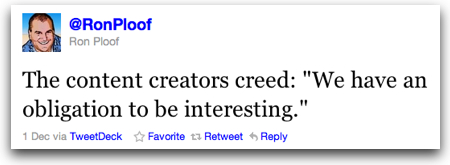
Loved this tweet from Ron Ploof last week:

contentcreatorscreed.jpg

The content creators’ creed:

We have an obligation to be interesting.

Ron said in a subsequent reply back: ‘It came from a customer considering a company blog. He said, “So you’re saying we have an obligation to be interesting?”

We don’t, of course, truly have that obligation.

We are free to go ahead and create the most boring, useless, trivial, mundane, unreadable and unviewable content.

We have that freedom.

There are no set “rules” that dictate what kind of content we must create online.

But…

IF we want people to read, view or listen to our content…

IF we want people to share our content to others…

IF we want people to take action based on our content (visiting a site, downloading something, buying an item, signing up, etc., etc.)…

IF we want people to choose our content amidst the insane amount of content being created each day…

THEN… I agree with Ron…

We have an obligation to be interesting!


If you found this post interesting or useful, please consider either:


Anyone recommend WordPress hosting providers that give out IPv6 addresses?

NewImage.jpgCan anyone recommend affordable hosting providers for WordPress that currently provide IPv6 addresses?

As I’ve written about before, I’m working on moving all my sites from TypePad over to WordPress and am currently evaluating several hosting providers. One new criteria I added to my list recently is this:

I would like my blogs to be available over IPv6.

Why? Simple. I tend to write across my various blogs on “emerging technology” issues. Much of the audience for my writing are the “early adopters” who are working with new technology, new toys… and generally working on the bleeding edge of communication.

As some of those folks (myself included) either move their networks to IPv6 or at least experiment with IPv6, I would like my sites to be natively accessible over IPv6 like many other sites are now available including Google, CNN, Facebook and more. Call me silly, but when I’m doing IPv6 testing, I’d like to be able to get to my own sites without going through a IPv6-to-IPv4 converter.

I also want to do this move once, because it’s going to be a big enough pain-in-the-neck as it is, between the initial migration from TypePad and then pointing all the domains over, mapping them, etc.

I’m currently testing out Bluehost and in talking to their support team, they are looking to have some IPv6 options available next year… but I: 1) don’t want to wait; and 2) want to be sure IPv6 addresses will be available. A2 Hosting offers IPv6 addresses, but only for their more expensive dedicated hosting offerings. I’m looking for someone who can provide more of a web hosting or Virtual Private Server (VPS) offering with IPv6.

SOLUTION?

SixXS offers a great list of hosting providers offering IPv6 and some of those look quite interesting… I just don’t personally know anyone hosting on them.

There is, of course, one of the strong proponents of IPv6, Hurricane Electric, who offer a traditional web hosting offering… which might be okay, although I admit that I’m more partial to a system that gives me ssh access with ideally full root access. I can get that root access – and IPv6 – over at someone like RapidXen that goes to the other extreme and just gives you bare bones hosting, i.e. here’s your server, here’s your command line… have fun. (Which I can be fine with, although I’m not overly interested in being responsible for all the system admin of my system.)

So… with all that, anyone out there have recommendations for hosting providers where I can run WordPress with IPv6? (thanks in advance)

P.S. And yes, it’s not 100% clear to me if WordPress plays well with IPv6, but then again, I know some people are doing it!


If you found this post interesting or useful, please consider either:

One Day of Content Creation: Dec 1, 2010 – 16 blog posts across 14 sites

Building off of something I did the first time back in July, I decided to see if I could fit in writing across as many of the sites where I can write as possible. Why today? Partly to celebrate C.C. Chapman’s new book, “Content Rules”, and partly because… well… it’s December 1st and so it seemed a good way to kick off the last month of 2010!

How did I do this time?

Today’s tally is 16 blog posts published across 14 sites. And, unlike last time I did this, today was not only about writing. Today’s content also included a set of photos uploaded to Flickr and a video podcast. (And in the time it took me to create, edit, render and publish the video podcast I probably could have cranked out 2 or 3 written posts!)

With that… I’ll get this post up in the final minutes of the day… and put this “One Day of Content Creation” theme back on the shelf for maybe another six months or so. 🙂

For the record, here are today’s posts… (and yes, the VoiceObjects Developer Portal post is listed as December 2nd because the server goes off of the time in Germany – and it was already “tomorrow” when I posted the piece there)


Personal Blogs

Disruptive Conversations:

Disruptive Telephony:

Code.DanYork.com

DanYork.com

Seven Deadliest Unified Communications Attacks:


Voxeo Blogs

The Tropo Blog

Voxeo Talks:

Speaking of Standards:

Unified Self-Service:

Voxeo Labs:

Voxeo Developers Corner

VoiceObjects Developer Blog

Phono Blog

Emerging Tech Talk (video)


Blogs I did NOT update

And as the day draws to an end, I see there are still more blogs/sites that I did NOT update… simply not enough hours today: 🙂

Next time…


If you found this post interesting or useful, please consider either:


My Report into the FIR podcast – November 29, 2010

fir_100x100.gif

Sent in my regular weekly 5-minute report this morning for today’s For Immediate Release” podcast episode. In today’s report I discussed:

The episode will be available for your listening pleasure from the FIR web site later today.


If you found this post interesting or useful, please consider either:


Cleaning Out Your Queue! (of blog posts)

Sweeping the stairsDo you have a queue of blog posts waiting to be written? Do you come across great articles on the web and say “I should write a post about that!“? Do you scan your Twitter feed or Facebook NewsFeed each day and see 10 different links you would like to write about?

Do you wake up each morning with your head exploding with stories to be told?

What do you do with all those story ideas?

Do you…

  • jot them down on a piece of paper? In a Moleskine, maybe?
  • save them as bookmarks to a service like del.icio.us?
  • save them in a service like Evernote?
  • save them in a text file on your local system?
  • record them as “to do” items in a task manager?
  • leave the links open as tabs in your browser so you can find them? (which works great until your browser crashes)

What do you do to build your queue?

My own way is a bit of many of those. I’m a big user of Things for task tracking on my Mac and so I’ll write in there of posts I want to write. I use a keyboard shortcut to copy the URL into the notes of a task. I also will save bookmarks into my del.icio.us account (yes, I still use it) and have a special tag there I use for things I want to write about. And yes, I do leave links open in various tabs in my browsers. I also write almost all my posts offline using MarsEdit and so I will actually have a local queue of partially written posts right there.

BUT… the key question is…

DO YOU EVER CLEAN OUT YOUR QUEUE?

This is honestly something I struggle with myself. Each day I probably have 15 new ideas for posts … and time to write maybe 3 or 5 (or less). The queue I have stretches on to hundreds of post ideas… some of which are quite frankly no longer really relevant now that so much time has passed since I wrote them down. In talking to some folks about this, some suggestions are:

  1. SET ASIDE SOME TIME TO REVIEW YOUR QUEUE – AND WRITE – I’m trying to block out a couple of hours each week where I just go back into my queue and try to pound out a couple of posts. I might even reach back to something 6 months old that I still think is worth sharing and commenting on.
  2. SHARE YOUR QUEUE – Sometimes the question you have to ask yourself is: What is more important? That the story be written? Or that you write about it? If there’s something that should be written about and you just don’t see realistically how you are going to have the time to write about it… share that idea. Tweet about it… post it on Facebook… send an email out… pass it along to others who you know write on the topic. Get it out there. And then… remove the idea from your mental queue. Let it go.
  3. PURGE YOUR QUEUE – Sometimes there are stories that just lose their value with time. Writing about how excited you are about the latest iPod Nano may no longer be relevant in 6 months because Apple will already have come out with a new one. So carve out some time to just go through your queue (in whatever form you keep track) and discard ideas you just won’t have time to deal with.

The important thing is that you take the action of starting to do something about all those queued ideas. Otherwise, as admittedly happens to me sometimes, you can start to get overwhelmed with all the stories you want to write – and the lack of time you have to write them.

What do you do? What strategies have you found that work for you in dealing with all the ideas you have?

Image courtesy of pedrosimoes7 on Flickr.


If you found this post interesting or useful, please consider either:

C’mon TypePad, can’t you catch this spam?

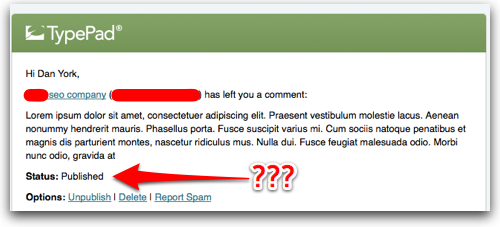
Um, TypePad … isn’t this a fairly obvious spam comment on my blog?  I mean… when the name includes “seo company” and it starts off “Lorem ipsum”….

typepadblogcommentspam.jpg

As I’ve noted, I’ve been increasingly unhappy with aspects of TypePad’s service… and the increasing number of spam comments that are getting through the “filters” TypePad has makes me wonder if the comment spam filters are being maintained and updated.  If this kind of thing continues, I think it’s only going to drive me and others increasingly over to WordPress…


If you found this post interesting or useful, please consider either:

Skype’s Fatal Flaw in their Blog Site Redesign

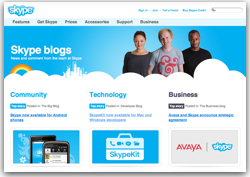
skypeblogs.jpgA while back, the good folks at Skype did a thorough redesign of their blog. They moved the blogs to the “blogs.skype.com” domain and created a nice portal page that shows blog posts across all their various blogs. That portal page easily lets you see the “top stories”.

They added in some great pictures of their primary bloggers. They spent some time just refreshing the overall artwork.

All in all the blog site looks great and the redesign was, to me, very nicely done.

Except…

While the form may be quite pleasing, the function is unfortunately not.

Here’s the problem… from the “blogs.skype.com” portal, you can easily get an overall sense of what is being written across all Skype blogs and can visit posts you want to read. However, within a single blog (like this one) you see only a single post followed by this lovely link:

skypeblog.jpg

Yes, indeed, there is no way to quickly browse through the contents of a single blog! Instead you have to view each post individually and step through them one-by-one. That may be fine if someone has the time to go through and sit there scrolling down and then waiting for pages to load. But if you just want a quick view of what they are writing about… it’s a mind-numbingly slow process.

For instance, I recently wanted to know what was new with the Skype client for Linux (not much, it turns out), so I went to the Skype Linux blog to learn more. The first post was quick and I could easily scroll down and click the “Old articles” link. The second post has 182 comments – and ALL comments are displayed! Given that the “Old articles” link ONLY appears at the bottom of a post, I had to scroll all the way down to the bottom to go back to the previous post.

RECOMMENDATIONS

If I were Skype (and I have no affiliation with them beyond being a very active Skype user), I would encourage them to:

  1. Provide a way to see recent posts for a blog – Either display the posts on the main blog page in full form or as abstracts – or at the very least provide a widget or box that lists titles of recent posts, allowing someone to jump to a post based on the title.
  2. Provide navigation on the TOP of posts – Forgetting about the issue with seeing all recent posts, if I am reading any blog post and want to go to the previous or next post, it’s annoying to have to scroll all the way to the bottom. (And yes, my blog (this one) goes the other direction in only having nav links at the top, which is fine for browsing but kind of annoying if you’ve scrolled all the way to the bottom. I personally like blogs to have both links at the top and bottom.)
  3. Consider not displaying the comments – If they left the blog as it is, I would at least not display comments by default. I personally like the display of comments by default… but if you have to scroll all the way down to see the navigation link, it can be a bit of a pain. I would not display them – as they seem to already do for the first post on each blog – and let people click the “Comments” link if they want to view them all.

What would you suggest? How could Skype make the navigation better?


If you found this post interesting or useful, please consider either:


Recommendations for a WordPress Hosting Provider?

wordpress.jpgAt the very severe risk of opening myself up to endless spam comments from a zillion people trying to get me to buy their hosting services… I want to ask you, dear readers and friends, a simple question:

Who do you recommend for hosting WordPress sites?

For some time now I have been unhappy here on TypePad… many reasons, some of which I’ve written about and others that I started writing about earlier this week… and then SixApart dropped the news that it had been acquired – and I seriously wonder what kind of investment TypePad will really get. But that’s for another post…

Anyway, I’m finally gearing up to bite the bullet and move over to WordPress, a platform I use daily and have become extremely pleased with. I looked at WordPress.com and in fact have a couple of smaller experimental blogs there… but it is too limiting for someone like me. So I need to go self-hosted.

Type “WordPress hosting” into Google, though, and you get a zillion entries… everybody and their brother, sister, mother, father, aunts and uncles seems to be in the game.

In doing some research, I’d narrowed it down to a few services… and was pleased to see them listed on http://wordpress.org/hosting/ when I found that site.

Here’s what I want:

  • EASY INSTALLATION – I want to just make a couple of clicks and have WordPress up and running… I don’t want to download it, set up MySQL, do the Apache config, etc. Been there, done that… I’m looking to write, not administer.
  • MULTI-SITE – I have a network of blogs… I need a hosting provider that supports WordPress 3.0 in its full MultiSite usage.
  • EASY UPDATES AND PLUGIN INSTALLATION – WP 3 has all sorts of great ways to update the system, install plugins, update plugins… I want to use all that WP goodness. (I don’t want to be waiting for a provider to have the latest and greatest version available. I want to get it all direct after install.)
  • DOMAIN MAPPING – It goes without saying that I want to map all my various domains to WP in MultiSite mode.
  • BACKUPS – While I’ll make my own backups, I want the provider making backups, too.
  • COMMAND LINE – Having said all the “easy installation” stuff, I do want to be able to ssh into the server and muck with it if I want or need to. In fact, I’d potentially like to be able to run python scripts for Tropo apps on it. I may want to run other software, too.
  • RELIABILITY, SCALABILITY, SECURITY, STABILITY – It should go without saying that I want all of these traits in a hosting provider, too.
  • OUTSTANDING SUPPORT – I work for a company that provides hosting for communications apps. We provide an insanely high level of customer support (in fact, we call our teams “Customer Obsession Teams”)… our team have set a high bar for me personally… so I’m looking for a provider who can give a high level of rapid response, assistance, etc.

And naturally, I don’t want it to cost an enormous amount. I kind of like what MediaTemple offers… although some of the others out there have better pricing… what do you all think? If you do self-hosted WordPress, who do you use? Why did you choose them? Any other criteria you would add to my list above? (Feel free to email me if you don’t want to post public comments.)

Thanks in advance… and naturally I’ll be chronicling my move from TypePad over to WordPress… from everything I’ve read there are parts of it that will be potentially quite painful. 🙁


If you found this post interesting or useful, please consider either:


Ragan’s “WordPress for Business” Webinar – Oct 21

raganwordpresswebinar.jpgWant to learn about how to set up a corporate blog using WordPress? Want to find out how you can get involved with social media on a limited budget?

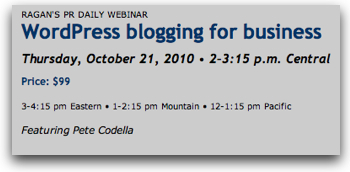
I’m not usually one to promote commercial webinars on this site… in fact, I don’t think I’ve ever done it before. But I’ll make an exception for Ragan’s “WordPress blogging for business” webinar coming up October 21, 2010, from 2-3:15 US Central time.

Why? Two reasons:

  1. I’m a huge fan of WordPress, have built Voxeo’s multi-blog portal on WordPress and maintain a blog about using WordPress for business.
  2. Because I’m a heavy user of WordPress, I want more people to use WordPress for business… the more business users of WordPress there are, the more plugins will be written that are business-focused, the more tips will be shared, the more consultants will be able to specialize… etc, etc…. it’s one of those opportunities like the Apache web server where all win by the collective usage and sharing.

So I applaud Ragan for running this webinar. It’s not free, but at $99 it’s not expensive, either. The agenda also look great:

  • Use the right strategy to name the blog—using a subdomain or a separate URL
  • Install WordPress software using WordPress.com or WordPress.org
  • Customize your blog’s settings and create various user profiles
  • Find the best plugins for your blog’s needs
  • Create your keyword publishing guide through search optimization strategies for blogging
  • Design a publishing calendar to keep your blog relevant, interesting and useful
  • Establish and publish a blog comment moderation policy
  • Know how and when to participate as publisher and commenter
  • Sprinkle social media content throughout the blog
  • Use Google Analytics to measure blog traffic and activity

If I were giving this webinar that is the kind of agenda I’d choose.

Now, I’m going out on a limb here a bit as I don’t know the presenter, Pete Codella… I’ve never heard him before and so I have no idea how good he may or may not be. Ragan is NOT a non-profit, though… they need to keep their lights on, so I’m going to assume that Monsieur Codella is a good presenter.. his bio seems solid, too.

Anyway… if you are interested in potentially using WordPress for your blog site, do check out this webinar.

Disclosure: I have NO financial connection to Ragan Communications and they have no clue that I am writing this post. I should note, though, that they are one of the sponsors of the “For Immediate Release” podcast to which I contribute weekly reports. I do not, however, receive any financial compensation for my involvement with FIR. I just think this is a cool webinar that Ragan is offering.


If you found this post interesting or useful, please consider either:


Brogan is right – the “Editorial Calendar” WordPress plugin truly rocks!

On Friday I saw Chris Brogan’s post “Use an Editorial Calendar” and immediately had to go check out the plugin’s page.  Chris is right on target… this is definitely an awesome plugin!  I now have it running on Voxeo’s blogs and on the VOIPSA blog and so far have been quite impressed.

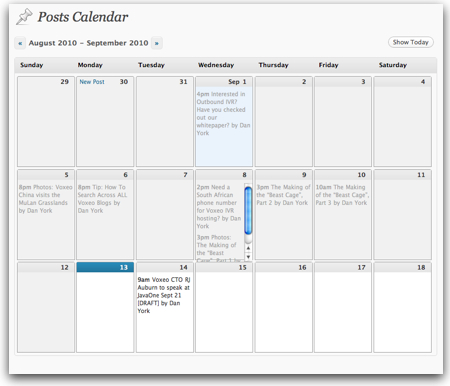
Now, much of the time my posts across my various blogs react to current issues or to topics I’ve had brewing for a while.  But in some cases, particularly the Voxeo blogs, I’ve wanted to apply some more discipline to the writing to ensure that I am in fact getting out posts with a regular frequency.  I like the fact that with this plugin I can simply get a quick view of what is currently scheduled and know when it would be good to target some more posts:

editorialcalendarplugin.jpg

It’s also great that directly from the interface you can create new posts (or at least stubs for new posts).  If you are laying out a campaign tied to an announcement or theme, this is a very easy and graphical way to lay out your post schedule.

I also like the fact that you can go back historically and see the flow of when you posted in a nice calendar format… complete with the names of the post authors (a setting you have to enable but is well worth it in multi-author blogs).

I’m very much looking forward to working with this plugin more – and wish there were something like that for here on TypePad (where this blog and Disruptive Telephony are located).

The folks at Stresslimit also put together this video screencast introducing the plugin – good stuff!

The WordPress Editorial Calendar Screen Cast from Zack Grossbart on Vimeo.

If you use WordPress you can find more info about the Editorial Calendar on its plugin page and can install it either from there or from directly inside of WordPress if you are set up that way.

Thanks, Chris, for recommending the plugin and thanks to the Stresslimit team for making it available!


If you found this post interesting or useful, please consider either: