Category Archives: Blogging

What is Your Backup Plan for Your Blog?

Off-site backup for Dallas companiesWhat is your backup plan if the platform you use for blogging suddenly… disappears?  What if the provider just shuts down one day? with no warning?  What if they have a server failure and your blog(s) go offline… and may be offline for some period of time?

How quickly would you be able to get back online?

And how quickly can you have your content back available – with correct URLs?

As folks who blogged at Vox.com discovered this past week, you may not have a whole lot of time to figure this out… thankfully they at least have most of a month and some easy transition tools… but other users on other platforms may not be so lucky…

But what is your backup plan?  Do you have one?  If not, perhaps it might be time to think about it?

(Next post, I’ll share some of my own backup plans…)

Photo attribution: alexmuse on Flickr


If you found this post interesting or useful, please consider either:


Vox FAIL – Blogging Platform Shutting as of September 30th – But what about the SEO?

voxlogo.jpgThere’s a fundamental challenge in using a hosted platform for any kind of service:

CAN YOU TRUST THE “CLOUD” TO BE THERE?

Not just in terms of availability (i.e. uptime versus downtime), but also that the hosting platform will be around for a long time – or that you will be able to easily move to another platform.

We’ve reached that state of trust with hosted email servers and hosted web servers – those are now “commodities” and we can choose from zillions of providers. We embrace “the Internet Way” of “distributed and decentralized” systems… the data is very portable (web pages, email messages). Yes, it’s a major pain, but it can be done.

Blog platform providers are a bit different, though. Sure, fundamentally they are just a hosted web server running a content management system (CMS)… but there are specific tools and ways that they work that you get used to and come to rely on. You build up a community of readers and other blogs you read… sure, you can move to another provider, but will they carry over all your links with all the SEO value they have? (not likely)

VOX.COM FAIL

The many users of the Vox.com blogging platform woke up yesterday to discover that their home is shutting down and going away effective September 30th:

On Thursday September 30th, your blog will no longer be available at Vox.com, and you will no longer be able to sign in to Vox.

Poof!

All the content you wrote… gone. Offline. Removed from the online world.

To the credit of SixApart, they have provided a site, closing.vox.com, that has instructions about how to move your blog to TypePad, to WordPress or to Posterous – and how to move your pictures and videos over to Flickr. However, if you read the comments on this post it would seem that all is not happy in Vox land and that the migration is not smooth and painless.

Largely because I am a paying TypePad customer and already had a blogging platform, I never used Vox beyond setting up an experimental page back in 2006 when the service came out. So the impact of the Vox closing to me personally is minimal.

SEO FAIL!

Here’s where I would be worried, though, if I did use Vox more… what is going to happen to the “search value” of all those blog posts that have been written over the years?

All of the links in search engine results to those posts will FAIL.

There was this comment left by SixApart executive Michael Sippey:

If you do move your blog to TypePad, we’ll redirect any requests for URLs on your Vox account to the home page of your new blog on TypePad.

But note the emphasis I added… your old blog posts will NOT redirect to your new blog posts! The links will instead go to the home page of your new blog, leaving visitors to somehow attempt to find the content that was previously linked to.

Way to kill search value. 🙁

Another user asked this specific question and the response was to put a link on your new home page to the specific post that gets a lot of traffic.

Not scalable – or desirable.

But it is what is is… you are not in control of your own platform. You were locked-in to the tools and systems of the vendor.

The WordPress Option?

If I were to counsel Vox.com bloggers on what to do next, my personal suggestion would be not to migrate to TypePad, or even to Posterous, but rather over to WordPress.com. Why?

BECAUSE YOU ARE NOT LOCKED IN!

With TypePad, you are back using SixApart’s hosted proprietary blogging platform. Sure, it’s essentialy hosted Movable Type, but it has evolved, and you then need to think about where you can host your site on MT. Posterous is a startup and is using whatever they are using… I’m not sure what they’re using, but it’s not clear to me that if THEY went away I’d be able to move my content. (In fairness, I don’t know.)

I do know, though, that WordPress.com uses the free and open source WordPress software – and if you don’t like hosting it at WordPress.com, you can migrate your site to any of a zillion other WordPress hosting providers – or run it on your own server. Odds are that if you use your own domain name on WordPress.com, you should be able to migrate your content from WordPress.com to another WP site with all the URLs intact!

You are in control.

Definitely something to think about when you evaluate any cloud provider – what happens if they go away? Can you move your content?

Best wishes to the folks who had accounts at Vox.com… I do not envy them the task of migration.

Did you have an account at Vox? Which provider did you choose to migrate to?


If you found this post interesting or useful, please consider either:


Podcamp Boston 5 coming up Sept 25-26 – sign up now! #pcb5

podcampboston5.jpg

Do you want to learn more about social media, online content creation, marketing, PR and so much more?  Do you want to meet people who are changing the online world?

If so, registration is now open for Podcamp Boston 5 taking place at Microsoft’s New England R&D Center on the weekend of September 25-26, 2010.  It’s hard to believe that it’s been 5 years since Chris Brogan, Christopher Penn and company kicked off the Podcamp world in “Beantown”… but it has been that long… and in looking at the list of people already registered, this year’s event should be outstanding!  You can register directly at:

http://pcb5.eventbrite.com/

or learn more about what will be going on at:

http://podcampboston.org/

I’ve attended and spoken at Podcamp’s before, and they are well worth the time!  Great people, great information… it’s all good!

P.S. My own schedule won’t work for me to make the drive southwest due to some family and school events, but I’m looking forward to hearing all about it and seeing the news and posts coming out of the show.


If you found this post interesting or useful, please consider either:


Does the Disqus blog comment system not work with the iPad?

Are any of you out there using the iPad running into problems with leaving comments on blogs using the Disqus blog comment system?

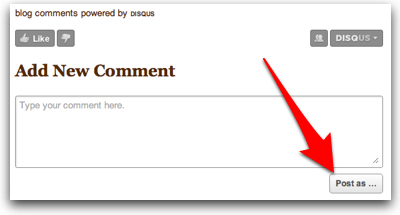
This morning I browsed to Scott Monty’s blog on my iPad and went to leave a comment on his “Picture This” post. (Great post, BTW!) I typed in my reply and then pressed the “Post as…” button… and… nothing:

disquslogin.jpg

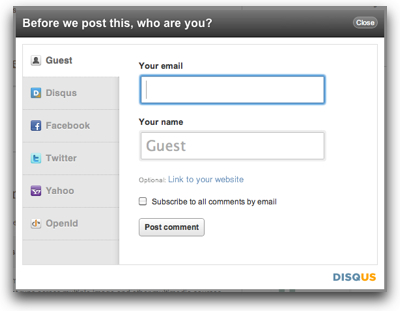
Now, when I press that same button on my laptop, I see this window popup on the page:

disqusloginpopup.jpg

allowing me to then choose the identity that I want to use to post the comment.

This popup does NOT appear for me when I’m using the iPad’s browser to view Scott’s blog.  I tried another blog that also used the Disqus system and had the same result.

Looking at the HTML source of the page, I’m guessing the issue may be the JavaScript script that Disqus is using to generate the comment form… but that’s just a guess at this point.  It may also not be an issue with the Disqus system, per se, but more in the specific way that Scott’s blog embeds the connection to Disqus. I don’t know.  All I know is that when I had a comment to leave this morning, I couldn’t do so.

Anyone else seeing this kind of issue using the iPad’s browser with Disqus-powered blogs?


If you found this post interesting or useful, please consider either:


The additional travel challenges for content creators (i.e. why my backpack is so heavy)

As I got ready for my travel down to New York City this week for the SpeechTEK conference where I spoke and also helped staff Voxeo’s booth, I reflected as I packed on all the extra steps I wind up going through when planning to be a “content creator” at the show.  I’m not there only to talk and show our new services… I’m also there to write blog posts, take and upload photos, record video interviews (and maybe audio interviews), to post tweets and respond to tweets, etc., etc.  For multimedia content creation, there’s a bit of extra work and gear.

THE GEAR

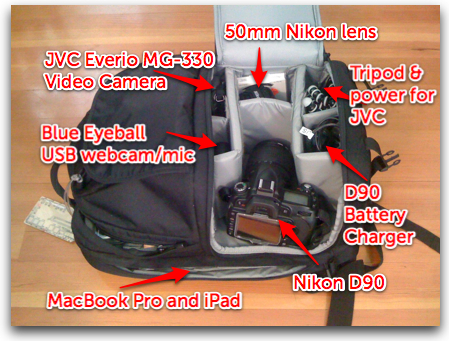
My travel pack of choice these days is a Lowepro Fastpack 250. It fits the gear I need, but also has this great feature where you can unzip the side pocket and pull your DSLR out very quickly.  As you can see by the picture, I travel these days with a Nikon D90 for photos and a small JVC Everio MG-330 hard drive video recorder.  In truth, the D90 can also do video… but it’s harder to hold for video than the JVC unit is.  Perhaps I’ll eventually do more with it… but for the moment I carry both.  Both have power cords (or battery chargers), naturally.

I also carry a Blue Eyeball (which I reviewed) in case I want to do two-shot video recordings (using my MacBook Pro’s camera and the Blue) for an interview.

contentcreatorsbackpack.jpg

Add to this, of course, the laptop, and these days the iPad as well… and it’s a heavy pack.  I also naturally have my iPhone for photos and quick status updates and such as well.

THE ADDED STEPS

There are also a series of steps that all this gear adds to travel preparations:

1. Import and delete all the photos off the DSLR memory card (which in my case means importing them all into iPhoto on my Mac).

2. Import and delete all the movies off the video camera (import into iMovie for me).

3. Make sure the battery is fully charged on the DSLR.

4. Make sure the battery is fully charged on the video camera.

5. Make sure that I have all relevant cables needed to copy content off of the cameras and onto my laptop.

It’s not a huge number of steps, but it does add up, particularly if I have a lot of photos or movies on the cameras.  Yes, with memory cards being so cheap I certainly could leave the photos on the DSLR, but I’m also paranoid about losing photos… so I want to make sure they are off the camera before I go traveling.

If you are a “content creator” for your organization, what do you bring when you travel?  What steps do you wind up adding to your travel preparations?


If you found this post interesting or useful, please consider either subscribing to the RSS feed or following me on Twitter or subscribing to my email newsletter.


Congrats and best wishes to Frank Eliason and his move from Comcast to Citi

Frank Eliason

For those of us working in social media circles, the name of Frank Eliason is certainly one we’ve heard. He’s been the person behind @ComcastCares and has not only helped put Comcast on the map with using social media for customer service, but also clearly shown to larger businesses how social media can help.  These days he’s got a whole team of people working there at Comcast and a sophisticated system in place tracking/monitoring and helping Comcast respond.  As a former Comcast subscriber when I lived up in Burlington, VT, a few years back, I can attest to the speed at which Comcast responded on Twitter.  I also met Frank at an Enterprise 2.0 conference a year or two back in Boston, and appreciated the thoughtfulness with which he spoke about what they’ve done there at Comcast.

Now, in a post two weeks ago on the Comcastvoices blog titled simply “Goodbye“, Frank writes about the successes there at Comcast and how he is moving on. Subsequent articles as well as Frank’s own tweets identified his destination as landing at financial services firm Citi to head up their social media efforts.

Yes, it’s a loss for Comcast, but in his time there Frank has built up a great team and I’m sure they will only continue to grow and expand their efforts.  Now it will be interesting to see what Frank does over at Citi!

Congrats and best wishes, Frank!

P.S. Jason Falls had an interesting post “A New Chapter in Personal Brands” about Frank’s move…


If you found this post interesting or useful, please consider either subscribing to the RSS feed or following me on Twitter or subscribing to my email newsletter.


One Day of Content Creation… 16 posts across 13 blogs

Lately I’ve been a wee bit frustrated by not writing as much as I have wanted to. As a writer, there’s a bit of twisted dynamic that goes on inside your brain… it’s almost like you MUST WRITE… or else you just feel, well… blah. I’ve been feeling that way a bit lately. With all the other responsibilities of life/work/etc, I haven’t made enough time to write.

So as I went for my morning walk this morning I said to myself… “you know what, I’m going to write a post in ALL of my current blogs today.” And then… so that I wouldn’t back down, I posted that statement to my Facebook account. 🙂

I knew it was going to be a crazy, busy work day as we’re in the midst of preparing for a impending trade show, product launches, publicity campaigns, and everything else… but I said, “Perhaps I can squeeze some posts off during various moments of the day.”

Turns out I was able to do it! Sure, not all of them were big or important posts… a few were longer and detailed… others were short posts or update – but hey, they were posts!

I also discovered in the process that what I think of as my “current” blogs consists of some 14 blogs (2 of which are actually podcasts). I hadn’t actually counted for a while… so it was a useful exercise for that purpose. There’s actually a few others where I could write, but I don’t any more. In any event, it’s actually quite a lot of area across which to spread my writing.

I’ll have to do this again sometime… it was actually kind of fun.

To prove my statement, here’s the list:


Personal Blogs

Disruptive Telephony (link)

Disruptive Conversations (link)

DanYork.com (link)

Seven Deadliest Unified Communications Attacks (link)

Advogato (link)

Blue Box: The VoIP Security Podcast (link)


Voxeo Blogs

Voxeo Talks (link)

Speaking of Standards (link)

Voxeo Developers Corner (link)

Unified Self-Service (link)

The Tropo Blog (link)

Behind The Blog (link)


VOIPSA Blog

Voice of VoIPSA


Current blogs I did NOT update

Emerging Tech Talk

Wellllll, this is actually a video podcast, so maybe I can escape on a technicality… but the truth is that I have the next episode queued up to be released with an impending announcement – and I have to wait for that. Putting up a show today would have meant either: 1) posting a show with an out-of-order sequence number; or 2) posting a show with the next number and then pulling down the queued show and re-rendering and re-uploading with a new show number. The amount of work with #2 didn’t seem worth it and #1 is too strange for me.

dyork.livejournal.com

As of today I am going to stop thinking of this as a “current blog”. The reality is that I don’t write there any more and I want to leave the current post there at the top so that people who do find the site know how to get to where I am currently writing.


If you found this post interesting or useful, please consider either subscribing to the RSS feed or following me on Twitter or subscribing to my email newsletter.


The Skype/Fring dustup and the importance of quick blog – and comment – response

As I wrote about over on Disruptive Telephony recently, Skype recently was attacked by a startup, fring, for allegedly blocking fring’s connections. Today, over on this “Brafton” site, an unnamed author makes good points in “Skype/ fring battle indicates blogs can be good for brand management and link bait.

They point out that Skype was able to quickly respond to the attack with a post out in their own blog. The response post very clearly said that fring’s claims were untrue and led to posts like mine that called fring’s statement into question – as well as the update or revision of many of the posts that had gone out quickly with the initial news.

It was an effective response by Skype – and a great reminder of the power of having a blog with which they could in fact respond.

However, the Brafton writer goes on to point out something I’d noticed as well. Skype’s blog post rapidly filled up with comments – but almost no responses from Skype employees. To their credit, Skype left comments wide open so people left all sorts of comments venting their frustration with various other aspects of Skype’s policy.

As of this moment, there are 219 comments on the post – but only 2 are from someone at Skype (Peter Parkes – who is a great guy) answering 3 of the other 217 comments.

Now, many of the comments are purely venting about the lack of a non-Verizon Android app and a hundred other topics. Perhaps the folks at Skype just realized that they couldn’t possibly satisfy the comments… and just decided to let people vent. Still, the paucity of Skype comments seems kind of glaring. As the Brafton write indicated, some of those comments express disappointment at not seeing more response from Skype… so the commenters did notice. One commenter (michael.nr.burrows) said:

Wow not many blogs get this vociferous, and you know what, the staggering lack of comment from Skype tells me a lot about their attitude to their customers.

It’s curious… in the midst of those comments are some that would seem could have had a response.

The Brafton writer concludes:

The moral of the story is that blogs can be a powerful tool in managing a brand and generating inbound links, but it’s important for corporate bloggers to keep a conversation going by responding to commenters in order to maximize blog brand-boosting opportunities.

I agree… the power of having a corporate blog is to be able to respond quickly to attacks that happen in blogs… but posting the initial post is just the start of the response.

P.S. Prior to writing this, I did try to reach out to Peter Parkes at Skype, but his mood message indicates he’s on vacation through the weekend. Could part of Skype’s challenge be that they only have one person focused on blog response? (I don’t know.) Good question for you all – do you have coverage for people going on vacation?


If you found this post interesting or useful, please consider either subscribing to the RSS feed or following me on Twitter or subscribing to my email newsletter.


Frustations with TypePad: Hideous trackback URLs – and inability to easily link between sites

typepad.jpgFor over 5 years, I’ve been a paying customer of TypePad and use TypePad’s blog hosting service for my 5 main blogs (this one, Disruptive Telephony, DanYork.com, Blue Box and Seven Deadliest UC Attacks). In fact, you’ll note that one of those, danyork.com, is what I use as essentially my home page on the Internet. Beyond that, I have about 10 other blogs on TypePad that I’ve used for various projects, experiments, etc. (Once upon a time the Green Mountain Curling Club site was in my TypePad account. It’s not anymore… someone else took it over when I left Vermont.)
Overall, I’ve been very pleased with TypePad’s service. It’s generally always worked… no major outages… quick and simple to put up new sites, complete with domain mapping… support has been relatively quick.

But I’m finding myself increasingly hitting limits or encountering challenges with the site – and I’m starting to think about potentially moving my sites… although the headaches involved with doing that make it fearsome to contemplate. Over a couple of posts I want to outline some of the limits I’ve run into and perhaps find out what other TypePad bloggers have done to combat those issues.


Linking Between Sites

Perhaps my greatest frustration with TypePad right now is the difficulty involved with linking between sites within my own account on TypePad. For instance, today I wrote a post on my Blue Box Podcast blog that linked to two different posts (here and here) over on my 7 Deadliest UC Attacks blog. Given that I have referenced those posts on one of my other sites, I would like to have some mention of that reference on each of the 7 Deadliest UC Attacks posts.

Essentially, I want a trackback or pingback from the one new post to the two old posts.

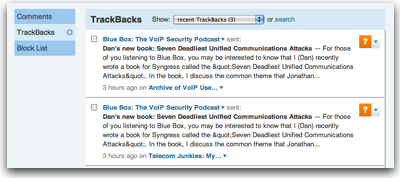
You see, I guess I’ve gotten spoiled… WordPress just makes this trivial and automatic. For instance, over on Voxeo’s blog portal, here’s a post in one blog (Voxeo Talks) that references a post on a different blog (Emerging Tech Talk). Look at this second post… down there in the comments is the reference from the newer post:

ett-trackback.jpg

What did I have to do to have this cross-blog linkage happen other than link from the new post to the old post?

NOTHING!

WordPress tries to send Pingbacks and the pings “just show up” on the other older posts. I don’t have to think about it… I just link and it happens.

In contrast, here are the steps I had to go through to link my posts in TypePad.

  1. Go to each of the old posts and find the Trackback URL – which involves scrolling down to the end of the post to find something looking like this:
    typepadtrackback.jpg
  2. Copy the Trackback URL– For each post to which you are linking, copy that big ugly Trackback URL.
  3. Switch back to your new post – Either in the web interface or in an offline editor like MarsEdit (what I use).
  4. Open the Trackback field and paste the URL.
  5. Repeat the above steps for EACH post you reference.
  6. Publish your post.
  7. Approve the Trackbacks in the target blogs – For your own sanity, you pretty much have to run comment moderation if you blog is even remotely popular. The result is that Trackbacks get stuck in the moderation queue. So you have to go into the admin GUI and approve the trackbacks:
    typepad-trackbacks.jpg
  8. Repeat the preceding step in the admin interface for each blog referenced – In my case, the two posts I referenced today were both in the same blog, so I could go to one admin interface and approve them both. In cases where I reference posts across multiple blogs, I have to switch to the admin interface for each blog and approve the trackback. Not difficult to do… just tedious and extra time I have to spend.

So… eight or more steps in TypePad – versus zero steps in WordPress.

Can you see the frustration?

What I want is that if I link to a post in one of the other blogs that I own, then there should be some link automagically created back to my new post.


Hideous Trackback URLs

The existing process might be a bit easier if the TypePad Trackback URLs were easy to create. Consider this Trackback URL from WordPress:

http://blogs.voxeo.com/voxeotalks/2010/07/15/slides-voxeos-unique-business-culture/trackback/

And then look at this one from TypePad:

http://www.typepad.com/services/trackback/6a00d8341bfc6e53ef01347fc3ed5a970c

What is simple about the first one? Easy, it is just the blog post URL with “/trackback” added on to it!

That’s it.

So if I am linking to a previous post on a WordPress blog, I have to just visit the page once to get the URL of the post (or get the URL from another post) and then simply append “/trackback” to the URL to send a Trackback over to it. I never have to go back to that page. I never have to look down to the bottom of the post to find the Trackback URI. I just add /trackback and go on with writing. Easy to do after the fact as well – you never have to visit the page again.

Now, again, with WordPress supporting Pingback automagically, I don’t need to use Trackbacks within my own site… but if I want to – it’s easy to do.

The TypePad Trackback URLs, on the other hand, have no pattern I’ve seen… I must go back to the post page, hunt for the URL at the bottom of the post and copy/paste it back.

Again… not hard to do… just time-consuming.


In the end, I want to run a network of blog sites – and quickly and easily link between them as I post new content referencing older posts.

TypePad really needs to make this easier.


If you found this post interesting or useful, please consider either subscribing to the RSS feed or following me on Twitter or subscribing to my email newsletter.


Bryan Person launches new blog: Exploring the iPad

bryanperson.jpgWant to learn more about the iPad? I was pleased to read in Facebook this morning that my friend Bryan Person is launching a new blog:

Exploring the iPad

Now, Bryan has literally just started the blog up, so the content there is just a couple of posts, but being an iPad user and finding more uses for it every day, I’m looking forward to Bryan’s own explorations.

If you’re an iPad fan, do check it out…

P.S. Thanks, Bryan, for linking to my video about the Camera Connection Kit.


If you found this post interesting or useful, please consider either subscribing to the RSS feed or following me on Twitter or subscribing to my email newsletter.