Category Archives: Tools

Why I Am NOT Thrilled About Twitter Buying TweetDeck…

Oh, Tweetdeck, say it isn’t so… rumors have been swirling for months and now appear to be confirmed by TechCrunch that Twitter will be acquiring TweetDeck for $40-50 million USD. A zillion other sites have written about this in the 21 hours since TechCrunch posted their piece (well, all the ones that weren’t engaging in the feeding frenzy about Osama Bin Laden), but here’s my view:

I fear for my TweetDeck!

You see, TweetDeck has become far more for me than simply a “Twitter client”. It is more my “social media command console“. When I’m in my home office I have it running on a large iMac screen, complete with all my various Twitter lists, Twitter searches, Facebook updates and so much more:
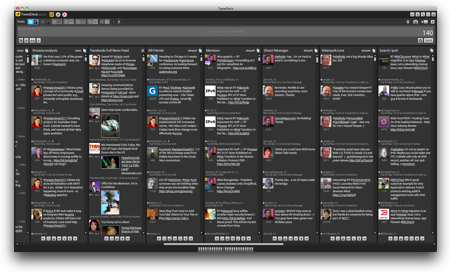
TweetDeck

As you can perhaps see at the very bottom of that screenshot, I have a ton of columns in TweetDeck, lining up with various searches, lists, for different accounts. I’ve arranged the columns so I can easily move back and forth to scan what is going on with various areas of interest or for different accounts. It works great. Sure, it’s an Adobe AIR client, so it naturally sucks up more CPU and memory than I’d like… but the convenience and power of the app make it such that I’ll live with the drain on my system and hope that maybe some day AIR will suck less.

When I’m on the road, TweetDeck is fired up on my laptop providing me a mobile command center. I was even using it for a while on my iPad… although there were too many crashes and I actually tried out the “official” Twitter client for the iPad… and have admittedly come to like that client on the iPad.

Part of TweetDeck’s strength is its support for multiple accounts. I’m currently using it to manage:

  • 5 Twitter accounts
  • 1 Facebook account (my own)
  • 1 Facebook page

The beauty of TweetDeck is that you can so easily post out to multiple accounts… or retweet from multiple accounts. If I post something to one account and then want to retweet it from other accounts, it is a simple matter of clicking the “retweet” icon for a tweet and then clicking the buttons associated with the accounts I want to retweet from. I’ve yet to find a Twitter client that rocks the multiple account feature better than TweetDeck.

Ditto the support for the “classic” retweet (that you could edit) and the “new” retweet (that is a pointer to the tweet). TweetDeck gives you the option to choose between the two approaches and, if you don’t set the choice in your options, you get this box each time you retweet, giving you the flexibility to choose right then what kind of retweet you want to do:
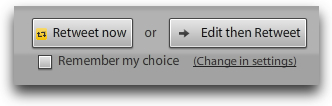
TweetDeckretweets

I love it! It works perfectly for me.

Add to this the ease at spawning new searches… viewing profiles… launching new columns on hashtags…. and on and on…

It is, indeed, my social media command center.

So Why The Fear of Twitter?

So why my fear? I mean, on one level this is great for the TweetDeck gang… kudos to them for making a product strong enough to be acquired! (And I mean that, seriously… they are great folks there!)

But that strength is my concern… I worry that:

1. TWITTER WILL KILL TWEETDECK – Twitter already has an “official” Twitter client, at least on Mac OS X. Why does it need a second? If, as the TechCrunch article suggests, this is a purely defensive move by Twitter, will they truly invest in keeping TweetDeck alive and improving?

2. TWITTER WILL STRIP THE NON-TWITTER FEATURES FROM TWEETDECK – Note that I said above that TweetDeck is my “social media command center”, not my “Twitter command center”. One of the great aspects of TweetDeck is that it also lets me bring in my Facebook status updates, my LinkedIn updates, my FourSquare updates and, if I cared, updates from MySpace and Google Buzz. I’ve come to really only use the Facebook updates… but it’s excellent to have both together in the same client. Particularly in that I can post to both using the single client.

Why should Twitter keep all this non-Twitter functionality in the client when all they really care about is.. well… Twitter?

Sure, they might not immediately remove it, but will engineers really spend time improving or fixing the non-Twitter features? When they have so many Twitter-related improvements to fix? I have to question how long the answer would be “yes”.

3. THE THREAT TO THE LARGER TWITTER ECOSYSTEM – On a more macro level, I worry about the acquisition of TweetDeck putting even more of a chill on third-party development than is already there. Twitter is at a point where they really have to choose between being an “open” platform or being an entire solution or service. They certainly seem to want to be more of the entire solution… and further client consolidation is only going to drive that.

And we, as users very definitely lose if there is not a broader ecosystem.

In the end…

Ultimately it may be that TweetDeck needs this acquisition. I don’t know their finances or what they are trying to do. It may be that this is their best path to growth.

And maybe my fears will be unfounded and Twitter will let TweetDeck thrive and grow as the multi-service command center that it is.

And maybe the rumors of the acquisition may be completely unfounded…

It just does cause me to be concerned.

What about you? Do the rumors concern you? What concerns you most about a potential acquisition of TweetDeck by Twitter?


If you found this post interesting or useful, please consider either:


Like WordPress? Check out WordCamp Central to find an upcoming WordCamp near you!

WordCampCentralWould you like to learn more about WordPress and how you could use it for even more than you do today? Would you like to meet with and learn from other WordPress users? If so, checkout:

central.wordcamp.org

There you will find a great list of upcoming “WordCamp” events around the world… as well as information about how to create a WordCamp event if there isn’t one around you (and you’re interested in starting one).

I’m a huge fan of WordPress and use it both for Voxeo’s multi-blog site as well as all my newer blog projects like Code.DanYork.com. There is a fantastic community of developers around WordPress and it’s great to see events like these WordCamp events that help foster that ever-growing community.

I’ve not yet been able to attend a WordCamp event myself, but I’ve seen the content coming out of several of the events and I definitely want to attend one… (I was hoping to hit WordCamp Boston this year, but it unfortunately looks like I’m traveling those days). If you get the opportunity, they definitely look like good events to connect and learn with others using WordPress.


If you found this post interesting or useful, please consider either:
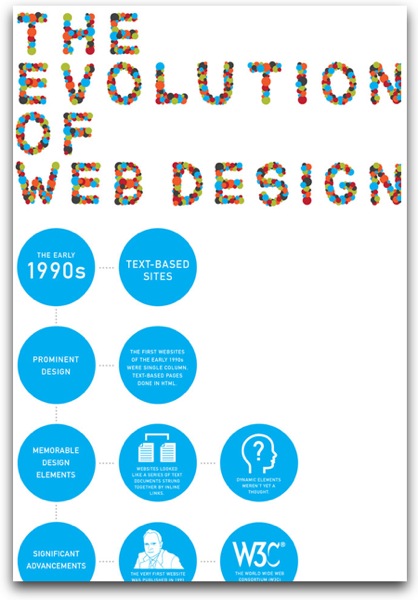

KISSmetrics’ Great Infographic on The Evolution of Web Design from 1990’s to Today

Mashable.com today published a great infographic that was created by KISSmetrics on “The Evolution of Web Design“.

For those of us who have been working with the web from its earliest days, it’s a great trip down memory lane. I remember learning of “the World-Wide Web” back in 1991 or so when all you could do was telnet into info.cern.ch. I had written and was teaching an “Introduction to the Internet” class for large companies in the Boston area… and had a section at the end about “new topics” that included a brief mention of this world-wide web thing 🙂 Shortly, thereafter, of course, I was rapidly developing courseware in how to create HTML pages and helping people learn how to set up websites.

We’ve come a l..o..n..g.. way from hand-coding all our pages using an editor like “vi” or Notepad…

Kudos to the KISSmetrics team for coming up with the cool infographic. The full graphic is huge… but worth checking out.

Webdesigninfographic

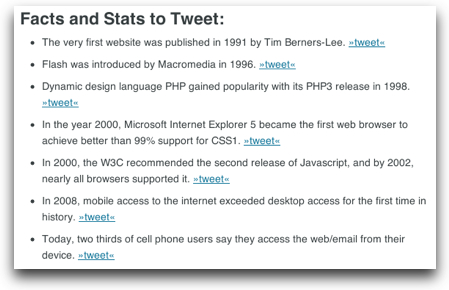
P.S. Kudos to the KISSmetrics folks for also providing a “Facts and Stats to Tweet” area below the infographic, complete with links to tweet out those stats. A well-done example of making it easy for people to tell the story you want and get people coming back to your site… 😉

Factstotweet


If you found this post interesting or useful, please consider either:

Do You Flip? Cisco Says “No” And Shuts Down Flip Video

FlipvideoI’ve always thought the Flip video cameras were among the coolest of the latest wave of consumer video gadgets out there. Pull one out, point it at someone or something, press the big red button and start recording. Flip out the USB connector to plug it into your PC or Mac and… ta da… your video was up onto YouTube or in email or whatever.

How many zillion videos have been shot with Flip cameras over the past few years? How many “person-on-the-street” video interviews have been shot at events, conferences or just anywhere? How many video podcasts have had episodes quickly created via Flip cameras?

I long desired a Flip camera but held off for the promise of some of the WiFi-enabled versions that Cisco talked about some time back. Meanwhile, many folks continued to buy them.

Not any more.

Cisco Systems announced this morning that it is shutting down the Flip video division and will “support current FlipShare customers and partners with a transition plan”.

On one level, it’s not a huge surprise… the acquisition by Cisco always seemed a bit strange. While Cisco has had a consumer presence, most notably with the Linksys product line, that consumer focus was still around Cisco’s core networking. You could stretch the Flip acquisition to fit in with all of Cisco’s other breathless talk about video, video, video… but still, it was a consumer camera and did seem odd. Obviously Cisco management held this view.

One also has to wonder if there really is a place now for a dedicated “pocket” video camera. I do record videos these days… but using my iPhone 4 that is always with me and able to just start recording. With the rise of the iPhone, Android devices and even Blackberries with cameras, the writing may have been on the proverbial wall for Flip for quite some time.

Still, it’s worth pausing for a moment and celebrating how effective Flip was at introducing so many people to creating new video content and sharing it online. Thanks, Flip, for all you did… and for your “big red button” that made it so easy for people to get started!


If you found this post interesting or useful, please consider either:


Is Blogsy the iPad blog editor I’ve been seeking?

Is Blogsy the blog editor for the iPad that I’ve been seeking? As I mentioned recently, I’m a huge fan of offline blog editors and on my Mac I use MarsEdit to write up pretty much all my blog posts (including this one). But being a huge user of the iPad, I’ve been searching for a MarsEdit-equivalent there. Primarily I just want the ability to be able to write up blog posts when I’m offline and then easily publish them when I come back online. Airplane travel is one use case… but there are other times, too. And the iPad format is a perfect one for writing for me.

My solution so far is to use Textastic to write my blog posts and then just copy/paste them over when I’m back online. I’m a bit “old skool” and seriously don’t mind writing in HTML code at all… in fact the vast majority of time I’m using MarsEdit in the HTML view. But there is a certain value in just having the blog posts all in one app that can then upload to your blog server when you’re online.

I’ve also used the WordPress app for the iPad, and it definitely has some great features, too.

Now, I don’t know yet if Blogsy can do all that I want to do. One basic issue is that while it supports WordPress and Blogger, it doesn’t support TypePad where this blog is located. And while my long-term direction is to migrate my blogs away from TypePad over to WordPress, that’s not happening for a while. So Blogsy is only a partial solution for me… but it does look pretty cool.

This demo video shows what Blogsy can do:

They have other videos as well on their How-To page (nicely done, by the way).

Given that right now Blogsy only costs $3 in the AppStore, I naturally had to buy the app… we’ll see how it goes – and you can be sure I’ll be writing more about it here.

What do you think? If you have an iPad, does Blogsy interest you for blogging? Do you already have another solution you like better? What works for you?


If you found this post interesting or useful, please consider either:


What is PeerIndex all about? (Klout competitor) Listen to this podcast…

Want to learn more about PeerIndex, another of the new companies working to help us understand the online influence someone has? Recently For Immediate Release co-host Neville Hobson interviewed Azeem Azhar, Founder of PeerIndex, to learn more.

The interview covered a good bit of ground and I found it quite interesting. While I may have some issues with what Klout, PeerIndex and others are doing, I commend them for taking on the task and experimenting to try to see what works best. If you haven't checked out what PeerIndex is doing, it is well worth a look. The interview with Neville runs about 25 minutes.

TED Video: Eric Whitacre’s Virtual Choir 2.0 is Truly Amazing!

This morning, by way of a tweet, I learned of this incredible video of Eric Whitacre’s recent talk at the TED conference. Given that I spent many years myself singing in choirs, I was truly moved by seeing what he and the folks involved are doing. I’m definitely looking forward to the “Virtual Choir 2.0” premiere on YouTube later this week….


If you found this post interesting or useful, please consider either:


Breaking News: MediaSift (makers of TweetMeme) Licenses Twitter Firehose to Merge With Klout And Sentiment Data

Data20conMoments ago at the Data 2.0 Conference in San Francisco, representatives of Twitter and MediaSift (the people behind Tweetmeme) stood onstage to announce that MediaSift is licensing Twitter’s “firehose” to provide a way to obtain filtered feeds from the Twitter firehose. The service, which will be branded “DataSift”, will be available at:

http://datasift.net/

Right now the service is in “Alpha” only and will be launched, per the news post, in Q3 2011.

The intriguing element here is that instead of dealing with the entire Twitter firehose through, for instance, the service that Gnip provides, with DataSift you will be able to filter the feed down based on keywords… or even Klout scores (or PeerIndex scores) and/or sentiment analysis.

This is where it could get interesting. You could then set up monitoring for tweets mentioning your brand name that had a negative sentiment and were from someone with a certain “authority” (remembering the issues with any such system). You could then act on those tweets in some fashion (sending out an alert, responding via Twitter, pinging someone via SMS). The key is that the filtering is done in MediaSift’s cloud and you get to interact with an already filtered and merged feed.

Pricing was not disclosed in the announcement, although it was said that you only have to pay for the tweets with which you interact – and could also do that on a time-driven basis (i.e. for an hour). On the DataSift web site, there is a pricing page with little detail, but a pricing calculator may give some view into the pricing (if that price there is in US dollars. I can’t tell from the symbol).

All in all it sounds like an intriguing service… now we just have to wait for it to actually be launched and publicly available.


If you found this post interesting or useful, please consider either:


TED Video: The Birth Of A Word by Deb Roy (and visualizing social interactions)

If you haven’t seen this video that has been circulating around some parts of the Twittersphere, it’s well worth a watch. As the abstract says:

MIT researcher Deb Roy wanted to understand how his infant son learned language — so he wired up his house with videocameras to catch every moment (with exceptions) of his son’s life, then parsed 90,000 hours of home video to watch “gaaaa” slowly turn into “water.” Astonishing, data-rich research with deep implications for how we learn.

What is also interesting is the part after his son’s word where Deb Roy looks at how they applied their techniques to analyzing social interactions online…


If you found this post interesting or useful, please consider either:


Free webinar, April 7 – Social CRM and Building Apps to Monitor Social Channels

Are you struggling with how to monitor and respond to customer interaction on social channels like Twitter? Do you have staff assigned to social monitoring but are trying to figure out how to scale your interactions? Are you looking at “Social CRM” and how you tie social channels into the rest of your customer interaction channels?

On Thursday, April 7, 2011, we at Voxeo will be hosting a free webinar called Social CRM and Building Apps to Monitor Social Channels where we will talk about how our platform and services can assist companies and organizations with scaling and supporting their customer interaction over social channels. The abstract of the session is:

Two thirds of today’s Internet users actively engage with social networks such as Twitter or Facebook. They use it mainly for personal communication, but often share feedback and thoughts about product or service experiences. Companies need to contribute to this conversation to protect their brands, enhance customer service or provide proactive customer care. They are or will soon be faced both with a staffing problem and the technical challenge of having to integrate with their more traditional customer interaction channels.

Learn how Voxeo can help you automate communication over social channels and bridge the gap between social networks and traditional channels such as IVR or direct agent interaction.

We’ll have a demo as part of the session and will leave plenty of time for Q&A. We’ll also show the analytics that are available for social channels… and how those channels can be integrated in with the other tools we have to create and manage “multi-channel” applications that interact with customers across voice, SMS, IM, mobile web and social channels like Twitter.

It should be a great session and the main presenter is my colleague Tobias Göbel who is quite excellent. Registration is free and we’d love to have you join us.


If you found this post interesting or useful, please consider either: