Category Archives: Tools

My 2 Favorite Things about the WordPress 3.1 Admin Bar

Having now worked with WordPress 3.1 for a good while on my personal sites (and just recently rolling it out across all Voxeo’s blogs), I have to say that one of the features I thought would be big definitely is: the Admin bar.

Here are my 2 favorite things:

Wp31adminbar

On a site like the Voxeo blog site, I literally working with 20 blogs. The ability to rapidly switch between those sites using the “My Sites” menu on the admin bar is HUGE. Further, I love that you can switch not just to the admin backend for the sites, but also to just view the site or to quickly create a new post:
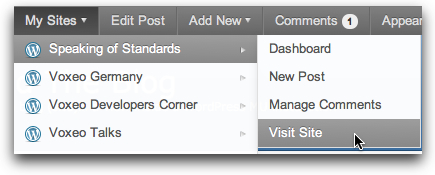
Mysites

My second favorite thing is the “Edit Post” button (which becomes “Edit Page” on a WordPress “Page”). This is wonderful because if you are looking at a post or a page and see something that needs to be fixed, you are just one click away from fixing it. Sure, you could always do this in the past in most themes from a “Edit post” link in the footer… but first you had to scroll down and find it.

These two features alone have made me incredibly happy to have upgraded my sites to WordPress 3.1. The third favorite feature would be the ability to manage comments very easily from the admin bar… which is also very cool.

If you haven’t upgraded WordPress to 3.1 yet, I’d definitely encourage you to consider it. Well worth it, in my opinion.


If you found this post interesting or useful, please consider either:


SalesForce.com Gets SocialCRM In A Big Way – Buys Radian6 for $326 Million

Salesforceradian6The news rocking the Twittersphere and PR/marketing side of the online world today is that SalesForce.com is acquiring social media monitoring company Radian6 for $326 million USD ($276 million cash and $50 million stock). SFDC issued the standard overly formal news release which has the gory details for those whose eyes are still open. Radian6, on the other hand, has a nice friendly blog post up

The coverage is predictably everywhere… and climbing up Techmeme right now. Some stories:

For my part, I’m intrigued to see how they will further integrate Radian6’s extensive social media monitoring into SalesForce.com’s already powerful CRM environment. Some hints are in the news release:

  • Sales and Service Cloud: Social media monitoring and engagement has emerged as the requirement for any brand and customer engagement strategy, helping companies join conversations about their brands and stay connected to their customers and prospects. By combining Radian6’s social media monitoring and engagement platform with Sales Cloud and Service Cloud, companies will be able to keep customer success at the center of their business with real-time social intelligence.
  • Salesforce Chatter: Radian6 and salesforce.com will create the bridge between public social networks, like Facebook, Twitter, YouTube, blogs and online communities, and Salesforce Chatter, the private, secure social network for the enterprise. Chatter feeds will no longer just contain the activity happening within the walls of a company, but will be filled with real time insights from fans on Facebook pages, followers on Twitter, comments on blog posts and more.
  • Force.com Platform: Developers will be able to build apps that tap into the power of Radian6, putting the social web into everything they build. In such a dynamic market, this acquisition will present a huge opportunity for salesforce.com to extend its developer and partner ecosystem with technology not available anywhere else.

Done well, it could truly provide a powerful means for building “Social CRM” applications. I’m looking forward to seeing what happens next!


If you found this post interesting or useful, please consider either:


MarsEdit v3.2 Released – Continual Improvements for Offline Blogging on MacOS X

MarseditThis week, Daniel Jalkut over at Red Sweater Software released version 3.2 of his MarsEdit desktop blog editor and while the release notes show really just minor additions:
  • New Word Count feature displays in post status bar
  • Now reads previously used Tags from WordPress on refresh
  • Now more resilient to malformed XML and “bad characters” in downloaded posts
  • Performance improvements in media browser and autosave features
  • Now code signed to prevent need for re-authorizing keychain access every release

… the truth is that they continue to show the ongoing improvements to what is already an excellent desktop blog editor. For instance, the word count in the status bar may be a minor thing, but it’s very cool to know how long your post is in terms of word count.

Yes, it’s commercial software that you have to pay for. But if you use a Mac and write across multiple different blog platforms like I do, MarsEdit rapidly becomes a key part of being able to crank out content on a consistent basis.

Sometime I really need to do a screencast to show why I like using it so much…

Anyway, if you’re on a Mac and do a lot of blogging, do check out MarsEdit if you haven’t already.

P.S. And no, I don’t have any kind of commercial relationship with Red Sweater… in fact, I paid them for the software. I’m just a very pleased user!


If you found this post interesting or useful, please consider either:


LinkedIn’s Brilliant PR Move – The “Personal” Letter To Its First Million Members

I do have to hand it to CEO Reid Hoffman and the others at LinkedIn for a positively brilliant action today. Like many others in the early adopter set, I received a “personal thank you” from Reid Hoffman thanking me for being among the first million LinkedIn users now that they have hit 100 million users. (If you didn’t get the letter, no worries, TechCrunch posted a copy.)

The genius here was including our actual member number (which turns out to be the ID number in your LinkedIn URL). Mine is 199,110 … which when you realize that there are now 100,000,000+ members means that I was indeed among the earlier folks using LinkedIn.

And… like the sheep we so often are in the early adopter set… my first reaction was to go tweet about it.

At which point I noticed a zillion other people tweeting about it…

Brilliant.

Absolutely brilliant.

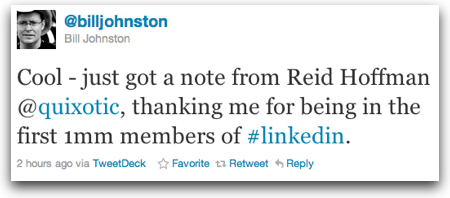
Some folks just tweeted how cool it was:

Chaimhaas

Billjohnston

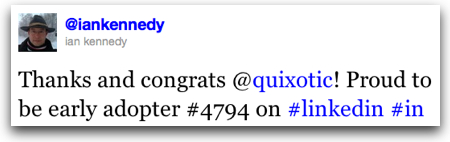
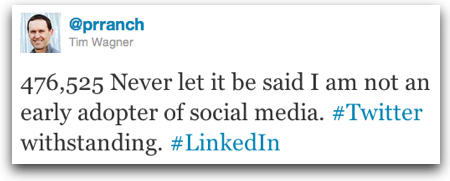
While others tweeted about being an early adopter:

Twitter   ian kennedy Thanks and congrats  quix

Twitter   Tim Wagner 476 525 Never let it be sa

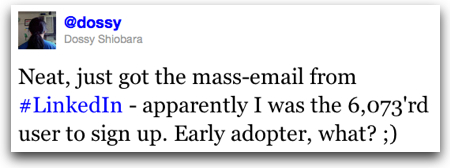
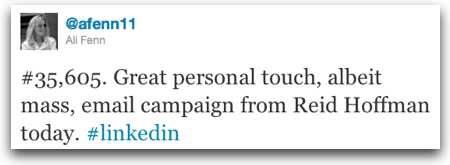
And others did note the mass e-mail side of it:

Twitter   Dossy Shiobara Neat just got the mass em

Twitter   Ali Fenn  35 605 Great personal t

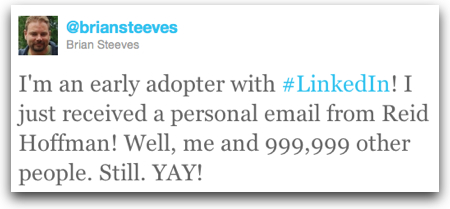
My favorite was perhaps this one

Twitter   Brian Steeves I m an early adopter with

and this witty tweet

Twitter   Sameer Patel I love you regardless of y

My own tweet, then, was one of amusement more than anything else.

Brilliantly done, LinkedIn … you played us so extremely well. Appealing to our pride in being early adopters. You had to know we would tweet that out. And of course, we did. (And some of us even wrote blog posts about it.)

Well done.

P.S. Congrats, by the way, on hitting 100 million users.


If you found this post interesting or useful, please consider either:


One Simple Example of Why We Need Akismet and Other Anti-Blog-Comment-Spam Services

Need I say anything more beyond this actual comment received on one of my blogs today?

Hi, i just wanted to come here to show you about a super cheap service that posts comments such as this on millions of WordPress blogs. Why you may ask, well you may want to sell a product or service and target webmasters or simply just improve the amount of backlinks your web site has which will improve your Google rankings which will then bring your website much more visitors and cash. Take a quick look at this website for much more info.

Naturally I will not include the link to the spam service.

These are the kind of services that need to be blocked, because they seriously pollute the conversations out there. I run blog comment anti-spam services on all my blogs – and/or moderate all comments – precisely because of this kind of garbage.

It’s a shame that we have to… because it potentially puts blocks (or at least delays) in the way of conversations… but we do.


If you found this post interesting or useful, please consider either:


Tumblr’s Awesome Error Message

Lately I’ve been using Tumblr a bit for a project and overall it’s gone quite well and left me quite impressed with the service. Today, though, while working on the site Tumblr had some problem because suddenly I couldn’t get to the site.

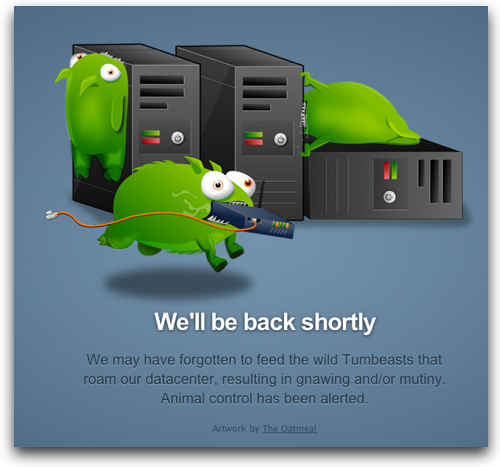
However, Tumblr did give me a great laugh with this error message:

Tumblrerror

And with that laugh, I gave them a bit of a break and went to do something else for a few minutes before checking back.

Lesson – if you have a technical problem, at least try to amuse people with your error message…

(And just a minute or two later my Tumblr site was responding again.)


UPDATE: My colleague Justin Dupree pointed out the origin of the Tumbeasts, as did someone named Daniel (nice name!) as a comment to this post. Thanks to both Justin and Daniel for pointing out the origin!


If you found this post interesting or useful, please consider either:


Oooo, shiny… WordPress 3.1 Gives Easy Internal Linking, Admin Bar, More…

The big news in the WordPress world this week was the release of WordPress 3.1 with all the goodness a new WP release brings. The release blog post and the more detailed entry in the WordPress Codex mention a number of features, but two that I definitely like are:

1. The New "Admin Bar" – This shows up on the top of your WordPress window and does indeed give you easy access to common functions. When you have comments, the number of comments shows up to the right of the word "Comments". Seems to be quite nicely done.

Wp31 adminbar

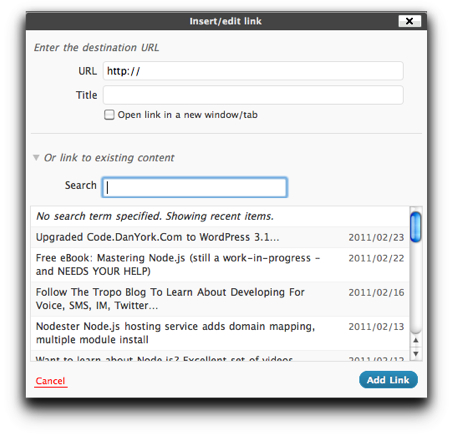
2. Internal Linking – Hooray!!! If you are writing frequent blog posts, like I do, and want to easily reference older blog posts, it's always been a bit of a pain to have to find and reference those older posts. Now, when you use the visual editor in WordPress 3.1, you can simply select the text and click the link icon in the editor. The standard window to insert a link pops up, but with a new option "Or link to existing content". You can then simply search through your older posts (or choose from your list of most recent posts). Click the post you want, press "Add Link", and… ta da!

Wp31 internallinks

This is truly an awesome capability for those of us who want to frequently reference older posts.

The blog post announcing WordPress 3.1 references a number of other goodies, including improvements to the "Network" support, that I'm definitely looking forward to trying out.

If you use WordPress and have upgraded to 3.1, what do you like the best?


If you found this post interesting or useful, please consider either:


Video: Donna Papacosta on Curating Twitter with Paper.li

While I haven’t yet found that using Paper.li to “read Twitter and Facebook as a daily newspaper” fits within my daily workflow, I know that a good number of friends and colleagues use the service… and Donna Papacosta recently published this video explaining how to get started:

Why doesn’t it work for me? Mainly because I already have a whole system in place using TweetDeck for monitoring Twitter that I check regularly… and for the “browsing” that you can do with Paper.li, I’m a big user of FlipBoard on my iPad.

Still, I can understand the value in getting a daily email summary that can highlight some of the things you may have missed. It’s good to see these kind of tools being developed. The whole issue of curating the insane volume of content out there is a topic that will consume us all for quite some time, I’d say…


If you found this post interesting or useful, please consider either:


Do You Need to Hit The Publish Button RIGHT NOW?

PublishbuttonDo you need to publish your blog post right when you finished writing it? Right at that precise moment?
Or could it wait to be published for an hour? or a day? or even a week?

Could there be a better time to publish this particular post? Or a better day of the week?

When you finish writing a blog post, it is tempting to just hit the “Publish” button right at that moment because, well…

you’re done!

Or at least… you think you are.

You want to just get the post out.

Move on to the next post coming out of your brain.

But when you are about to hit that button…

STOP!

For just a moment… and ask yourself…

Does this post NEED to go out right now?

Maybe it does… maybe you are breaking some news or chasing a topic that is breaking on a site like Techmeme…. maybe time is critical. Maybe you’ve set a personal goal and need to hit it (been there, done that).

But maybe it doesn’t. Maybe if you let it sit overnight or for a day or two you’ll have some additional insight to add. Maybe you’ll see a better way to word the post if you look at it again later. Maybe you’ll spot that typo that you just didn’t see in the heat of writing the post.

Maybe you can instead schedule the post to come out at some future time. Instead of having a spiky publishing schedule where posts come out at whatever random moments you write them, you could have a more consistent schedule where posts come out every day or every couple of days.

Most blogging platforms have a scheduling feature, and there are even some great tools like the Editorial Calendar plugin for WordPress (see also another review I wrote about it) that give you a view of what you have coming out when. (I use it and definitely like it.)

Admittedly, I struggle with this concept myself… it is soooo tempting just to press “Publish” and get your content out there… but if you pause for just that moment, it may in fact wind up working out better for you!

What do you think? Do you schedule posts? Or do you just hit Publish? (Or will you now try to schedule some posts?)

P.S. This post was in fact scheduled for a future time… even though I was sorely tempted to just hit that dang “Publish” button!


If you found this post interesting or useful, please consider either:


New Version of WordPress App for iPhone and iPad has TONS of Fixes

For those of us with an iPhone or iPad, going into the “Updates” section of the AppStore is a bit like Christmas… you never know what gifts you are going to receive! What apps will have updates? What new features will be in them?

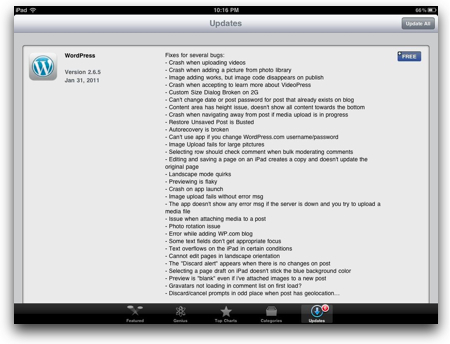
Today’s round of updates didn’t bring many new features for the WordPress app, but it sure did bring a veritable TON of fixes!

wordpressappupdate.jpg

Kudos to the WordPress team for: 1) fixing so many things; and 2) being so VERY open about it. (Other app vendors might have just said “Many bug fixes” and left it at that.)

And if you haven’t tried out the WordPress app for a bit, you should give it a try… I particularly like how well it works on the iPad.


If you found this post interesting or useful, please consider either: